Sprout Social Content Calendar: How To Plan & Schedule
At AI Flow Chat

Contents
0%A Sprout Social content calendar gives you a centralized view of every post across your social channels, scheduled, drafted, or waiting for approval. It's one of the platform's most used features, and for good reason: managing multiple accounts without a visual calendar is a recipe for missed posts and duplicated effort.
But here's what most guides skip over, the calendar itself is only half the equation. You still need to fill it with content that actually performs. That's where a tool like AI Flow Chat fits into the workflow. Instead of staring at empty calendar slots, you can use our visual AI canvas to reverse-engineer viral posts, extract hooks from competitor content, and generate platform-ready drafts before dragging anything into Sprout's scheduler.
This guide walks you through how to set up and use Sprout Social's content calendar step by step, from configuring your publishing queue to approving posts across teams. We'll also cover practical ways to speed up the content creation side so your calendar stays full without burning hours on manual drafting.
What the Sprout Social content calendar does
The Sprout Social content calendar is a visual publishing hub that shows you every scheduled, drafted, and queued post across all your connected social profiles in one place. You get a color-coded calendar view by day, week, or month, which makes it easy to spot gaps, identify posting clusters, and understand the rhythm of your content before anything goes live.
The publishing and scheduling view
When you open the calendar inside Sprout, you see posts organized by profile and date. You can filter by network, campaign tag, or content type to cut through the noise fast. Clicking any post opens a side panel where you edit copy, swap media, or reschedule with a drag-and-drop to a new date. This makes last-minute changes simple without breaking the overall plan.

Sprout also lets you schedule posts across multiple networks from a single compose window. You write the copy once, adjust it per platform (character limits, image specs, and link previews are handled automatically), and push it to the queue. Posts go out through Sprout's publishing infrastructure, so you don't need to be online when they publish.
If you're managing more than two social accounts, the ability to see everything in one calendar view alone pays for the subscription.
Approval workflows and team collaboration
For teams or agencies, Sprout's approval workflow is one of its most practical features. You can set up a multi-step review process where a content writer drafts a post, a manager reviews it, and a client or senior stakeholder gives final sign-off, all inside the platform. Nothing goes live until the right person approves it.
Approval steps are tied to specific profiles, so you can have a stricter process for a client account while giving your own brand's content a shorter path to publishing. Each post shows its current approval status directly on the calendar, so you never have to dig through email threads to find out if something is cleared.
Asset management and campaigns
Sprout lets you tag posts to campaigns, which groups related content together so you can measure performance by initiative rather than just by individual post. If you're running a product launch, a seasonal promotion, or a recurring content series, tagging all related posts to one campaign makes reporting much cleaner.
The platform also connects to an asset library where you store images, videos, and brand materials. When drafting posts, your team pulls from the library instead of hunting through shared drives or Slack messages. This keeps creative assets version-controlled and accessible to everyone with account access.
What it doesn't handle
Sprout organizes and publishes your content, but it does not generate the content itself. The calendar will show you empty slots, but filling them still requires a content creation step that happens outside the platform. This is the gap that slows most teams down: you have a great scheduling tool but no fast way to produce posts that are worth scheduling in the first place. The following steps walk through a workflow that solves both sides of that problem.
Step 1. Audit your channels and pick a cadence
Before you put a single post on the Sprout Social content calendar, you need to know which profiles you're actively managing and how often each one requires content. Skipping this step means you'll fill the calendar based on gut feeling rather than a real framework, and that leads to inconsistent posting and wasted scheduling time.
List every active profile and its purpose
Open a simple spreadsheet and write down every social profile you manage. For each one, note the platform name, account handle, and the primary goal it serves. Is this profile driving website traffic, building brand awareness, or handling customer support? Knowing the purpose of each account shapes your posting frequency and determines what kind of content earns a calendar slot.
Here's a basic audit template you can copy:
| Profile | Platform | Primary Goal | Current Posting Frequency |
|---|---|---|---|
| Brand Main | Awareness | 3x/week | |
| Blog Promo | Traffic | 2x/week | |
| Support | X (Twitter) | Customer Service | Daily |
| Product | TikTok | Engagement | 4x/week |
A profile without a defined goal will always produce scattered content, no matter how well you schedule it.
Choose a posting cadence you can sustain
Once you complete the audit, set a realistic weekly frequency for each profile. The goal is not maximum volume. It's enough consistency that your audience knows what to expect, and your team can actually deliver without burning out or cutting corners on quality.
Platform norms vary considerably: TikTok rewards frequent posting, while LinkedIn performs well at two to four posts per week. Match your cadence to both what the platform favors and what your current content production capacity supports. Once you lock in these numbers, every empty slot in Sprout maps to a specific profile and goal rather than a vague intention to post more often. This makes building your calendar in the next steps much faster because you're filling defined spaces, not making judgment calls from scratch each week.
Step 2. Build campaigns and content buckets
With your cadence set, the next task is organizing what you'll actually post. Campaigns group time-sensitive content around a specific initiative, like a product launch or a seasonal sale. Content buckets are recurring content categories that fill your calendar week after week regardless of what campaigns are running. Setting both up before you open Sprout's composer saves you from staring at blank slots and improvising content under pressure.
Set up campaigns in Sprout
Sprout lets you create named campaigns and tag every post to them from the composer window. To set one up, go to Publishing > Campaigns in the left navigation, click "Create Campaign," give it a name, a date range, and an optional description. Every time you draft a post related to that initiative, tag it to the campaign so you can pull performance data by initiative rather than sorting through individual posts later.
A campaign structure might look like this:
| Campaign Name | Goal | Duration | Profiles |
|---|---|---|---|
| Spring Product Launch | Drive conversions | April 1-30 | IG, LinkedIn, TikTok |
| Webinar Promo | Registrations | May 5-12 | X, LinkedIn |
| Brand Awareness Series | Followers | Ongoing | IG, TikTok |
Define your recurring content buckets
Content buckets are the engine behind a consistent Sprout Social content calendar. They give every team member a clear answer to "what should I post today?" without needing a creative brief each time. Pick three to five buckets that match your audience's interests and your brand's goals, then assign each one a posting slot in your weekly schedule.
Once your buckets are defined, filling the calendar becomes a logistics task rather than a creative one.
Here are common content buckets that work across most industries:
- Educational: Tips, how-tos, and explanations that solve a specific problem
- Social proof: Customer reviews, testimonials, and case study highlights
- Behind the scenes: Process content, team moments, or production clips
- Promotional: Product features, limited offers, and direct calls to action
- Engagement: Questions, polls, and content that invites a reply
Assign each bucket to specific days so your calendar carries built-in variety without requiring fresh creative decisions every week.
Step 3. Draft posts fast with AI Flow Chat
Now that your content buckets are defined and your campaign structure is in place, you need to fill each slot quickly without sacrificing quality. This is where most workflows stall: you have the schedule mapped out in the Sprout Social content calendar, but generating platform-ready copy still takes hours of manual writing. AI Flow Chat solves this by letting you paste in reference content, such as a top-performing TikTok or a competitor Instagram Reel, and pull out the hooks, structure, and angles that made it perform well.
Pull reference content and extract winning patterns
AI Flow Chat's visual canvas lets you drop source links directly into your workspace. Paste a YouTube video URL, a TikTok link, or a competitor's ad into the canvas, and the platform transcribes and analyzes the content automatically. From there, you can prompt the AI to identify the hook structure, explain why the post resonated, and suggest angles you can adapt for your own brand without copying the original.
Here's a straightforward workflow to follow each time you need fresh material:
- Paste a high-performing post link into the AI Flow Chat canvas
- Add a prompt node asking for the hook formula and content structure
- Request three variations of the hook rewritten in your brand voice
- Copy the output into a draft post ready for Sprout's composer
Analyzing what already works before you write anything is the fastest path to content that performs rather than content that simply fills a slot.
Generate drafts that are ready to schedule
Once you have the extracted patterns and hook variations, use AI Flow Chat's prompt library to generate full post copy for each platform in one session. You can reference your brand's Notion pages or existing style guides directly in the canvas, which keeps outputs aligned with your tone guidelines without extra editing passes. Build a reusable flowchart for each content bucket, and you can produce a full week of platform-ready drafts in under an hour rather than writing each post from scratch before anything moves into Sprout.
Step 4. Schedule, approve, and publish in Sprout
With your drafts ready, moving them into the Sprout Social content calendar is a straightforward process if you follow a consistent sequence each time. The goal is to get posts from draft to scheduled without creating bottlenecks or sending anything live before the right person has reviewed it.
Add drafts to the publishing queue
Open Sprout's Compose window and paste the copy generated in the previous step. Select the profile you're publishing to, attach your media from the asset library, and set a specific date and time. Sprout shows you a preview for each platform so you can catch formatting issues before the post is queued.

Use this checklist each time you add a post to the queue:
- Copy is finalized and matches the platform's character limit
- Media is attached and pulled from the asset library, not uploaded ad hoc
- Post is tagged to the correct campaign from the campaign dropdown
- Scheduled time aligns with your cadence plan from Step 1
- Profile selection is confirmed and no extra accounts are accidentally checked
Tagging every post to a campaign at this stage saves significant time when you pull reports at the end of the month.
Run the approval workflow before publishing
If you're working with a team or managing client accounts, set the post status to "Needs Approval" instead of scheduling it directly. This routes the post to the designated reviewer inside Sprout without requiring any back-and-forth over email or Slack.
Each approver receives a notification inside the platform and can either approve the post, request edits, or reject it with a note. Once the final approver signs off, the post status updates to approved and the scheduler publishes it at the set time automatically. Your calendar view reflects the current status of every post in real time, so you can see at a glance what is approved, what is waiting, and what still needs attention before the week is out.
For solo users without a formal approval process, set posts directly to scheduled and use the calendar's filter view to do a quick final review of the coming week every Monday morning before anything goes live.
Step 5. Track results and improve next month
Publishing consistently is only valuable if you review what worked and apply those findings to the next cycle. Sprout Social's reporting suite sits inside the same platform as your Sprout Social content calendar, which means you don't need to export data to a separate tool to understand how your posts performed.
Pull your performance report in Sprout
Navigate to Reports > Post Performance in Sprout's left sidebar after your publishing period ends. Filter by the campaign you tagged posts to in Step 2, then sort by engagement rate rather than raw impressions. This surfaces the posts that actually connected with your audience, not just the ones that got the most algorithmic reach.
Review these metrics for every post in the period:
| Metric | What to look for |
|---|---|
| Engagement rate | Above your profile's baseline average |
| Link clicks | High clicks indicate strong calls to action |
| Reach | Unusually high reach signals shareability |
| Comments | Comments show the topic triggered a reaction |
| Saves/bookmarks | High saves mean the content had lasting utility |
A post with 10 comments tells you more about what resonated than a post with 10,000 impressions and no replies.
Apply findings to your next planning cycle
Once you have the data in front of you, identify which content buckets consistently outperformed the others and which ones failed to generate engagement across multiple posts. This is not about cutting buckets immediately. It is about adjusting their frequency so your strongest categories get more calendar slots next month and weaker ones get revised before they repeat.
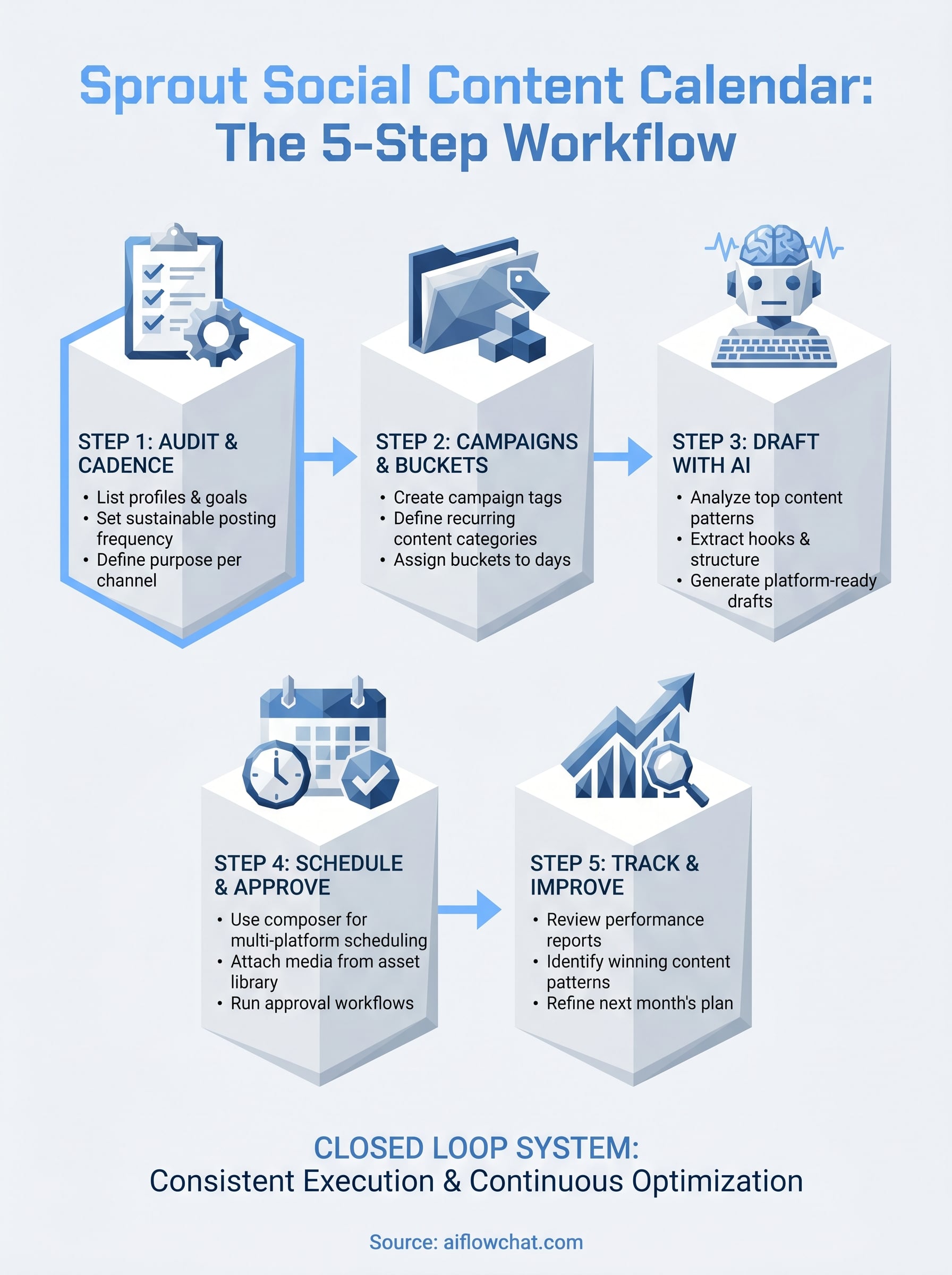
Take the top three performing posts and bring them back into AI Flow Chat. Drop the links into a new canvas session and prompt the AI to identify common patterns across the hooks, format, and structure. Use those patterns as the creative brief for the following month's content. This turns your Sprout performance data into a direct input for your drafting process rather than a report you read and forget, which closes the loop between publishing and production in a repeatable, measurable way.
A simple way to keep it running
The Sprout Social content calendar works best when you treat it as a closed loop rather than a one-time setup. Each month, you audit performance in Sprout, bring the top posts back into AI Flow Chat to extract what worked, generate new drafts from those patterns, and push them back into the schedule. Repeating this cycle consistently is what separates teams that grow their social presence from those that post irregularly and wonder why results stall.
You don't need a large team or a complicated process to make this work. Three tools drive the entire system: a structured audit in Step 1, a reliable drafting process using AI Flow Chat, and Sprout's approval and scheduling workflow. Each one handles a distinct part of the job. If you want to speed up the content creation side of this workflow right now, try AI Flow Chat and build your first content flowchart in under 15 minutes.
Continue Reading
Discover more insights and updates from our articles
Choose an AI model for scripts, marketing copy, coding, research, long documents, and quick everyday work using a practical quality, speed, and credit-cost framework.
Compare eight current Poppy AI alternatives for visual research, creator workflows, general AI work, grounded synthesis, automation, and reusable delivery.
A practical method for turning a scattered content process into a clear AI-assisted flowchart with source context, review checks, and a reusable output.