Instagram Growth Plan: Content Calendar For Instagram (2026)
At AI Flow Chat
Contents
0%Posting on Instagram without a plan is like throwing darts blindfolded, you might hit something, but you'll waste a lot of energy getting there. A content calendar for Instagram gives you a clear roadmap for what to post, when to post it, and why each piece of content exists. Without one, most creators and marketers fall into a cycle of last-minute scrambling that kills both quality and consistency.
The real challenge isn't knowing you need a calendar. It's building one that actually holds up beyond the first week. You need a system that accounts for content pillars, posting frequency, platform trends, and the dozens of reference points, competitor posts, viral hooks, saved ideas, floating around in your head or scattered across apps. Most templates fall apart because they treat scheduling as the whole solution when it's really just one piece. The missing layer is a repeatable process for turning research and inspiration into ready-to-publish content on a predictable timeline.
That's exactly what this guide walks you through. You'll get a step-by-step framework for planning, organizing, and maintaining an Instagram content calendar that drives real growth in 2026. We'll also show you how AI Flow Chat can streamline the heaviest part of the process, pulling insights from viral Reels, competitor ads, and reference content, then generating post drafts directly inside a visual workspace built for creators and marketers. No more bouncing between five tabs to get one caption written. Let's build this thing.
What an Instagram content calendar includes in 2026
A content calendar for Instagram in 2026 is more than a spreadsheet with dates and captions. It's a planning system that connects your goals to your daily output and makes it easy to stay consistent even when your schedule gets tight. The format you use matters less than the information you capture inside it. A well-built calendar tells you not just what to post, but the format, the angle, the hook, the reference material, and the result you're trying to drive with each piece of content.
The core fields every calendar needs
Most creators use a calendar that's too thin. They write a date, a rough topic, and a caption idea, then wonder why execution always feels chaotic. Every field in your calendar should reduce a decision you'd otherwise have to make at posting time. The table below covers the core fields that make an Instagram calendar actually functional in 2026.
| Field | What to include |
|---|---|
| Publish date | The exact date and time you plan to post |
| Format | Reel, carousel, static image, Story, or broadcast channel post |
| Content pillar | The category this post belongs to (education, promotion, social proof) |
| Hook or headline | The first line of the caption or the opening frame of the video |
| Reference source | Any viral post, competitor ad, or document you're pulling inspiration from |
| Caption status | Draft, in review, approved, or scheduled |
| CTA | What you want the viewer to do after seeing the post |
| Hashtag set | The group of tags you're using, pulled from a saved library |
| Performance notes | Reach, saves, shares, or profile visits after publishing |
Building these fields into your calendar from day one keeps your whole workflow aligned and cuts the time you spend searching for context before you write a single caption.
What's changed in 2026
Instagram's algorithm in 2026 rewards consistency and format diversity more aggressively than it did two years ago. Accounts that rely on only static images or only Reels see slower reach growth compared to those that mix formats with intention. Your calendar now needs to track format distribution across a given week or month, not just topic coverage, so you can spot gaps before they cost you.
Broadcast channels and close friends Stories have also matured into real content surfaces where high-engagement posts perform well. These are no longer optional extras. Creators who skip them are leaving direct audience access unused. Your calendar should include dedicated rows or columns for these surfaces alongside your standard feed and Stories planning. That way nothing slips through the gaps when you sit down to batch-create content for the week.
Step 1. Set goals, audience, and KPIs
Before you build out a single week of posts, you need to know what you're trying to accomplish. A content calendar for Instagram built without clear goals is just a list of random ideas with dates attached. Every decision you make later, from format choice to caption structure, flows directly from what you define in this step.
Define your goal for this month
Your goal needs to be specific and time-bound, not vague. "Grow my account" tells you nothing. "Add 400 new followers from Reels in April" gives you a target to build content around. Start with one primary goal per month so your calendar stays focused and doesn't pull in five directions at once.
Common goals that work well for a monthly Instagram plan:
- Follower growth: attract new audiences through Reels and discovery surfaces
- Lead generation: drive profile link clicks or DM conversations
- Sales conversions: promote an offer with a direct purchase CTA
- Community engagement: build saves, shares, and comment depth
- Brand authority: establish credibility in a niche through consistent education content
Know who you're posting for
Your target audience profile shapes everything from the language in your captions to the visual style of your Reels. Write down one specific person you're creating content for. Name their biggest problem, the platforms they spend time on, and what kind of content makes them stop scrolling.
The more specific your audience definition is, the easier every content decision becomes when you sit down to fill in your calendar.
Pick the KPIs that match your goal
Once you have a goal and an audience, you need two or three KPIs to measure progress. Tracking ten metrics at once creates noise. Track only the ones that tell you directly whether your goal is moving in the right direction.
| Goal | Primary KPI | Secondary KPI |
|---|---|---|
| Follower growth | New followers per week | Reel reach |
| Lead generation | Link clicks | Profile visits |
| Sales conversions | DM replies | Story swipe-ups |
| Engagement | Saves per post | Comments per post |
Assign a baseline number to each KPI before the month starts. That gives you a real comparison point when you review results in Step 8.
Step 2. Choose your content pillars and offers
Content pillars are the three to five recurring topics that define what your account stands for. They give your content calendar for Instagram a clear structure so you're never staring at a blank cell wondering what to post next. Without pillars, your feed becomes a random mix of ideas that confuses your audience and dilutes your positioning. Pillars keep every post connected to a purpose.
Define your three to five content pillars
Your pillars should reflect both what your audience wants to learn and what you want to be known for. A good set of pillars covers a mix of education, entertainment or storytelling, and promotion so your feed doesn't read as either purely informational or purely sales-driven. Start by listing the five questions your audience asks most often, then group similar ones together. Each group becomes a pillar.

Here are five common pillar categories with example topics for a marketing-focused account:
| Pillar | Example post topics |
|---|---|
| Education | How-to tutorials, tip lists, strategy breakdowns |
| Social proof | Client results, testimonials, before-and-after case studies |
| Behind the scenes | Your process, tools you use, day-in-the-life content |
| Promotion | Product launches, limited offers, waitlist CTAs |
| Opinion or perspective | Hot takes, industry trends, contrarian views |
Aim for no more than 20% of your posts to be directly promotional. The other 80% should build trust and deliver value so that when you do promote, your audience is primed to act.
Map your offers to your pillars
Once your pillars are set, attach each offer or product you want to promote to the relevant pillar. This prevents your promotional posts from feeling disconnected from the rest of your content. If you sell a course on ad strategy, your education and social proof pillars are the natural lead-in posts that warm up the audience before a promo post lands.
Write out a simple mapping like this:
- Education pillar leads to: free lead magnet or low-ticket offer
- Social proof pillar leads to: main paid offer or service
- Behind the scenes pillar leads to: community or membership product
This mapping becomes a reference layer inside your calendar so every post has a clear role in your overall funnel, not just a topic.
Step 3. Pick your posting cadence and format mix
Picking the right posting frequency before you fill in your content calendar for Instagram saves you from over-committing and burning out by week two. The goal isn't to post as often as possible. It's to post consistently at a rate you can actually sustain while maintaining production quality on every piece of content you publish.
How often to post on Instagram in 2026
Most accounts that grow steadily in 2026 post four to six times per week across all surfaces, combining feed posts, Stories, and broadcast channel updates. That number sounds high, but it gets manageable once you factor in that Stories and broadcast messages take a fraction of the time a Reel or carousel requires. Start with a baseline of three feed posts per week if you're building from scratch, then add surfaces as your workflow gets faster.
Here's a sustainable starting cadence for a creator or marketer running content alone:
| Surface | Frequency |
|---|---|
| Reels | 2x per week |
| Carousels | 1x per week |
| Stories | 3 to 5x per week |
| Broadcast channel | 2x per week |
Consistency beats volume. One fewer post per week is always better than dropping off entirely because your schedule became unsustainable.
Balance your format mix
Your format distribution matters as much as your frequency because Instagram surfaces each format to different audience segments. Reels drive discovery and reach new followers. Carousels generate saves and hold attention longer. Stories build intimacy with people who already follow you. Running only one format caps the ceiling on both reach and retention at the same time.
Plan your format mix as a percentage of your monthly output. A solid split for a growth-focused account looks like this: 40% Reels, 30% carousels, 20% Stories-only content, and 10% static images or broadcast posts. Adjust those percentages based on which formats your specific audience responds to once you have a few weeks of performance data to reference.
Step 4. Build your calendar in a tool that fits
The best tool for your content calendar for Instagram is the one you'll actually open every week. Fancy platforms with unused features create friction, and friction leads to abandonment. Pick something that matches how you already think and work, whether that's a spreadsheet, a project management board, or a dedicated planning app. The format matters far less than whether your calendar lives somewhere you visit daily.
Three tools that work for different setups
Your choice of tool should reflect the size of your operation and your workflow preferences. A solo creator managing one account has different needs than an agency running five. The table below breaks down three reliable options and what each one does best.
| Tool | Best for | Key advantage |
|---|---|---|
| Google Sheets | Solo creators and budget-conscious marketers | Free, flexible, shareable with collaborators |
| Notion | Teams and structured thinkers | Combines calendar, content briefs, and asset storage in one place |
| Trello | Visual planners who work in Kanban boards | Drag-and-drop status columns make it easy to track production stage |
Pick the tool you already use for other work before adding a new one. Consolidating your systems saves more time than any feature upgrade will.
A simple calendar template to start with
Once you pick your tool, copy this template structure into your first tab or board. It covers every field you need without overcomplicating the setup. You can add columns later as your workflow matures.
| Date       | Format    | Pillar        | Hook                        | Caption status | CTA         | Hashtag set | Notes |
|------------|-----------|---------------|-----------------------------|----------------|-------------|-------------|-------|
| 2026-04-07 | Reel      | Education     | "Stop doing this one thing" | Draft          | Follow      | Set A       |       |
| 2026-04-09 | Carousel  | Social proof  | "Client went from X to Y"   | Approved       | DM me       | Set B       |       |
| 2026-04-11 | Story     | Behind scenes | "Here's my morning workflow"| Scheduled      | Poll        | None        |       |
Duplicate this template for each month and archive the previous month in a separate tab. That way your performance notes stay accessible when you run your monthly review in Step 8.
Step 5. Create a repeatable production workflow
A calendar without a production workflow is just a wish list. The calendar tells you what to post and when, but the workflow tells you how each piece of content moves from idea to published. Without a defined sequence of steps, you'll spend more time figuring out what to do next than actually creating. Building a repeatable workflow is what keeps your content calendar for Instagram running week after week without burning you out.
Batch your content creation by task type
The fastest way to produce more content in less time is to stop switching between different types of tasks mid-session. Writing, recording, editing, and scheduling all require different mental modes. Mixing them in a single sitting creates constant context switching that slows everything down. Instead, dedicate specific time blocks to each task type across your week.

A practical weekly batching schedule for a solo creator looks like this:
| Day | Task |
|---|---|
| Monday | Research and content planning (pull references, finalize hooks) |
| Tuesday | Writing session (captions, scripts, carousel copy) |
| Wednesday | Recording or design session (Reels, graphics, carousels) |
| Thursday | Editing and review (cut video, refine captions, approve assets) |
| Friday | Scheduling all approved posts for the following week |
Batching by task type instead of by post cuts your total production time significantly because you stay in one mode longer and build momentum inside it.
Build a simple production checklist
Every post should clear the same set of checkboxes before it goes live. A checklist removes the guesswork from your review step and ensures nothing gets published with a missing CTA or the wrong hashtag set. Build it once, then reference it every time you finalize a post.
Production checklist per post:
[ ] Hook written and reviewed
[ ] Caption finalized and proofread
[ ] CTA matches this month's goal
[ ] Correct hashtag set attached
[ ] Visual asset exported at correct spec
[ ] Publish date and time set in scheduler
[ ] Calendar row updated with "Scheduled" status
Copy this checklist into your calendar tool as a recurring task template so it's ready every time a new post moves into the final review stage.
Step 6. Write captions, hashtags, and CTAs faster
Caption writing is where most creators lose the most time in their content calendar for Instagram workflow. Starting from a blank screen on every post is the main reason batching sessions run long and quality drops. The fix is to stop writing from scratch and start writing from proven formulas you can apply to any post type in minutes.
Use a caption formula for every post type
A caption formula gives you a repeatable sentence structure that removes the guesswork from every writing session. You fill in the variables instead of constructing the whole thing from nothing. Below are four formulas that cover the most common post types in a creator or marketer's calendar.
Education post:
[Counterintuitive hook]. Here's what most people get wrong about [topic]:
[Point 1]
[Point 2]
[Point 3]
[CTA]

Social proof post:
[Client name or type] went from [before state] to [after state] in [timeframe].
Here's exactly what we changed: [1-2 sentences]. [CTA]

Opinion post:
[Bold claim]. [1-2 sentences expanding the claim]. [Ask for a reply in the CTA]

Promotional post:
[Specific problem]. [Agitate it in one sentence]. [Introduce the offer]. [CTA with urgency or scarcity]
Plug your hook from your calendar directly into the formula and your caption writes itself in under ten minutes per post.
Build a hashtag and CTA library
Using the same hashtag sets and CTAs repeatedly is not lazy, it's smart systems thinking. Pre-built libraries mean you never pause a writing session to research tags or word a CTA from scratch. Create three to five hashtag sets organized by content pillar and save a short list of CTAs organized by goal. Pull from both libraries at the end of every caption draft.
Your CTA library should cover these five goal types:
| Goal | CTA example |
|---|---|
| Follower growth | "Follow for more [specific topic] every week." |
| Engagement | "Tell me in the comments: [direct question]." |
| Lead generation | "Link in bio to grab the free [resource name]." |
| DM conversion | "DM me the word [keyword] and I'll send you [thing]." |
| Sales | "Tap the link in bio before [deadline or limit]." |
Save these inside your calendar tool so they are one click away when you finish writing a caption draft.
Step 7. Schedule, publish, and manage engagement
Scheduling your posts in advance is what separates a functioning content calendar for Instagram from a plan that collapses under daily pressure. Once your captions, assets, and hashtag sets are approved, move them into a scheduler so they publish automatically while you focus on other work. Batch-scheduling a full week of content in a single Friday session takes less than 30 minutes once your files are organized and your calendar rows are marked as approved.
Pick the right time to publish
Your publish time directly affects how much initial reach each post gets because Instagram's algorithm weighs early engagement signals heavily in the first 60 minutes after a post goes live. The best window varies by account, and you can find your specific data inside Instagram's native Insights under the audience activity tab. Start with that data before relying on generic recommendations you find elsewhere.
Use the table below as a starting reference while you gather your own audience data over the first four weeks:
| Day | Suggested publish window |
|---|---|
| Monday to Wednesday | 7:00 AM to 9:00 AM or 12:00 PM to 1:00 PM |
| Thursday and Friday | 11:00 AM to 1:00 PM |
| Saturday and Sunday | 9:00 AM to 11:00 AM |
Test one time slot consistently for four weeks before switching. Inconsistent timing makes it impossible to know whether a post underperformed because of timing or content quality.
Manage engagement without losing hours
Replying to every comment within the first 60 minutes after posting signals strong engagement to the algorithm and rewards you with additional reach. You don't need long replies. A short, direct response that continues the conversation keeps the thread active and encourages more replies from others. Set a 15-minute engagement block immediately after each scheduled post goes live as a recurring reminder in your calendar.
Run through this checklist during every engagement block to stay consistent and efficient:
Engagement block checklist (15 minutes):
[ ] Reply to all new comments on today's post
[ ] Like and reply to 5 comments on similar accounts
[ ] Check DMs and respond to any new messages
[ ] React to 3 to 5 Stories from engaged followers
[ ] Update calendar row with any notable early performance data
Step 8. Review performance and improve next month
A monthly review is the step that turns your content calendar for Instagram from a static plan into a system that compounds over time. Without it, you repeat the same guesses month after month. With it, you build a growing record of what actually works for your specific audience, and that record makes every future month faster to plan and stronger to execute.
Pull the right numbers from Instagram Insights
Open Instagram Insights at the end of each month and pull the same set of metrics for every post you published. Consistency in what you measure is what makes comparisons meaningful. Focus on metrics that connect directly to the KPIs you set in Step 1, not every number the platform shows you.
For each post, record these five data points into your calendar's performance notes column:
Monthly post review fields:
- Reach: total unique accounts that saw the post
- Saves: how many people saved it for later
- Shares: how many times it was forwarded or shared to Stories
- Profile visits: how many viewers visited your profile from this post
- Follows from this post: new followers attributed to this post
Saves and shares are the strongest signal that your content delivered real value. Reach tells you how far it spread, but saves tell you whether it was worth keeping.
Score your content calendar and adjust
Once you have the numbers, rank your posts from highest to lowest using your primary KPI as the sorting metric. Look at your top three posts and identify what they share: format, pillar, hook style, or topic. Then look at your bottom three and find the common pattern there too. Those two patterns tell you exactly what to do more of and what to cut in the next month's plan.
Run through this review checklist before you build next month's calendar:
Monthly review checklist:
[ ] Top 3 posts identified with shared characteristics noted
[ ] Bottom 3 posts identified with shared characteristics noted
[ ] Format distribution reviewed against the plan
[ ] Posting cadence assessed (did you hit your targets?)
[ ] One change to test next month documented
[ ] KPI baseline updated for next month's comparison
Fill in next month's calendar with at least two posts that replicate the top-performing format and angle before you add anything else. Build from what is already working instead of starting fresh.
Your next 30 days on Instagram
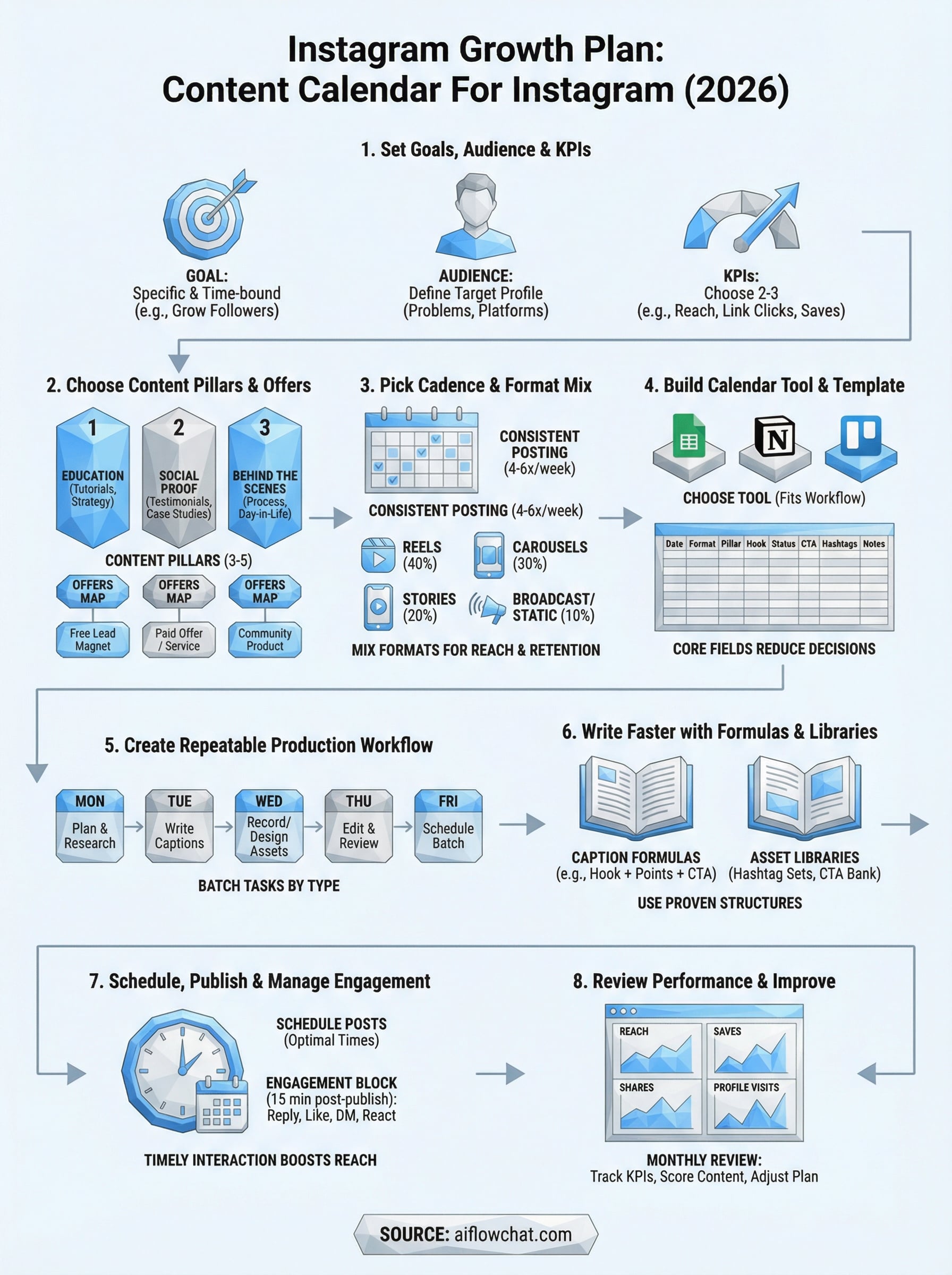
You now have every piece you need to build a content calendar for Instagram that holds up past the first week. Set your goal, pick your pillars, define your cadence, and block time to batch your content before the month begins. Each step in this guide builds on the previous one, so skipping straight to scheduling without doing the groundwork will cost you more time than it saves.
The fastest way to close the gap between planning and publishing is to stop generating content from a blank screen. AI Flow Chat lets you pull in viral Reels, competitor ads, and reference documents directly into a visual canvas where your captions, scripts, and carousel copy write themselves from proven source material. Start your first batch session this week and you'll have a full month of posts ready before it ends.
Continue Reading
Discover more insights and updates from our articles
Choose an AI model for scripts, marketing copy, coding, research, long documents, and quick everyday work using a practical quality, speed, and credit-cost framework.
Compare eight current Poppy AI alternatives for visual research, creator workflows, general AI work, grounded synthesis, automation, and reusable delivery.
A practical method for turning a scattered content process into a clear AI-assisted flowchart with source context, review checks, and a reusable output.