Content Repurposing Framework: Turn One Asset Into 10+
At AI Flow Chat
Contents
0%You published a great video, blog post, or podcast episode. It performed well. Then you moved on and created something entirely new from scratch. Sound familiar? Most creators and marketers repeat this cycle weekly, leaving massive amounts of untapped value sitting in their content libraries. A solid content repurposing framework changes that by giving you a repeatable system to extract every ounce of reach from a single asset.
The math is straightforward: one well-researched piece of content can become a Twitter thread, a LinkedIn carousel, a short-form video script, an email newsletter, a blog post, and more, without starting from zero each time. The problem isn't knowing this is possible. The problem is doing it consistently without burning out or letting quality slip.
This guide breaks down a step-by-step framework for turning one content asset into 10+ pieces across platforms. You'll get the exact process for selecting source content, adapting it per platform, and building a workflow you can actually repeat week after week. We built AI Flow Chat specifically for this kind of work, its visual canvas lets you drag in a viral video or blog post, connect it to multiple prompts, and generate platform-ready outputs in one workspace. But whether you use our tool or not, this framework will change how you think about content production.
Let's get into it.
What a content repurposing framework includes
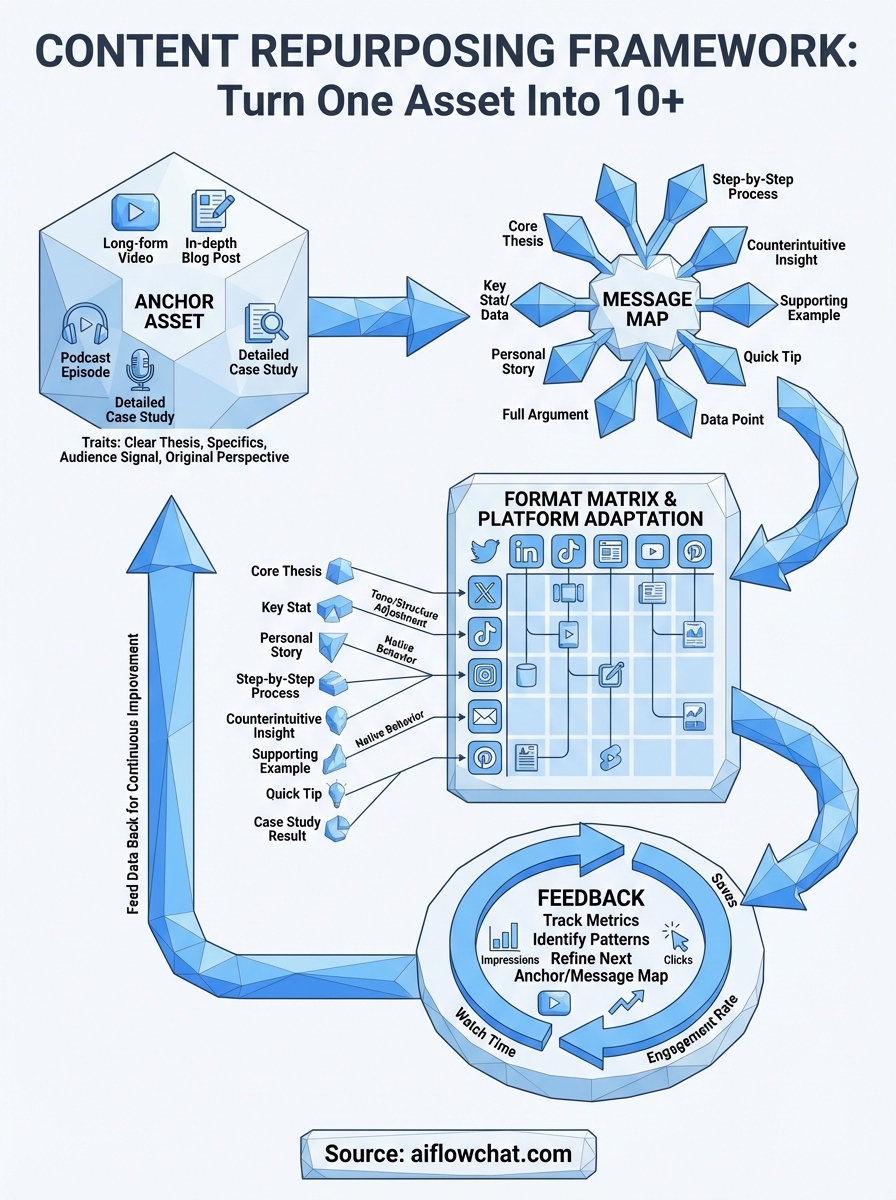
A content repurposing framework is not just a checklist you run through once. It's a repeatable production system built around four core components: a high-value source asset, a structured message map, a format matrix, and a feedback loop. Each component feeds the next, so every time you run the system, your output gets faster and more targeted. Skip one layer and the whole thing collapses into the same ad-hoc content creation you're trying to escape.
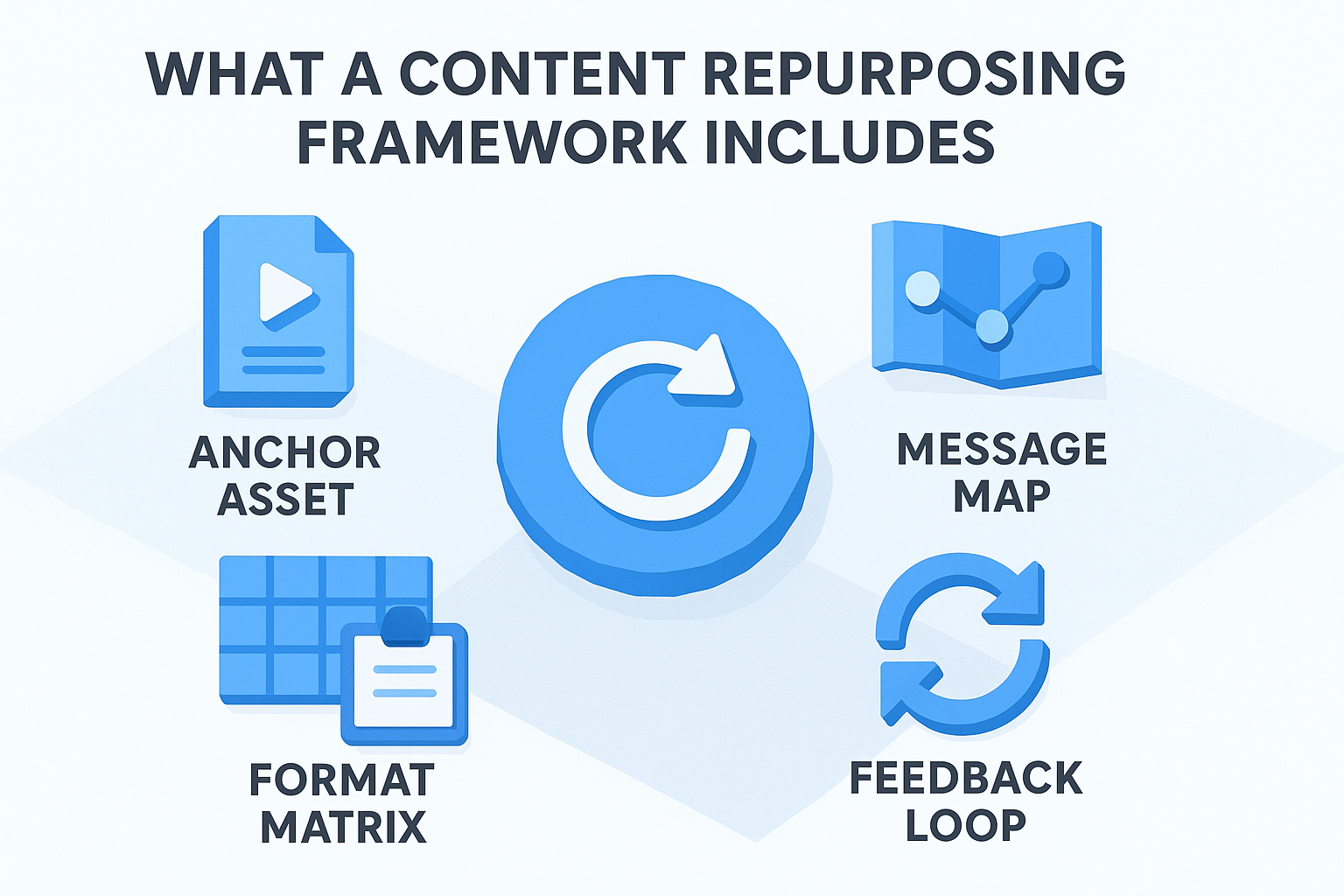
A framework without a feedback loop is just a one-time process, not a repeatable system.
The anchor asset
The anchor asset is the single piece of source content that everything else gets built from. It needs to be substantive enough to extract multiple angles, which rules out most social media posts or short threads. Think long-form: a 30-minute YouTube video, a 2,000-word blog post, a podcast episode, or a detailed case study. The anchor sets the quality ceiling for every derivative piece you create from it.
Not every piece of content qualifies. The best anchors share a few common traits:
- They contain a clear, singular thesis or central argument
- They include specific examples, data, or stories that can each stand alone
- They have shown some signal of audience resonance (views, saves, comments, shares)
- They cover a topic you can speak to with genuine depth
The message map
A message map is a breakdown of every distinct claim, insight, example, and sub-argument inside your anchor asset. You're auditing the content and tagging its parts. A 20-minute video might contain eight to twelve distinct messages, each of which can carry its own short-form piece without requiring the full context of the original.
Building a message map also forces you to think about audience fit before you start producing. Some messages work better for a LinkedIn audience (professional framing, data-backed claims), while others land better on TikTok (personal story, fast hook). When you map the messages first, format decisions become obvious instead of guesswork, and you stop wasting time producing content that doesn't match the platform.
The format matrix
The format matrix is a simple grid that matches each message to the right platform and content format. It removes decision fatigue from your production process because you're not asking "what should I post today?" You already know the answer before you open a single tool.
Here's a basic format matrix template you can adapt:
| Message | Format | Platform | Length/Type |
|---|---|---|---|
| Core thesis | Thread | X (Twitter) | 8-10 tweets |
| Key stat or finding | Carousel | 5-7 slides | |
| Personal story or example | Short video script | TikTok / Reels | 60-90 seconds |
| Step-by-step process | Blog section | Website | 500-800 words |
| Quick tip | Single post | 1 image + caption | |
| Full breakdown | Newsletter | Email list | 400-600 words |
Fill this matrix out before you produce anything. It gives you a clear production queue instead of a blank page every Monday morning.
The feedback loop
The feedback loop is what turns your framework into a learning system rather than a static checklist. After you publish the derivative content, you track which formats and messages drove the most engagement, saves, clicks, or conversions. That data feeds directly back into your next anchor selection and message map priorities.
Tracking does not need to be complicated: a simple spreadsheet with columns for format, platform, publish date, and one primary engagement metric is enough to spot patterns after a few publish cycles. Creators who skip this step keep producing content without ever knowing what's working, which means they never improve their hit rate on future repurposing runs.
Step 1. Pick the right anchor asset
Every repurposing cycle starts with one critical decision: which piece of content do you build everything else from? Get this wrong and you spend hours trying to extract derivative pieces from something too shallow, ending up with low-quality outputs that don't land on any platform. Get it right and the rest of your content repurposing framework runs almost automatically because the source material contains enough depth to supply ten or more distinct pieces without running dry. The anchor asset is not just a starting point, it is the engine behind every format and platform you are about to feed.
The quality of your anchor asset sets the ceiling for every piece of derivative content you produce from it.
What makes a strong anchor asset
Not all content qualifies as an anchor. You need source material that is dense with ideas, examples, and specifics, not a two-minute opinion clip or a listicle skimming the surface of a topic. The best anchor assets are long-form and well-researched, built around a topic you know deeply enough to approach from multiple angles without recycling the same point twice. If a piece only supports two or three derivative formats, it is not deep enough to anchor a full repurposing run.
Strong anchors share these qualities:
- Length and depth: A minimum of 1,500 words written or 15+ minutes of spoken content
- A single clear thesis: One central argument that the entire piece supports
- Distinct sub-points: At least five to eight individual claims, examples, or stories inside the piece
- Audience signal: Evidence of resonance such as high watch time, saves, or comments
- Your original perspective: Your direct take on the topic rather than a summary of other people's ideas
How to audit your existing library
Before you create anything new, scan your existing content archive first and score what you already have. Most creators sit on dozens of assets that performed well and were never repurposed. Pull your top-performing videos, posts, or articles from the last 12 months and run each one through a quick evaluation using the template below.
| Asset | Format | Length | Top metric | Sub-points count | Score (1-5) |
|---|---|---|---|---|---|
| [Title] | Blog post | 2,400 words | 3,200 views | 7 | 4 |
| [Title] | YouTube video | 22 minutes | 18k views | 9 | 5 |
| [Title] | Podcast episode | 35 minutes | 5k downloads | 6 | 4 |
Score each candidate out of five by weighing its depth, existing performance data, and how much original perspective it contains. Pick the highest scorer for your first repurposing run. Once you build this habit, running the audit monthly means you always have a strong anchor queued before production starts, which removes the blank-page problem from your workflow entirely and keeps your publishing schedule consistent without requiring new research every single week.
Step 2. Build a message map from the asset
Once you have your anchor asset locked in, the next move is pulling it apart methodically. A message map is a structured breakdown of every distinct idea inside your source content, organized so each point can stand completely alone as its own piece. This is the step most creators skip, which is exactly why their content repurposing framework collapses after two or three derivative pieces. Without a message map, you end up recycling the same angle repeatedly instead of mining the full depth your anchor already contains.
A message map turns one piece of source content into a clear production queue you can execute without second-guessing every format decision.
How to extract messages from your anchor
Run your anchor asset from start to finish and tag every distinct claim, example, statistic, or story as you go. Do not group similar points together yet. Each discrete idea gets its own line, even if it feels minor or obvious. A 20-minute video or 2,000-word article should yield eight to twelve individual messages when you do this correctly. If you pull fewer than five, the anchor is probably too shallow to support a full repurposing run and you should go back to your library audit from Step 1.
Use this extraction template to log each message as you review the asset:
| # | Message summary | Type | Standalone? (Y/N) |
|---|---|---|---|
| 1 | Core thesis statement | Argument | Y |
| 2 | Specific statistic or data point | Evidence | Y |
| 3 | Personal story or example | Story | Y |
| 4 | Step-by-step sub-process | How-to | Y |
| 5 | Counterintuitive insight or opinion | Opinion | Y |
Fill this out before you open any publishing tool. The template forces you to treat each message as a standalone unit of value rather than a paragraph that only makes sense in the context of the full original piece.
Tagging messages for platform fit
After your extraction pass, go back through the map and assign a primary platform to each message based on its format and natural tone. Data-backed arguments tend to perform well on LinkedIn. Personal stories drive engagement on TikTok and Instagram Reels. Step-by-step processes convert well in email newsletters and long-form blog content. Matching each message type to the right platform before you start producing removes the guesswork and stops you from creating content that will not land regardless of how well it is written.
Add two columns to your extraction template: one for target platform and one for intended content format. With those columns filled in, your message map doubles as a production schedule. You know exactly what to build, where to publish it, and in what order, without any additional planning work before you start producing.
Step 3. Turn the map into 10 plus deliverables
With your message map complete, you now have a structured list of standalone ideas ready to become individual pieces. This is where your content repurposing framework starts paying off in real volume. The goal here is to assign each message a specific deliverable, filling your production queue with 10 or more concrete outputs before you write a single word or record a single frame.
A filled production queue built from one anchor asset means you never stare at a blank page again.
Use a deliverable matrix to assign every message a format
A deliverable matrix maps each message from your extraction template to a specific content format and platform pairing. You are not brainstorming here. You are making precise assignments. Take your list of eight to twelve messages and run each one through the grid below, matching it to the format that fits its natural tone and structure.
| Message type | Deliverable format | Platform |
|---|---|---|
| Core thesis | Long-form thread | X (Twitter) |
| Key statistic | Carousel post | |
| Personal story | Short video script | TikTok / Reels |
| Step-by-step process | How-to blog section | Website |
| Counterintuitive take | Single text post | LinkedIn / X |
| Supporting example | Email newsletter segment | Email list |
| Quick tip | Single image post | |
| Full argument | YouTube Shorts script | YouTube |
| Data or research point | Infographic brief | Pinterest / LinkedIn |
| Case study or result | Lead magnet section | Email opt-in |
Working through this matrix with a 10-message anchor gives you 10 ready-to-produce deliverables in under 30 minutes. Most creators treat format selection as a creative decision made at publish time. Treating it as a structured assignment made during planning removes that friction entirely and keeps your production pipeline moving without stalling on decisions that have nothing to do with writing.
Batch your outputs by format, not by message
Once your matrix is filled, group your deliverables by format type rather than working through them message by message. Write all your thread drafts in one sitting. Film all your short video scripts back to back. Draft all your email segments together. Batching by format means your brain stays in one mode for longer, which cuts production time significantly and keeps quality consistent across similar outputs.
For example, if your matrix surfaces three short video scripts, write all three in one session using the same hook-body-CTA structure. Then move to carousels, then to threads. You produce more in less time and avoid the context-switching that kills output quality when you jump between completely different formats every 20 minutes.
Step 4. Adapt for each platform and format
Your deliverable matrix tells you what to produce and where to publish it. But dropping the same copy-paste text into every platform is one of the fastest ways to destroy the performance of your content repurposing framework. Each platform has its own native content behavior: the way users scroll, the way the algorithm surfaces posts, and the way audiences expect to be addressed. A LinkedIn post that earns strong engagement reads nothing like a TikTok script built around the same core message. Adapting is not optional. It is the step that decides whether your repurposed content earns real attention or disappears into the feed within minutes of going live.
The message stays constant. The delivery changes to match where your audience is and exactly how they behave there.
Understand the native behavior of each platform
Every major platform rewards content that feels native to its environment. Long-form explanatory content earns more saves and shares on LinkedIn because the audience arrives in a professional, information-seeking mindset. TikTok and Reels reward a hard hook in the first two seconds because the feed is built for passive scrolling. X (Twitter) rewards compression, forcing you to distill an entire argument into the fewest possible words. Email newsletters reward a direct, personal tone because the reader actively chose to receive your content in their inbox.
Before you adapt any piece, write down the one behavior that matters most on each target platform: what action do you want the audience to take, and what does the algorithm explicitly reward? Those two answers shape every structural decision you make before you write a single line.
Use a platform adaptation template
Use this template when you move a message from your map into a platform-specific deliverable. Fill it in before you start writing so every structural decision is made upfront instead of on the fly:
| Field | Your input |
|---|---|
| Source message | The specific message from your map |
| Core argument in one sentence | Strip it to the single point |
| Target platform | LinkedIn / TikTok / X / Email / etc. |
| Native behavior to match | e.g., saves on LinkedIn, watch time on TikTok |
| Hook format | Question / Bold claim / Counterintuitive stat |
| Body structure | List / Story / Step-by-step / Single argument |
| CTA | Follow / Save / Reply / Click / Watch |
| Target length | Word count or time in seconds |
Adjust tone and structure without changing the core message
Your central argument does not change between platforms, but sentence length, vocabulary, and structure shift significantly. A LinkedIn carousel covering a five-step process uses clear headers and clean bullet points. The TikTok version of that exact same process opens with a hard, specific hook like "Most creators skip step three and wonder why nothing ever lands," and then delivers each step in short, punchy sentences with zero formatting. The argument is identical. The execution is entirely different. Run the adaptation template for every deliverable in your queue and you will cut production time while keeping quality consistent across every platform you publish on.
Step 5. Publish, track, and improve the system
Producing ten deliverables means nothing if you publish them randomly and never measure what lands. This final step is what separates a one-time content push from a true content repurposing framework. You need a publishing schedule, a tracking system, and a monthly review habit that feeds data directly back into your next anchor selection and message mapping process.
Publishing without tracking is the same as running an experiment with no results log: you accumulate output but learn nothing useful from any of it.
Set a publishing schedule before you go live
Before you publish a single piece, map every deliverable to a specific publish date using a simple content calendar. Spacing your 10+ outputs over two to three weeks keeps your audience engaged without flooding a single channel in one day. Assign each platform its own publish window: LinkedIn posts on Tuesday and Thursday mornings, TikTok and Reels on Monday and Wednesday, email newsletters on Friday. Staggering publication also gives each piece enough breathing room to accumulate clean engagement data before the next one drops, which makes your tracking far more reliable across the full cycle.
Track the metrics that matter
Not every metric tells you something useful. Focus on one primary metric per platform rather than chasing every number available in your analytics dashboards. Use this tracking template after each publish cycle:
| Deliverable | Platform | Publish date | Primary metric | Result | Notes |
|---|---|---|---|---|---|
| Core thesis thread | X (Twitter) | [Date] | Impressions + reposts | [#] | Strong hook |
| Statistic carousel | [Date] | Saves | [#] | Low reach | |
| Story short video | TikTok | [Date] | Watch time % | [#] | Hook worked |
| How-to blog section | Website | [Date] | Organic clicks | [#] | Needs CTA |
| Email newsletter | Email list | [Date] | Click rate | [#] | High intent |
Fill this table within 72 hours of each publish date while the early data is still reliable. Waiting longer makes it harder to separate the initial algorithmic push from genuine organic performance, which distorts the patterns you are trying to identify.
Feed data back into your next cycle
After two to three weeks, review your completed tracking table and identify the two or three deliverables that outperformed the rest. Look for patterns: did story-driven messages outperform data-led ones? Did a specific platform consistently drive more saves or clicks? Those answers directly shape your next anchor selection and your next message map priorities. You are not starting from scratch on the next cycle. You are running the same system with sharper inputs, which is exactly how your output quality compounds over time instead of staying flat.
Wrap it up and run the next cycle
You now have every component of a working content repurposing framework: a strong anchor asset, a message map, a deliverable matrix, platform-specific adaptations, and a tracking loop that gets sharper with every cycle. The first run takes the most effort. By the third cycle, you will move from anchor to 10+ published pieces in a fraction of the time because the system is already built and your decisions are already made.
The biggest mistake at this point is treating this as a one-time project. Run the full cycle monthly, feed your tracking data back into the next anchor selection, and your content output will compound without requiring proportionally more time or energy. If you want to speed up the production side significantly, try AI Flow Chat to pull your anchor asset directly into a visual canvas, extract messages, and generate platform-ready drafts in one workspace.
Continue Reading
Discover more insights and updates from our articles
Choose an AI model for scripts, marketing copy, coding, research, long documents, and quick everyday work using a practical quality, speed, and credit-cost framework.
Compare eight current Poppy AI alternatives for visual research, creator workflows, general AI work, grounded synthesis, automation, and reusable delivery.
A practical method for turning a scattered content process into a clear AI-assisted flowchart with source context, review checks, and a reusable output.