7 SEO Content Brief Template Examples for Faster Rankings
At AI Flow Chat
Contents
0%You hired a writer, gave them a topic, and got back something that completely missed the mark. No target keywords. Wrong audience. Thin on substance. The problem isn't usually the writer, it's the brief. A solid SEO content brief template eliminates the guesswork by giving writers exact instructions on what to cover, which keywords to target, and how to structure the piece for search.
But building briefs from scratch every time you publish is a grind, especially when you're managing multiple blogs, clients, or content calendars. That's exactly why we built repeatable workflow tools inside AI Flow Chat, so you can pull from reference sources, extract keyword data, and generate structured briefs without starting from a blank page every single time.
Below, you'll find seven SEO content brief template examples you can steal, adapt, and plug into your process right away. Each one serves a different use case, from basic blog posts to full-scale pillar content, so you can pick what fits and start producing content that actually ranks.
1. AI Flow Chat
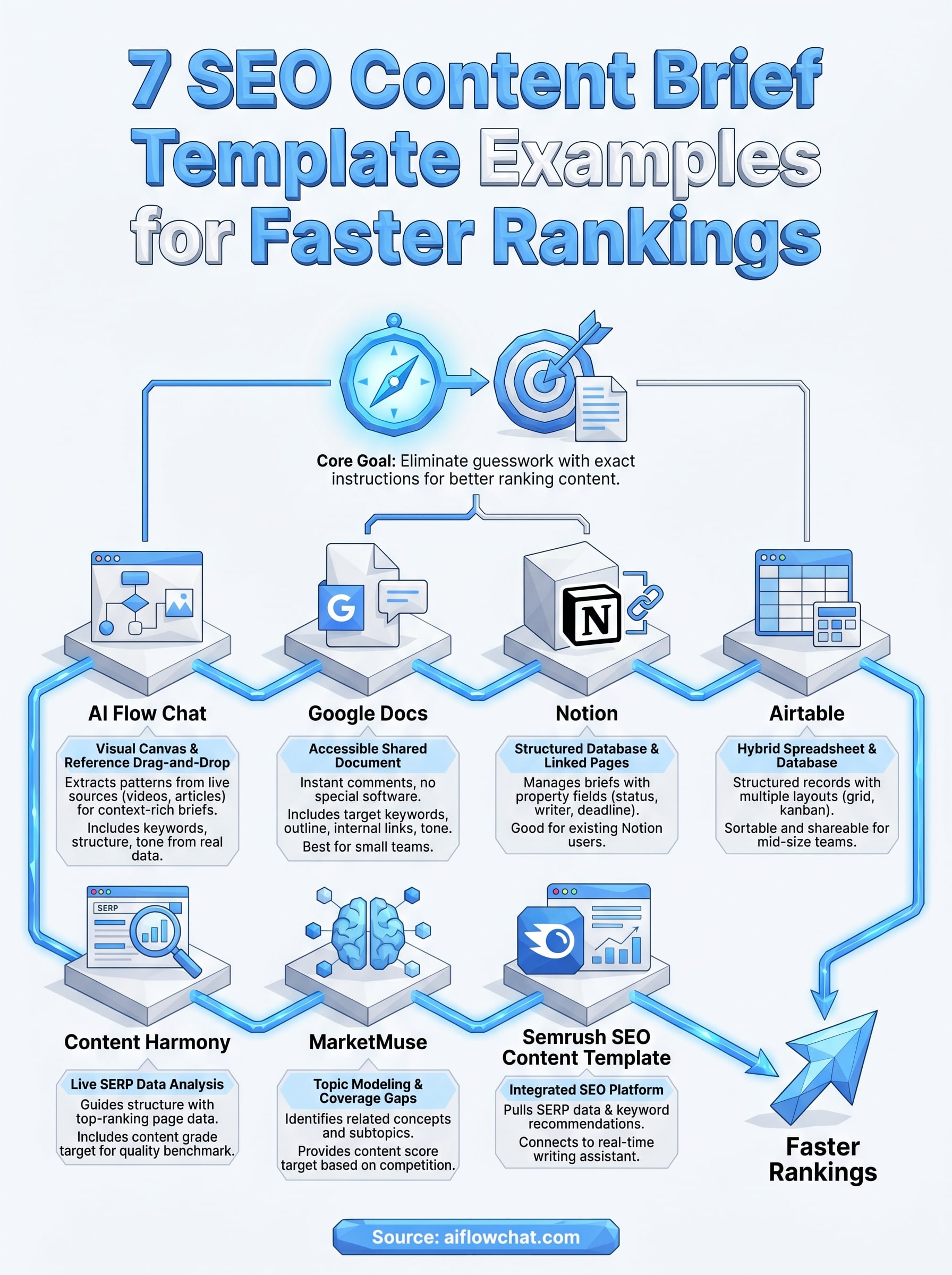
AI Flow Chat takes a different approach to brief creation than most tools on this list. Instead of filling out a static form, you drag and drop reference sources like YouTube videos, TikToks, competitor articles, and PDFs onto a visual canvas and let the platform extract the patterns that make content rank and resonate with a specific audience.
What this SEO content brief template includes
A brief built inside AI Flow Chat pulls from live reference material rather than generic placeholders. You get a target keyword, secondary keywords, a recommended structure with H2 and H3 headings, a suggested word count, audience notes, and a tone guide tied directly to the sources you fed in. The result is a context-rich SEO content brief template that reflects real data from top-performing content instead of guesswork pulled from thin air.
The brief is only as strong as the reference material you give it. Drop in a viral article alongside a competitor page, and the output reflects what actually works in that niche.
How you build and reuse briefs in AI Flow Chat
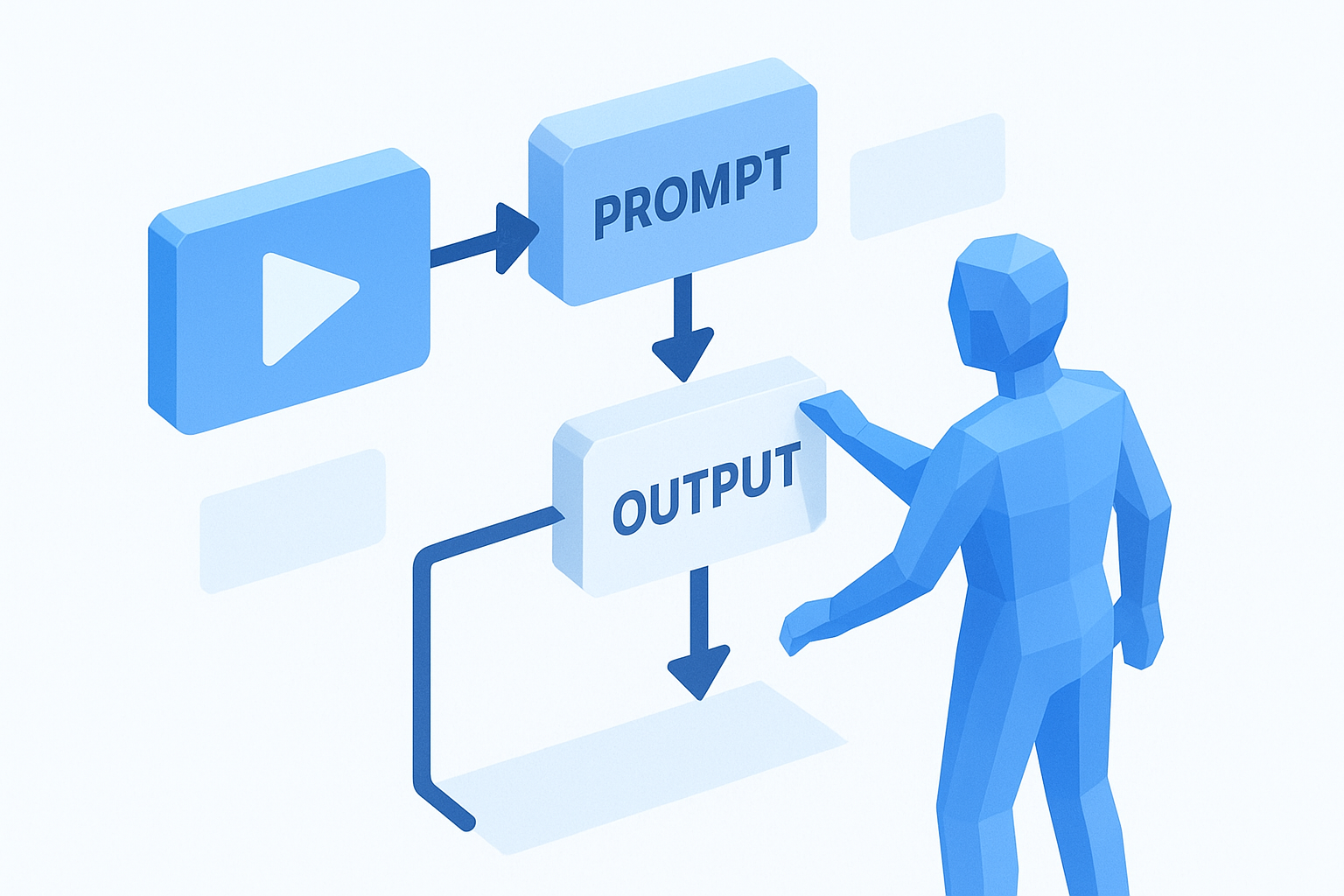
You build a brief by connecting nodes on the canvas: a source node (a YouTube link or a live URL), a prompt node, and an output node. Once the flow runs, you get a structured brief in seconds. The real power comes from saving that flow as a reusable template, so every future brief for the same content type runs the same process automatically without rebuilding from scratch. You can also schedule recurring brief generation using the platform's task scheduler, which is a practical option for agencies or solo operators running high-volume content calendars across multiple clients.
Best fit and typical cost
AI Flow Chat fits best if you manage multiple content streams and want briefs that connect directly to the content creation step without switching between several different tabs. It also works well for visual thinkers who find linear chat interfaces limiting when managing complex workflows. Pricing starts at $29 per month on a flexible credit-based model with no annual commitment required.
2. Google Docs SEO content brief template
Google Docs remains one of the most accessible ways to build a shared SEO content brief template that writers and editors can open and comment on instantly. It requires no special software, and most content teams already have it in their daily workflow.
What this SEO content brief template includes
A well-structured Google Docs brief typically covers your target keyword, secondary keywords, search intent, recommended H2 and H3 outline, internal link suggestions, word count range, and tone guidelines. You can also add a competitors section with direct links to the top-ranking pages so writers understand what they need to beat before they write the first sentence.
How you set it up for writers and editors
Start with a master template document that you duplicate for each new assignment. Use Google Docs heading styles to pre-structure the brief so it's easy to scan at a glance. Set the document permissions to "Can comment" for writers so they can ask clarifying questions directly in context without accidentally editing the core structure. That keeps feedback organized and cuts down on back-and-forth emails significantly.
Never edit your master template directly; always duplicate it first so the base structure stays intact for the next brief.
Best fit and typical cost
Google Docs works best for small teams or solo operators who want a free, frictionless solution without added complexity. It starts to break down when you're managing more than ten active briefs at once, since there's no built-in status tracking or database view. Google Docs is free with a standard Google account.
3. Notion SEO content brief template
Notion gives you a more structured and connected approach to brief management than Google Docs alone. Because it combines databases, linked pages, and rich text editing in one workspace, you can treat each brief as a living document tied directly to your content calendar, keyword list, and editorial pipeline.
What this SEO content brief template includes
A Notion SEO content brief template typically holds your target keyword, supporting keywords, search intent summary, recommended H2 and H3 structure, word count range, internal link targets, and tone guidelines. You can embed property fields like publish date, assigned writer, and content status directly inside the same database record, so nothing gets buried in a separate spreadsheet. Common fields to add as database properties include:
- Status (draft, in review, published)
- Target keyword and secondary keywords
- Assigned writer and due date
- Word count target
How you structure databases and brief pages
Set up a Notion database with one record per brief, then build a linked page inside each record for the full brief details. Use database properties to track deadlines and writer assignments at a glance in board or table view. Filters let you pull up only the briefs in a specific stage, which keeps large content operations manageable.
Lock a template page inside Notion so every new brief starts from the same structure and writers never face a blank record.
Best fit and typical cost
Notion works best for content teams that already use it for project management or documentation. It shows limitations when you need live SERP data pulled in automatically. The free plan covers solo use, and paid plans start at $10 per month per user.
4. Airtable SEO content brief template
Airtable sits between a spreadsheet and a database, which makes it a strong option for teams that want structured brief records with the visual flexibility of multiple layout options. Each brief lives as its own row, and every field is queryable, sortable, and shareable across your team.
What this SEO content brief template includes
An Airtable SEO content brief template stores your target keyword, secondary keywords, search intent, recommended outline structure, word count target, internal link suggestions, and tone notes all inside a single record. You can add attachment fields to include reference articles or screenshots directly alongside the brief so writers have everything in one place without hunting through separate folders or threads.
Keep a locked base template in Airtable so every new record inherits the same field structure and nothing gets missed at the brief stage.
How you manage briefs as records and views
Airtable lets you switch between views like grid, kanban, and gallery without changing the underlying data. Set up a kanban view organized by content status so you can see at a glance which briefs are assigned, in progress, or waiting for review. You can also filter records by writer or due date to keep large editorial pipelines from turning into a backlog.
Best fit and typical cost
Airtable works best for mid-size teams managing ten or more active briefs simultaneously. It lacks native SERP analysis, so you still need a separate keyword research source. Free plans support limited records, and paid plans start at $20 per month per user.
5. Content Harmony content brief template
Content Harmony is a purpose-built brief tool that pulls live SERP data to guide your content structure before a writer types a single sentence. Rather than working from assumptions, you build a data-informed SEO content brief template grounded in what Google already rewards on page one.
What this SEO content brief template includes
A Content Harmony brief pulls in your target keyword, related questions, recommended headers, and topic coverage requirements based on an analysis of top-ranking pages. You also get a content grade target your writer should hit, which removes the subjectivity from content quality reviews and gives editors a clear benchmark to measure against instead of relying on gut feel.
How you turn SERP data into a writer-ready brief
You start by entering your target keyword, and Content Harmony runs a SERP analysis to surface the topics, questions, and headers that appear most frequently across the top results. From there, you customize the brief by adding your own angle, tone notes, and internal link targets before sending it directly to your writer.

Sharing the content score target with writers upfront gives them a concrete goal for the first draft and cuts revision rounds significantly.
Best fit and typical cost
Content Harmony fits best for SEO teams and agencies that need consistent, research-backed briefs at scale without manually reviewing competitor pages each time. Plans start at $50 per month, which makes it a heavier investment for solo operators working with tighter budgets.
6. MarketMuse content brief template
MarketMuse uses topic modeling to build briefs around the full depth of a subject rather than just a target keyword. The platform analyzes your topic against a large content inventory to surface the related concepts and subtopics your brief needs to cover for a page to rank competitively.
What this SEO content brief template includes
A MarketMuse SEO content brief template delivers more than a keyword list. You get a recommended word count based on competitive analysis, subtopics to cover, questions to answer, and a content score target that gives editors a measurable standard to evaluate first drafts against. Key elements typically included are:
- Target topic and related subtopics
- Recommended word count range
- Content score target
- Questions to address
- Internal linking suggestions
How you use topic modeling to guide coverage
You enter your target topic, and MarketMuse runs an analysis against competing pages to identify which concepts appear most often in top-ranking content. The platform then produces a brief that maps out the coverage gaps your page needs to fill before it can compete at the top of the results.
This approach saves time compared to manually reviewing competitor articles one by one, and it keeps your brief grounded in what the search landscape actually rewards rather than assumptions.
Topic modeling carries the most value when you're targeting competitive topics where surface-level coverage won't break through existing results.
Best fit and typical cost
MarketMuse works best for enterprise teams and established SEO operations that produce high volumes of competitive content. The free plan is heavily limited, and paid plans start at $149 per month, which makes it a significant investment for solo operators.
7. Semrush SEO content template
Semrush built its SEO content template directly into its broader SEO platform, which means you get keyword data and on-page recommendations without switching between separate tools. The brief pulls from live SERP analysis and connects directly to the writing assistant inside the same workflow.
What this SEO content brief template includes
The Semrush SEO content brief template gives you a target keyword, semantically related keywords, recommended word count, readability score target, and a list of competitor pages to reference as benchmarks. It also surfaces backlink sources from top-ranking pages, which helps you understand the link profile your content needs to compete against at the top of the results.
How you apply the on-page recommendations
You enter your target keyword, and Semrush analyzes the top-ranking pages to generate a list of terms and topics your content should cover. As your writer drafts the content inside the SEO writing assistant, the tool updates the content score in real time so you can see how close the draft is to meeting the competitive benchmark before publishing.
Running the content template before briefing your writer gives them a concrete keyword list and score target so the first draft lands closer to ready.
Best fit and typical cost
Semrush fits best for teams that already use it for keyword research and want to extend that data into the brief and writing stage without adding another subscription. Access to the SEO content template requires a paid plan, which starts at $139.95 per month.
Next steps
Every tool on this list solves the same core problem: writers need clear direction before they write, and you need a repeatable system to deliver it consistently. The right SEO content brief template depends on your team size, your budget, and how much you want live data shaping your structure before you hand off to a writer.
If you manage multiple content streams and want briefs that connect directly to your research, reference sources, and publishing workflow, a visual canvas approach saves you significant time compared to rebuilding from scratch each time. AI Flow Chat lets you drag in competitor articles, YouTube videos, and live URLs to extract what works, then turn that into a structured brief you can reuse on every future assignment.
Pick the format that fits your current process, build one solid brief this week, and measure the difference in your next article's performance. Start building smarter content briefs with AI Flow Chat and cut the guesswork from your editorial process for good.
Continue Reading
Discover more insights and updates from our articles
Choose an AI model for scripts, marketing copy, coding, research, long documents, and quick everyday work using a practical quality, speed, and credit-cost framework.
Compare eight current Poppy AI alternatives for visual research, creator workflows, general AI work, grounded synthesis, automation, and reusable delivery.
A practical method for turning a scattered content process into a clear AI-assisted flowchart with source context, review checks, and a reusable output.