Ahrefs Content Gap Tool: How To Find Keywords You’re Missing
At AI Flow Chat
Contents
0%Your competitors are ranking for keywords you haven't even thought to target yet. The Ahrefs Content Gap tool is built to expose exactly those blind spots, showing you, side by side, which valuable search terms drive traffic to competing sites while yours gets nothing. It's one of the most practical features in Ahrefs for anyone serious about organic growth through competitive analysis.
But finding the gaps is only half the battle. You still need to produce the content that fills them, and do it efficiently enough to actually keep up. That's where a tool like AI Flow Chat fits in. Once you've pulled a list of missing keyword opportunities from Ahrefs, you can feed competitor pages, reference articles, and briefs directly into AI Flow Chat's visual workspace to draft optimized content at scale, using the same sources your competitors already rank with as your strategic starting point.
This guide walks you through exactly how to use the Content Gap tool step by step, from setting up your competitor comparison to filtering and prioritizing the results. You'll learn how to turn a raw keyword list into a clear content plan you can actually execute on.
What the Content Gap tool does and when to use it
The Ahrefs Content Gap tool compares your domain against one or more competitor domains and returns a list of keywords those competitors rank for that your site does not. Rather than guessing which topics to cover next, you get a data-driven picture of the exact search terms already driving traffic to competing pages. The comparison happens at the domain level by default, but you can also narrow it to specific URLs if you want to analyze a single competing page rather than an entire site.
The tool doesn't tell you what to create from thin air. It tells you what's already working for your competitors, so you can make a calculated decision about whether to pursue the same terms.
How the tool compares domains
Ahrefs pulls its keyword data from its own index, which tracks hundreds of millions of keywords across search engines. When you enter your domain alongside competitor domains, the tool cross-references each site's ranking keyword sets and identifies the overlap and the gaps. Keywords that appear in your competitors' ranking profiles but not yours show up as opportunities. You can also flip the tool around: instead of finding what you're missing, you can find keywords that only you rank for, giving you a sense of your unique competitive position in the SERPs.
The results come back as a keyword list with columns for search volume, keyword difficulty, traffic potential, and the number of competitors ranking for each term. This data lets you quickly sort and evaluate which gaps are worth targeting and which ones carry too little volume or too much competition to be worth your time. The more competitors you include in the comparison, the broader and noisier the list becomes, so you'll learn to filter aggressively in later steps.
When to run a Content Gap analysis
Running a content gap analysis makes the most sense at specific points in your strategy cycle. Using it at random rarely produces an actionable keyword list because you won't have the right context to filter results meaningfully. Going in with a clear goal changes how you read the data entirely.
Here are the situations where the Content Gap tool delivers the most value:
- When launching a new site or blog and you need to build a content calendar quickly based on proven demand rather than guesswork
- When you hit a traffic plateau and organic growth has stalled despite publishing consistently
- When entering a new niche or sub-topic within your existing domain and you need to map out what's already ranking before you write anything
- When a competitor has noticeably outpaced you in rankings and you want to understand which specific keywords are driving that gap
- After a core algorithm update when your rankings have shifted and you need to reassess which terms are worth pursuing
Each of these situations gives you a clear frame for interpreting the results. Without a defined goal going into the analysis, you'll end up staring at a list of hundreds of keywords with no real sense of where to start or what to do with them.
Step 1. Pick the right competitors
The quality of your Content Gap results depends almost entirely on who you compare yourself against. Feed in the wrong competitors and you'll get a bloated list full of keywords that have nothing to do with your actual audience. Before you open the Ahrefs Content Gap tool, spend a few minutes choosing comparison domains that closely mirror your target topic and audience.
What makes a competitor relevant here
A relevant competitor in this context is not necessarily the business you compete with commercially. It's any site ranking consistently for the same keywords you want to rank for. An e-commerce brand selling running shoes and a blog covering running performance could both be your keyword competitors, even if they sell nothing that overlaps with your product.
Focus on search competitors first and business competitors second. The goal is to find who is winning the rankings you want, not who sells what you sell.
To find your actual search competitors, type your main topic keyword into Google and note the domains that appear repeatedly across the top results. You can also use Ahrefs' Competing Domains report under Site Explorer to get a ranked list of sites with high keyword overlap with yours. That report surfaces domains automatically based on shared ranking keywords, which saves time compared to manual research.
How many competitors to include
You can add up to 10 comparison domains in the Content Gap tool, but more does not mean better. Including too many competitors pulls in a wide mix of keyword intents and topic clusters, which makes the final list harder to filter and act on.
A practical starting point is three to five tightly focused competitors. This keeps the results relevant and reduces noise. If you're analyzing a specific sub-topic rather than your whole domain, drop that number to two or three and point the tool at individual URLs instead of full domains. For example, if you're trying to fill gaps around "email marketing automation," compare a specific competitor page targeting that cluster rather than their entire site. That level of specificity produces a tighter, more actionable keyword list that you can map to content immediately.
Step 2. Run the Content Gap report
Once you have your competitor list ready, opening the Ahrefs Content Gap tool and entering those domains takes less than two minutes. The setup process is straightforward, but a few configuration choices you make at this stage will directly shape the quality of results you get back.
Where to find the tool in Ahrefs
Log into Ahrefs and go to Site Explorer. Enter your own domain in the search bar and hit enter. From the left-hand navigation panel, scroll down to the "Organic Search" section and click Content Gap. This drops you into the comparison interface where you'll enter your competitor domains.

The Content Gap tool lives inside Site Explorer, not the standalone Keywords Explorer, so always start with your own domain as the base.
From here, follow these steps to set up the report:
- In the "Show keywords that these targets rank for" field, enter your competitor domains one by one, each on its own line. Three to five domains is the recommended range from the previous step.
- In the "But this target doesn't rank for" field, confirm your own domain is already filled in. If it isn't, add it here.
- Leave the intersection filter set to "At least one target" for the first run. This casts a wider net and gives you a fuller picture before you narrow down.
- Click "Show keywords" to generate the report.
What to enter and how to read the initial results
Your first run will often return hundreds or even thousands of keywords, which can feel overwhelming. Don't try to act on the raw list yet. The columns you want to focus on immediately are search volume, keyword difficulty (KD), and traffic potential. These three data points tell you whether a keyword gap is actually worth pursuing or just a technical result with no practical value.
Each row in the results table shows you which of your competitors ranks for that term and at what position. A keyword where two or three of your competitors all rank in the top five, but your site doesn't appear at all, is a strong signal worth noting. That pattern points to a consistent gap rather than a one-off ranking result.
Step 3. Filter and prioritize keyword gaps
After running the report, your raw results from the Ahrefs Content Gap tool will likely contain far more keywords than you can realistically target. Most of them won't be worth your time. Filtering aggressively at this stage is what separates a usable content plan from a disorganized list you never act on.
Apply filters to cut the noise
The built-in filters at the top of the Content Gap results table let you narrow the list by volume, difficulty, and intersection count. Start with these three adjustments before you evaluate any individual keyword:
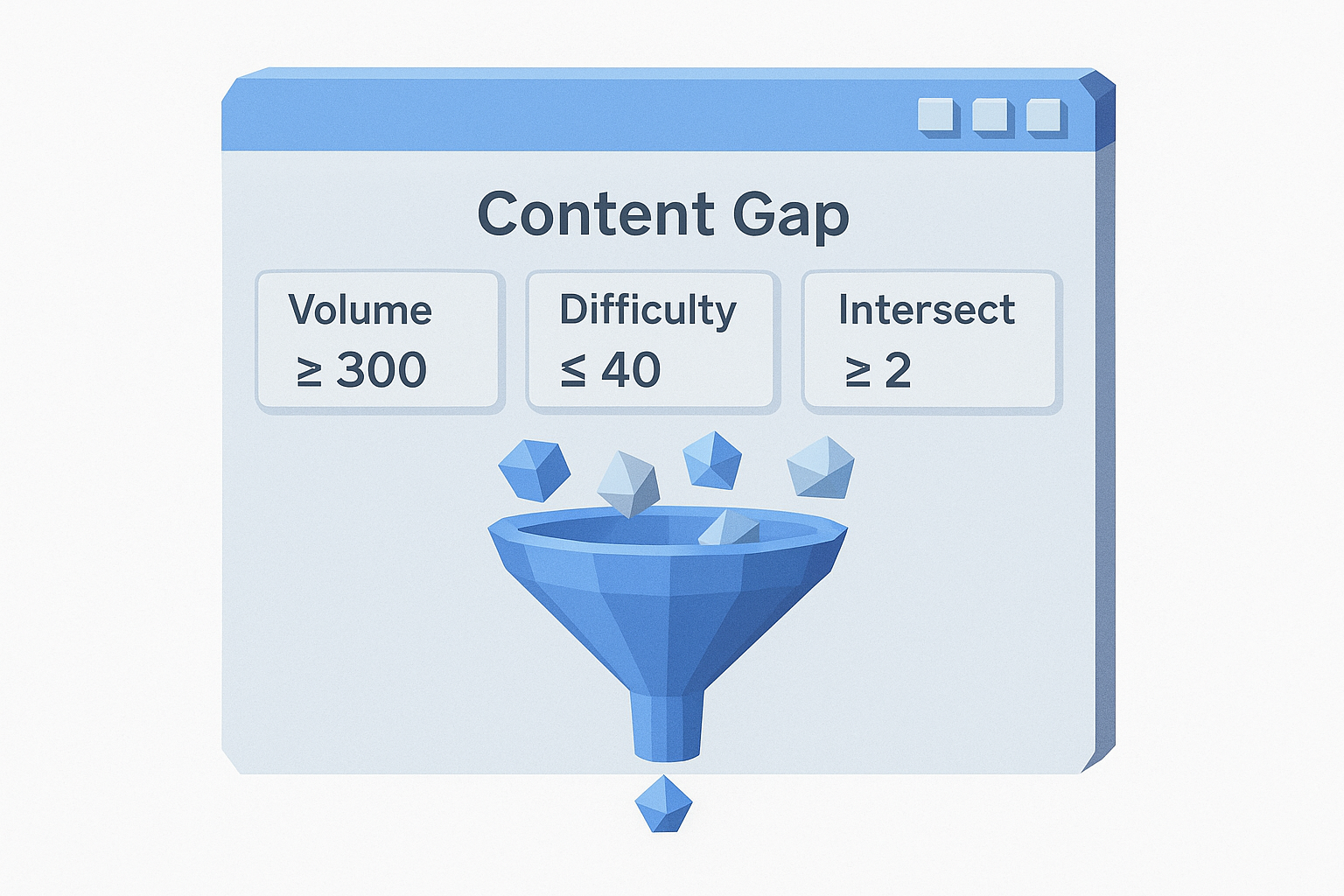
- Set minimum search volume to 300 to eliminate terms with no meaningful traffic potential
- Set maximum keyword difficulty to 40 to focus on gaps your site can realistically compete for
- Change the intersection filter to "2 targets" or higher so only keywords that multiple competitors rank for appear in your list
Keywords that two or more of your competitors rank for represent a more reliable signal than one-off rankings, since they point to consistent demand in your niche rather than a single site's unusual authority.
These adjustments typically cut your list down by 60 to 80 percent. What remains is a tighter group of high-signal opportunities you can evaluate individually rather than scroll through endlessly.
Prioritize what remains
With a filtered list in hand, sort by traffic potential rather than raw search volume. Traffic potential reflects the total clicks a keyword could realistically send your way based on how the top-ranking pages perform, not just how many people search the term. A keyword with 800 monthly searches and a traffic potential of 3,000 is a stronger target than one with 1,500 searches and a traffic potential of 400.
From your filtered list, group keywords by topic cluster rather than treating each one as a standalone target. A cluster of five related keywords with moderate volume each is often more valuable than a single high-volume term, because you can cover the cluster with one well-structured page and capture multiple positions at once. Map each cluster to either a new page you need to create or an existing page you need to update and expand.
Step 4. Turn gaps into pages and updates
At this stage, you have a filtered, prioritized keyword list from the Ahrefs Content Gap tool. The next decision is practical: for each keyword cluster you've identified, determine whether you need to build a new page from scratch or whether an existing page on your site already covers the topic partially and just needs a meaningful expansion. Treating every gap as a net-new page will slow you down. A smarter approach is to audit your current content first and match gaps to existing URLs before you schedule anything new.
Decide between creating new pages and updating existing ones
Your existing pages are often closer to ranking than you think. A page sitting on page two or three of Google for a keyword cluster may need a targeted update, not a replacement. Check your current rankings in Ahrefs' Site Explorer for the keywords in your gap list. If you already have a page ranking between positions 11 and 30 for a related term, update that page first rather than creating a competing one.
Publishing a new page when you already have a weak existing one covering the same topic can split your authority across two URLs and hurt both.
Use this decision framework for each cluster in your list:
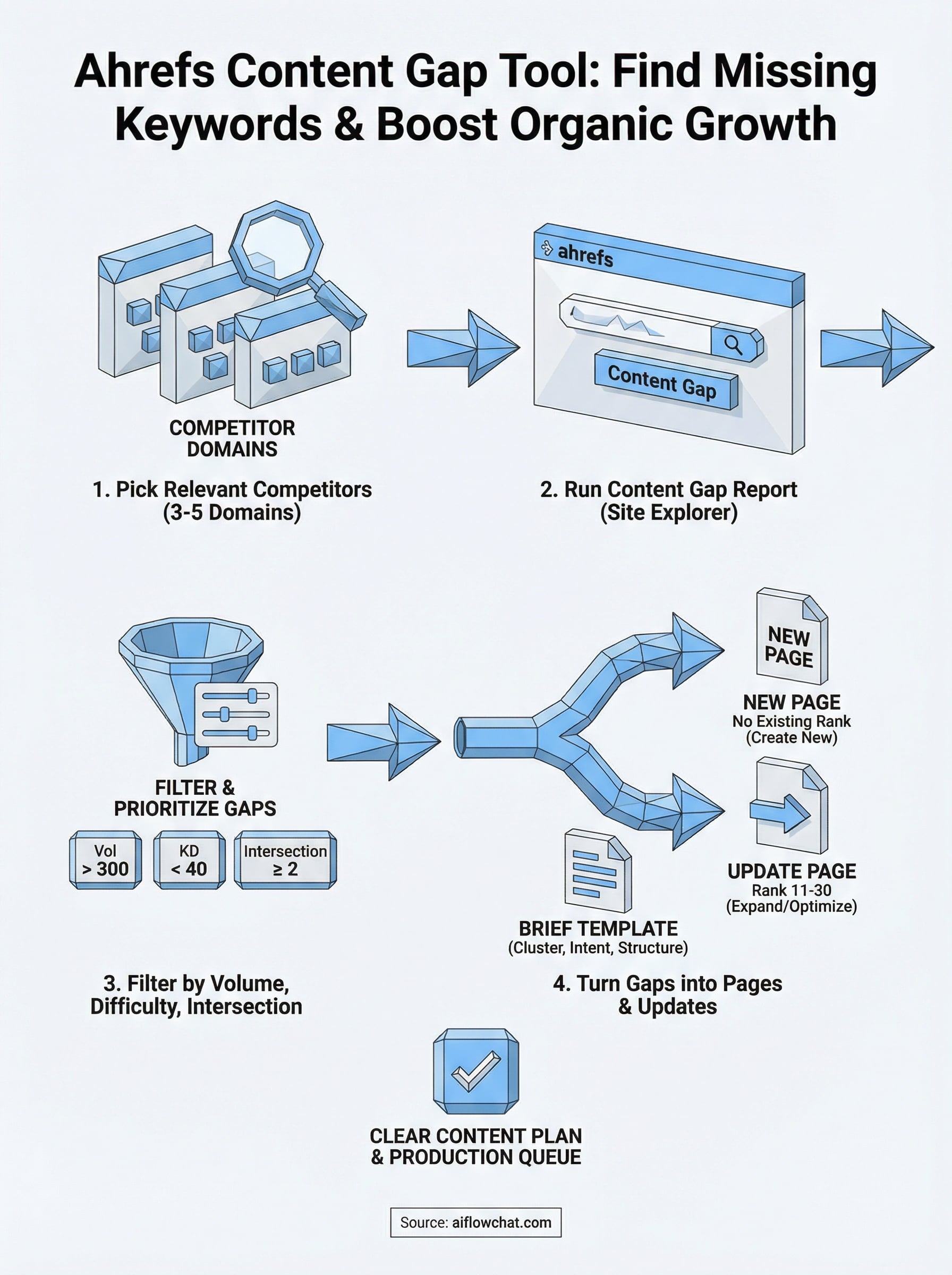
- Existing page ranks 11 to 30: Update and expand the page with the gap keywords woven into headers, body copy, and internal links
- No existing page ranks at all: Schedule a net-new page targeting the full cluster
- Existing page ranks 1 to 10 but misses related terms: Add a section or FAQ block to capture related keywords without rebuilding the page
Use a simple brief template to move fast
Once you've decided which gaps need new pages versus updates, write a brief for each one before drafting any content. This prevents scope creep and keeps each piece tightly focused on the target keyword cluster you identified. Here is a repeatable template you can fill in for every gap you plan to address:
Target keyword cluster: [primary keyword + 2 to 4 supporting terms]
Search intent: [informational / transactional / navigational]
Recommended content type: [new page / update to existing page at URL]
Target word count: [based on top-ranking competitor page lengths]
Key subtopics to cover: [list 3 to 5 based on competitor H2s]
Internal links to add: [existing pages on your site relevant to this cluster]
CTA or next step for the reader: [what should they do after reading]
Filling out this template for each cluster before writing keeps your execution consistent and gives you a clear production queue you can hand off or work through systematically.
Next steps
You now have a complete process for using the Ahrefs Content Gap tool from picking competitors to turning filtered keyword gaps into a prioritized production queue. The gap analysis itself takes under an hour once you know what you're looking for. The harder part is consistently executing on the content briefs you've built.
Start by running one focused analysis against three competitors this week. Apply the filters from Step 3, cluster the results by topic, and fill out briefs for the top five opportunities. Then work through them in order of traffic potential, not alphabetically or by whichever one feels easiest.
If you want to move faster once your briefs are ready, AI Flow Chat's visual workflow canvas lets you feed competitor pages directly into your content process and generate structured drafts using your reference material as the source, so you're building from proven content rather than starting from nothing.
Continue Reading
Discover more insights and updates from our articles
Choose an AI model for scripts, marketing copy, coding, research, long documents, and quick everyday work using a practical quality, speed, and credit-cost framework.
Compare eight current Poppy AI alternatives for visual research, creator workflows, general AI work, grounded synthesis, automation, and reusable delivery.
A practical method for turning a scattered content process into a clear AI-assisted flowchart with source context, review checks, and a reusable output.