TikTok Creative Center: How To Find Top Ads & Trends
At AI Flow Chat
Contents
0%The TikTok Creative Center is TikTok's free intelligence hub where advertisers and creators can browse top-performing ads, trending hashtags, popular songs, and creative insights, all pulled from real campaign data across the platform. If you're running TikTok ads or creating content for the platform, it's one of the most useful resources you're probably underusing.
The problem? Most people open it, click around for a few minutes, and leave without extracting anything actionable. There are filters, sorting options, and data points buried in the interface that can genuinely change how you approach your next campaign, but only if you know where to look and what to do with what you find. That's exactly what this guide covers from start to finish.
We'll walk through how to use each core tool inside TikTok Creative Center: Top Ads, Trend Discovery, Creative Insights, and more. You'll learn how to filter for winning ads in your niche, spot trending hooks before they peak, and turn those findings into your own high-performing content. And if you want to take it a step further, we'll show you how AI Flow Chat can help you feed those top-performing TikTok ads and trends directly into AI, so you can reverse-engineer what's working and produce your own variations without starting from a blank page every time.
What TikTok Creative Center is and isn't
TikTok Creative Center is TikTok's official free research tool that gives you access to aggregated, anonymized performance data pulled directly from the platform. Think of it as a live intelligence dashboard built on real ad spend and content engagement, not surveys or third-party estimates. You can browse top-performing ads, trending sounds, rising hashtags, keyword search behavior, and creative best practices without spending a single dollar on ads yourself. The tiktok creative center sits inside TikTok's business ecosystem, and any free TikTok account can access most of its features without needing an active ad account.
What it actually gives you
The tool breaks into several distinct sections, each covering a different type of intelligence. The Top Ads section shows you the highest-performing TikTok ads filtered by industry, objective, region, and time frame. You can watch the actual creatives, check their engagement metrics, and identify patterns in hooks, pacing, and format. The Trend Discovery section surfaces trending hashtags, songs, and creators, giving you a real-time read on what content themes are gaining traction before they peak. Beyond that, a dedicated keyword tool shows search volume and trend direction inside TikTok's own search bar, which matters more every month as users treat TikTok like a search engine for product discovery and tutorials.
The data inside TikTok Creative Center reflects actual platform behavior, so the trends you find are grounded in what real users are watching, sharing, and engaging with right now, not what an algorithm thinks they might.
Creative Insights is another section worth your time. It analyzes structural elements of high-performing ads, such as optimal video length, the best moments to place a call-to-action, and what hook formats drive the most watch time. These are patterns pulled from campaigns that have already run and performed across the platform, not generic best-practice advice you could find anywhere.
What it won't do for you
This is where a lot of users get tripped up. TikTok Creative Center does not generate any creative assets for you or hand you a ready-to-use content plan. It shows you what worked for others; it does not tell you exactly why it worked in your specific niche or how to adapt it to your own brand voice. The data is also aggregated and anonymized, which means you cannot see precise spend figures, exact audience targeting setups, or the full media strategy behind any given ad. You see the output, not the complete picture behind it.
You also get limited visibility into smaller or newer advertisers. The Top Ads section surfaces ads that have already accumulated significant engagement, so you are often looking at proven winners from bigger budgets rather than early plays from leaner competitors. That is useful for spotting durable patterns, but it means early-trend detection requires pairing Creative Center data with other signals to catch opportunities before they become obvious to everyone else. The steps in this guide are designed to help you do exactly that.
Step 1. Access it and set your market filters
Go to ads.tiktok.com/business/creativecenter and log in with your TikTok account. You do not need an active ad account to access the main tools, but logging in unlocks the full feature set including saved searches and deeper filtering options. Once you're inside, you'll see the main navigation bar across the top with tabs for Top Ads, Trends, Keywords, Creative Insights, and Audience Insights. Start here before you click anything else.
The filters you set at the start determine the quality of everything you find, so take two minutes to configure them correctly before browsing any data.
Set your region and industry first
The first thing you need to do is match the geographic region to your actual target market. TikTok Creative Center defaults to a global view, which blends data from markets with completely different user behavior, ad formats, and purchasing patterns. If you're selling to US customers, switch the region to the United States immediately. If you run campaigns across multiple English-speaking markets, you can compare region-by-region rather than averaging everything together into noise. After setting your region, select the industry vertical that matches your niche from the dropdown. Options include categories like Beauty, E-commerce, Education, and Technology, among others.
Use the time frame filter intentionally
Most users leave the time frame on the default 7-day window, which shows you what's hot right now but misses durable patterns that have performed consistently over 30 or 90 days. For ad research, the 30-day view gives you a better signal on creative formats that hold attention across a campaign's full lifecycle rather than just a weekend spike. For trend discovery, the 7-day view is more useful because you want to catch rising signals before they peak and become oversaturated. Switch between both depending on what question you're trying to answer.
Here's a quick reference for which filter setting to use per goal:
| Goal | Region | Time Frame |
|---|---|---|
| Find proven ad formats | Your target market | 30 days |
| Spot rising hooks early | Your target market | 7 days |
| Research competitor categories | Specific market | 30 days |
| Validate a trending sound | Your target market | 7 days |
Step 2. Use Top Ads to spot winning patterns
Click the Top Ads tab in tiktok creative center and you'll land on a feed of the highest-performing ads filtered by whatever region and industry you set in Step 1. Your goal here is not to watch ads for entertainment but to actively log structural patterns across multiple creatives so you can identify what repeatable elements drive performance in your niche.
Read the metrics before you watch
Before you hit play on any ad, look at the engagement metrics displayed beneath each creative: likes, comments, shares, and the overall performance score TikTok assigns. Sort the feed by "CTR" or "Engagement Rate" rather than the default ranking so you surface ads that actually compelled viewers to act, not just watch. High view counts with low engagement often indicate a strong hook but a weak body or call-to-action, which is still useful because it tells you what grabbed attention at the start.
Sorting by engagement rate rather than raw views gives you a cleaner signal on which creative approaches actually converted attention into action.
Break down what the first three seconds do
Once you watch an ad, pause at the three-second mark and ask yourself exactly what the opening frame showed, said, or implied. The first three seconds function as the hook, and high-performing TikTok ads almost always open with a specific problem statement, a surprising visual, or a direct bold claim. Pattern-matching across five to ten ads in the same category will reveal whether a particular hook format dominates your niche or whether winning ads vary their opening strategy.
Use this template to log your findings as you work through the Top Ads feed:
| Ad # | Hook format | Hook type | CTA placement | Format | Notes |
|---|---|---|---|---|---|
| 1 | Bold claim in text overlay | Text | 15s mark | UGC | Direct address to viewer |
| 2 | Problem statement by creator | Voice | 20s mark | Polished | Starts mid-action |
| 3 | Surprising before/after visual | Visual | 18s mark | UGC | No spoken intro |
Fill this out for at least ten ads before drawing any conclusions. Patterns only become visible once you have enough data points to compare, and a single strong ad tells you very little on its own.
Step 3. Find trends in hashtags, keywords, and songs
The Trend Discovery section inside tiktok creative center gives you three separate signals worth tracking: hashtag momentum, keyword search behavior, and rising songs. Each one tells you something different about what users are actively gravitating toward right now, and treating them as separate data streams rather than one blended "trends" view is what lets you extract precise, usable intelligence instead of general noise.
Read hashtag momentum, not just volume
When you open the Hashtags tab inside Trend Discovery, you'll see a list of hashtags sorted by popularity. Ignore the absolute numbers and focus on the growth rate column, which shows whether a hashtag is accelerating, plateauing, or declining. A hashtag with 500 million views but a flat trend line offers far less opportunity than one with 50 million views and a steep upward curve. Click into any hashtag to see its view count over time, the related content categories it appears in, and the regions where it's gaining the most traction.
A rising hashtag with strong regional momentum in your target market is a stronger signal than a globally popular one that has already peaked.
Use this checklist when evaluating any hashtag you're considering:
- Growth direction: Is the trend line moving up over the last 7 days?
- Regional fit: Does the spike align with your target market's geography?
- Content fit: Are the top videos using this hashtag relevant to your niche?
- Saturation risk: Is the hashtag so broad that your content will get buried?
Use the keyword tool for search-driven content
The Keywords tab reflects what users are typing directly into TikTok's search bar. Open it, filter by your industry, and sort by search volume growth to find phrases that are gaining traction. If a keyword like "collagen supplement routine" is climbing fast in Beauty, that is a specific content prompt you can act on today. Note both the keyword itself and its related search terms, which often reveal more specific angles your content can own.
Pick songs at the right point in their growth curve
The Songs tab shows audio tracks sorted by usage growth across TikTok content. Filter by genre and region, then prioritize tracks that show strong upward momentum in the past 7 days but have not yet hit their peak usage volume. Pairing your ad or organic content with a song in that early-growth window increases the chance that TikTok's algorithm surfaces your video alongside a rising trend rather than a saturated one.
Step 4. Check what competitors run and why it works
The Top Ads section inside tiktok creative center does more than show you what's popular across the platform; it lets you filter down to specific industries and regions so you can study what brands operating in your exact space are actively running. Your goal in this step is to reverse-engineer the creative decisions behind ads that have already earned strong engagement, so you can extract the structural logic rather than just copying the surface-level execution.
The most useful intelligence is not what a competitor made but why their specific creative choices drove people to act.
Search by industry and region to isolate relevant ads
Open the Top Ads tab and apply your industry filter alongside your target region. Scroll through the results and look for patterns across multiple creatives rather than fixating on a single standout ad. Pay attention to which brands appear repeatedly in the top results because consistent presence across a 30-day window signals that a brand is running ads that hold performance over time, not just spiking once. Click into each ad to see its format, length, and any visible structural choices like text overlays, voiceover style, or creator presence.
Break down the mechanics of each ad you study
Once you identify four to six ads that keep surfacing in your filtered feed, run each one through a structured breakdown. Document the opening frame, the core value proposition, and where the call-to-action appears in the video timeline. Look for the specific language patterns used in text overlays and whether the ad leads with a problem or a result. Logging this systematically turns scattered observations into a pattern you can actually use.
Use this template to capture what you find for each competitor ad:
| Element | What you observed | Why it likely works |
|---|---|---|
| Hook format | Problem statement in first 2 seconds | Triggers viewer identification immediately |
| Visual style | Raw, handheld footage | Feels native to the feed, reduces ad fatigue |
| CTA placement | Spoken + text at 18-second mark | Appears after value is delivered, not before |
| Offer framing | Outcome-first language | Focuses on result, not the product itself |
Fill this out for every ad you study before moving to the next step.
Step 5. Build a repeatable workflow in AI Flow Chat
At this point, you have a collection of structured notes from tiktok creative center: logged ad patterns, trending hashtags, rising keywords, and competitor breakdowns. The challenge is that raw research notes don't produce content on their own. You need a system that takes those inputs and consistently converts them into briefs, hooks, and scripts without you rebuilding the process from scratch each week. AI Flow Chat's visual canvas is built specifically for this, letting you drag your source materials and prompt logic into a reusable flowchart you can run every time you do research.

Connect your source materials on the canvas
Open AI Flow Chat and start a new canvas. Paste the URLs of the top-performing TikTok ads you identified directly into the canvas as source nodes. AI Flow Chat will transcribe and extract the content from each link automatically. Add your logged research notes as a text node alongside those video sources so the AI can reference both the actual creatives and your structural observations simultaneously. Connecting multiple source nodes to a single prompt node lets the AI synthesize patterns across all your inputs rather than analyzing each one in isolation.
Tethering your prompt to real source material keeps the AI's output grounded in what actually performed on the platform rather than producing generic suggestions.
Build a prompt sequence you can reuse
Once your sources are connected, create a prompt node that instructs the AI to extract hook formats, value proposition structures, and CTA patterns from the linked content. Save this prompt to your Reusable Prompt Library inside AI Flow Chat so you can drop it into any future canvas without rewriting it. Then add a second prompt node downstream that takes those extracted patterns and applies them to your specific product, brand voice, and target audience. Saving this two-node sequence as a flowchart template means your next research session starts from a working system, not a blank canvas.
Use this node structure as your starting template:
| Node | Input | Output |
|---|---|---|
| Source nodes | TikTok ad URLs + research notes | Transcribed content and context |
| Prompt 1 | Source nodes | Extracted patterns and structures |
| Prompt 2 | Prompt 1 output + brand context | Draft briefs and hook variations |
Step 6. Turn insights into briefs, hooks, and scripts
The research you've done inside tiktok creative center and through your AI Flow Chat canvas is only useful if it feeds directly into a production-ready brief. At this stage, your job is to take the patterns you extracted and translate them into structured documents that a creator, editor, or your own AI workflow can execute against without ambiguity. Skipping the brief and going straight to scripting is the most common reason good research produces mediocre content.
A well-structured brief converts scattered intelligence into a clear creative direction before a single word of script gets written.
Write your brief before you script
Every brief you write should answer four questions: what the hook opens with, what core problem or outcome the ad addresses, what the call-to-action is, and what format the content follows. Use the patterns you logged in Steps 2 and 4 to fill in each field rather than inventing answers from scratch. Pulling directly from what you observed means your brief is grounded in proven platform behavior, not assumption.
Use this brief template for each piece of content you plan:
| Field | Your input |
|---|---|
| Hook format | Bold claim / Problem statement / Visual surprise |
| Opening line | Write the exact first sentence here |
| Core value proposition | One sentence: what result does the viewer get? |
| CTA type | Verbal, text overlay, or both |
| CTA placement | Time in video (e.g., 15-second mark) |
| Video format | UGC, polished, talking head, voiceover |
| Reference ads | Paste URLs of the top ads you studied |
Draft hooks from the patterns you logged
Once your brief is complete, write three to five hook variations before committing to one. In your AI Flow Chat canvas, feed your completed brief alongside your extracted hook patterns into a prompt that asks for hook variations matching each format you logged. Label each variation by hook type (problem, result, curiosity, bold claim) so you can track which formats your audience responds to over time and build a hook library that gets more precise with each campaign you run.
Step 7. Validate with testing and track results
Publishing content built from tiktok creative center research does not end your job; it starts a feedback loop. Every brief, hook, and script you produce is a hypothesis based on observed patterns, and the only way to confirm whether those patterns actually hold in your specific niche is to test systematically and measure what the results tell you. Without a structured validation process, you're collecting research indefinitely without knowing if it improves your output.
The gap between good research and good results is a disciplined testing cycle that converts your observations into confirmed signals.
Run a structured A/B test
When you launch content built from your research, test one variable at a time so you can isolate what's actually driving performance. If you identified three hook formats in Step 2, produce two versions of the same ad that differ only in the opening hook. Keep the format, length, CTA placement, and offer identical across both versions. This gives you a clean read on which hook format resonates with your specific audience rather than a muddled result where multiple changes happened at once.
Use this test log to track each experiment:
| Variable tested | Version A | Version B | Metric to watch | Winner |
|---|---|---|---|---|
| Hook format | Bold claim | Problem statement | 3-second view rate | |
| CTA placement | 12-second mark | 20-second mark | Click-through rate | |
| Video format | UGC handheld | Polished talking head | Engagement rate |
Track the metrics that matter per goal
Not every metric is equally useful depending on what you're trying to learn from the test. Match your primary metric to the specific hypothesis you're testing rather than defaulting to overall performance score. Use this reference to stay focused:
- Hook effectiveness: 3-second view rate and average watch time
- CTA effectiveness: Click-through rate and conversion rate
- Format effectiveness: Engagement rate and share count
- Trend alignment: Organic reach growth over 7 days
Feed your results back into your AI Flow Chat canvas as a new source node alongside your original research. Over time, this builds a living dataset where confirmed patterns from your own campaigns reinforce or replace the patterns you initially pulled from platform-wide data.
Common issues and how to fix them
Even with the right filters in place, tiktok creative center produces frustrating results for some users. The problems are almost always fixable, and they usually come down to filter misconfigurations, misread data, or expecting the tool to do something it was never designed to do.
The data looks generic or doesn't match your niche
This is the most common complaint, and it almost always traces back to an industry filter that's too broad. If you selected "E-commerce" as your category, you're pulling data from thousands of unrelated advertisers. Go back to the Top Ads tab and narrow your industry to the most specific subcategory available. If no subcategory fits cleanly, combine the industry filter with a keyword search inside the Top Ads search bar to surface ads that actually reference your product type by name or category term.
Specificity in your filters directly determines the relevance of every result you see, so spend the extra minute to narrow them down.
The trends you find are already peaked
If every hashtag and song you find in Trend Discovery already has flat or declining momentum, you're working with the default time frame rather than sorting for growth rate. Switch the sort order from "popular" to "fastest growing" and reduce the time frame to the last 7 days. This surfaces signals that are still accelerating rather than ones that already dominated the feed two weeks ago. Cross-reference any rising hashtag against the content currently using it to confirm the trend is still in early momentum rather than a brief spike that has already passed.
Your saved searches and history aren't persisting
If your filters reset every session, you're likely using the tool without logging in to your TikTok account. Log in first before applying any filters or saving searches. Once you're authenticated, Creative Center stores your recent filter configurations and lets you bookmark specific ads and trend reports for future reference. This is particularly useful when you return to a trend you spotted earlier and want to check whether it has continued growing or started to plateau.
Put your findings to work
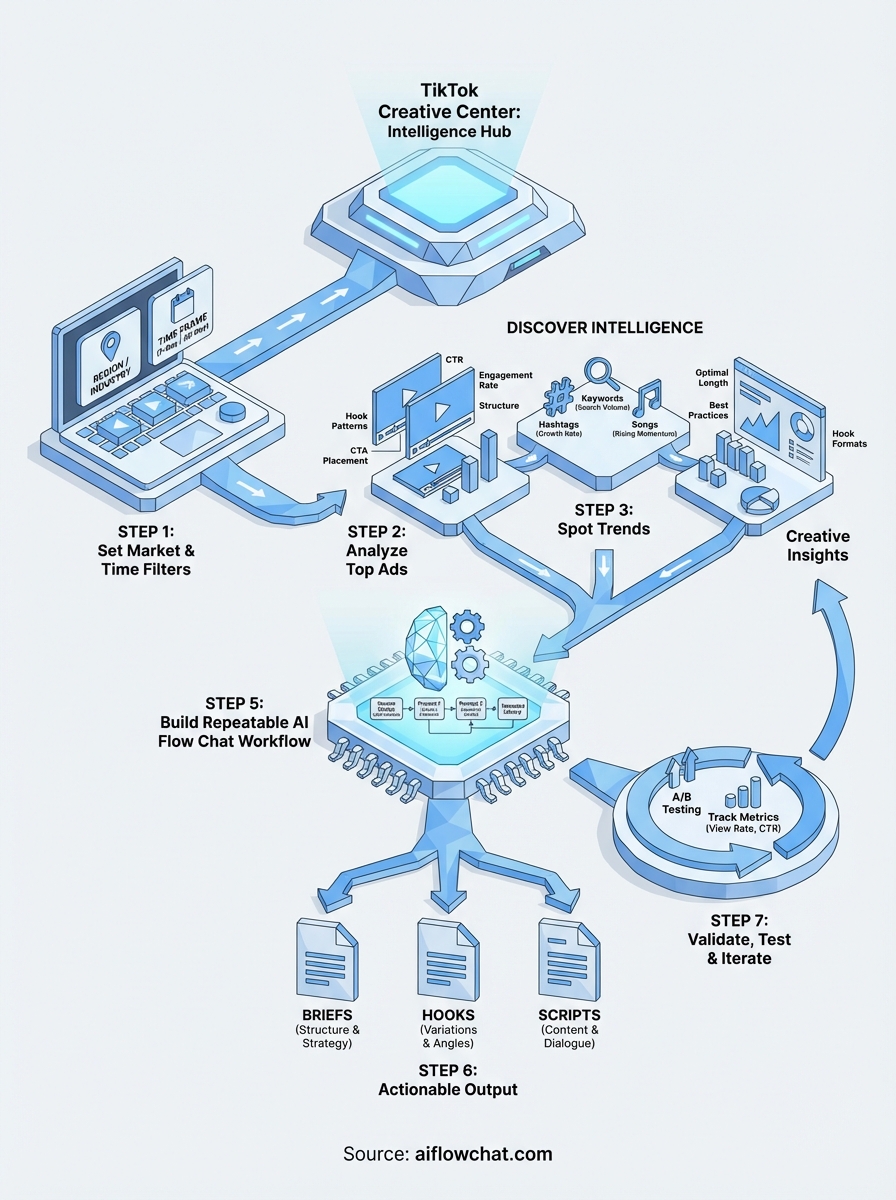
You now have a complete system: filters set correctly in tiktok creative center, structured research logs, competitor breakdowns, and a repeatable AI Flow Chat workflow that converts raw intelligence into production-ready briefs. The research process only pays off if you run it on a regular cadence, not just once before a campaign launch. Set a weekly slot to check trending hashtags and rising songs, and update your flowchart with new top ads as they surface so your creative library stays current.
Every test you run feeds the next round of research. Confirmed patterns from your own campaigns become more valuable than anything you pull from platform-wide data because they reflect your specific audience's behavior, not an averaged signal across thousands of advertisers. Start with one workflow, measure it, and refine from there. If you want to build that workflow visually and without starting from scratch, try AI Flow Chat and connect your first TikTok ad sources today.
Continue Reading
Discover more insights and updates from our articles
Choose an AI model for scripts, marketing copy, coding, research, long documents, and quick everyday work using a practical quality, speed, and credit-cost framework.
Compare eight current Poppy AI alternatives for visual research, creator workflows, general AI work, grounded synthesis, automation, and reusable delivery.
A practical method for turning a scattered content process into a clear AI-assisted flowchart with source context, review checks, and a reusable output.