10 Content Brief Template Examples for Clearer Writing
At AI Flow Chat
Contents
0%A solid content brief template saves you from the back-and-forth that kills content production speed. Without one, you're handing writers vague directions and hoping they read your mind, then burning hours on revisions when they don't. With one, every piece of content starts with clear expectations baked in: audience, structure, keywords, tone, and goals.
The problem? Most teams either skip the brief entirely or use a bare-bones outline that leaves too much open to interpretation. The fix isn't complicated, you just need a format that covers the right details without turning into a bureaucratic nightmare. That's exactly what the templates below are built for, whether you're briefing freelancers, in-house writers, or feeding structured prompts into AI tools like AI Flow Chat to generate drafts from proven reference material.
Below, you'll find 10 content brief template examples across different formats and use cases, from SEO-focused blog posts to social content and ad copy. Each one is ready to adapt to your workflow, so you can stop rewriting and start scaling.
1. AI Flow Chat
AI Flow Chat takes a different approach to content briefs than most tools on this list. Instead of filling out a static document, you build your brief visually on a canvas, connecting data sources, prompts, and outputs so the structure of your content is clear before a single word gets written.
What it is
AI Flow Chat is a visual AI content creation and workflow automation platform designed for creators, marketers, and agencies. Rather than a linear chat interface, it gives you an infinite whiteboard canvas where you drag and drop reference materials, prompts, and AI outputs to see exactly how inputs produce results. You can pull in YouTube videos, TikToks, PDFs, Notion pages, competitor ads, and live websites as source material, then build AI workflows around them using OpenAI, Claude, or Gemini under one subscription.
What to include in the brief
A well-built content brief template in AI Flow Chat connects your requirements directly to your reference material. On the canvas, attach the following to your brief node:
- Target keyword and search intent: what the reader is trying to find or accomplish
- Reference sources: links to viral content, top-ranking articles, or competitor ads to analyze
- Tone and voice notes: short descriptions or example sentences that define the writing style
- Audience details: who the content is for and what specific problem it addresses
- Structural requirements: word count, heading structure, and CTA placement
How to turn one brief into a repeatable template
Once a brief produces a strong output, you save the entire flowchart as a reusable AI workflow rather than rebuilding it from scratch. AI Flow Chat lets you lock in your reference nodes, prompt logic, and model selection so every new piece runs through the same proven structure. You can also schedule these workflows to run automatically, which means your brief becomes a production system rather than a one-time document.
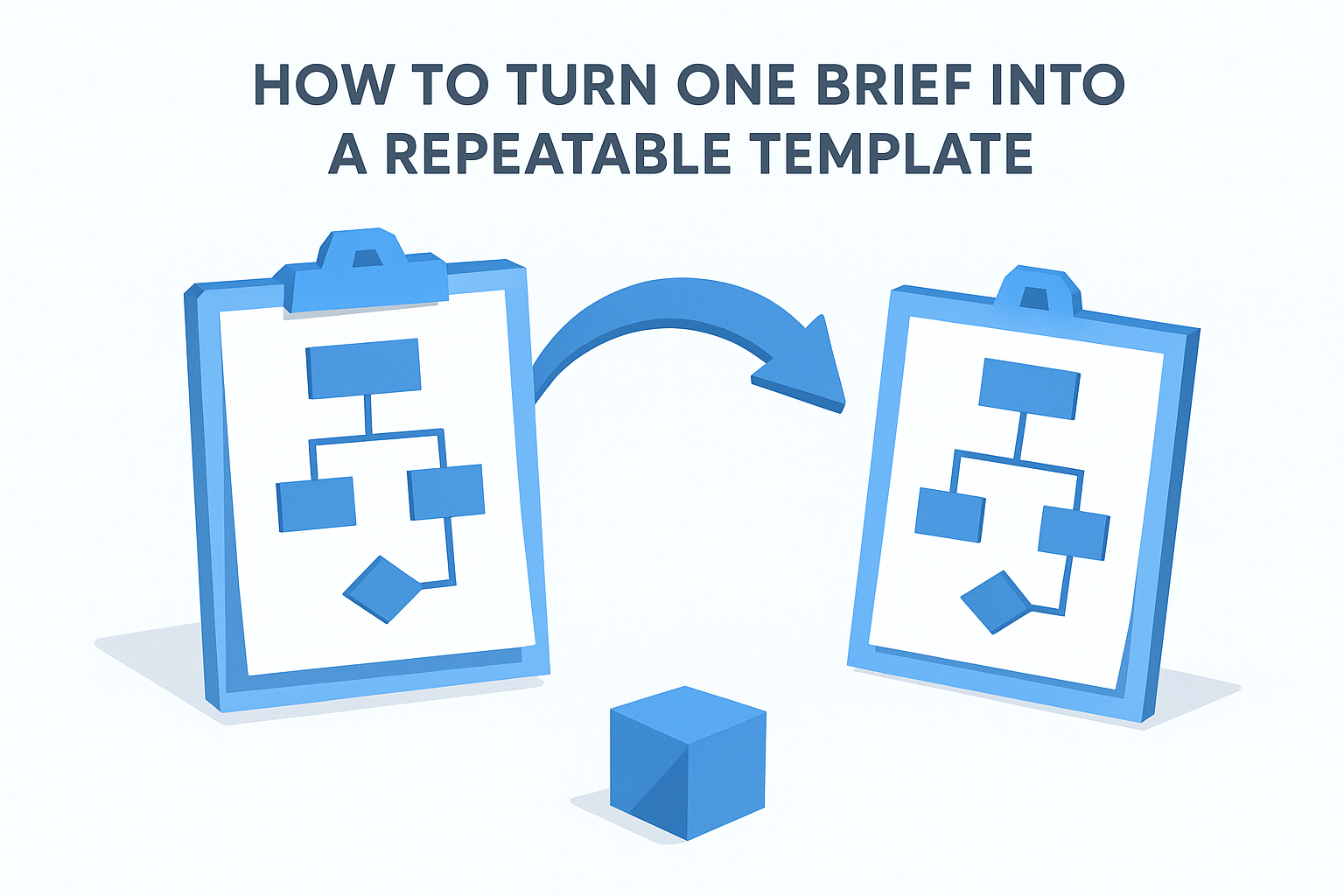
A brief that runs on a schedule stops being paperwork and starts being infrastructure.
Best fit use cases
AI Flow Chat works best for social media content, SEO blog posts, and ad copy where you replicate a proven formula across many pieces. It fits especially well when you regularly reverse-engineer viral content or need to clone winning hooks for different products or audiences.
Pricing
AI Flow Chat starts at $29 per month with no annual commitment. The platform uses a flexible credit-based model, so you only pay for what you use during active production periods.
2. Content Harmony
Content Harmony focuses on SEO-driven content production, giving you a brief-building tool that pulls keyword research, SERP analysis, and topic coverage into a single structured document. It's built for content teams that want data to drive the brief rather than relying on assumptions.
What it is
The platform analyzes the top-ranking pages for your target keyword and generates a brief that covers which topics those pages include, how they're structured, and what searchers actually want. It also compares your draft against that research in real time, so you can see whether your content is on track before you publish.
What to include in the brief
A content brief template in Content Harmony automatically pulls in keyword data, topic grades, and competitor insights. You layer your own voice guidelines, tone notes, and internal linking requirements on top of that foundation.
A brief built on real SERP data gives writers a much clearer target than one built on intuition alone.
Template structure highlights
Within the brief, you'll find target keyword, related questions, and topic coverage scores, alongside content grade benchmarks from top competitors and suggested word count ranges. That grading system turns abstract requirements into a measurable checklist your writer can act on immediately.
Best fit use cases
Content Harmony works best for SEO blog content and editorial teams that publish at high volume and need consistent quality across many writers. It fits organizations where content performance is tracked directly against search rankings.
Pricing
Plans start at $99 per month, with higher tiers available for larger teams and greater brief volume.
3. MarketMuse
MarketMuse is an AI-powered content planning and optimization platform that builds data-backed briefs from competitive research. It analyzes thousands of pages in your topic space to identify coverage gaps, recommended subtopics, and competitive benchmarks before you brief a single writer.
What it is
The platform maps out the full topic landscape for any keyword you target, showing you what top-ranking content covers, what it misses, and where you have the best chance to compete. Rather than guessing what to include, you get a research-driven starting point that tells your writers exactly what belongs in the piece.
What to include in the brief
A content brief template built in MarketMuse should include your target keyword, recommended subtopics pulled from the topic model, a competitive content score target, and suggested word count. You also add your internal linking recommendations and audience context on top of the generated data.
Template structure highlights
MarketMuse assigns every topic a personalized difficulty score based on your site's existing authority, not generic domain metrics. That score sits at the top of the brief so your writers understand the competitive bar they need to clear.
Knowing your actual competitive position before writing prevents you from creating content that cannot rank regardless of quality.
Best fit use cases
MarketMuse fits enterprise content teams and SEO agencies managing large topic clusters across high-authority sites. It works best when your content strategy involves building topical authority across interconnected subject areas rather than targeting isolated keywords.
Pricing
MarketMuse offers a free plan with limited queries. Paid plans start at $149 per month, with custom enterprise pricing available for larger teams.
4. Zapier
Zapier is best known as a no-code automation platform, but it also publishes free, downloadable content brief templates that any team can grab and adapt immediately. The templates live in Zapier's resource library and cover standard blog post and editorial use cases without requiring you to sign up for the tool.
What it is
This template is a straightforward Google Docs file that covers the essential fields most writing teams need. Zapier's own content team, which publishes at high volume, designed it, so the structure reflects real production experience rather than a theoretical framework.
What to include in the brief
When you use Zapier's content brief template, focus on filling in these core fields before you hand anything to a writer:
- Target keyword and search intent
- Audience definition and goal
- Suggested outline with heading structure
- Competing URLs for quality benchmarking
- Tone guidance and internal linking requirements
A brief that includes competing URLs gives writers a measurable quality bar, not just an abstract description of what "good" looks like.
Template structure highlights
The template keeps things lean and scannable, using labeled fields rather than dense prose sections. That makes it easy for writers to extract what they need quickly and for editors to check completeness at a glance before assigning work.
Best fit use cases
Zapier's template suits small teams and individual content managers who need a no-frills starting point without paying for a dedicated content tool. It works well for blog post production where simplicity and speed matter more than deep competitive data.
Pricing
The template is completely free to download and use with no account required.
5. Canva
Canva is primarily a design platform, but it also provides free content brief templates through its template library that you can customize directly in your browser. No downloads or additional software are required, which makes it one of the fastest ways to get a polished, shareable brief up and running.
What it is
The platform's content brief template options come in a visual, presentation-style format rather than a traditional document layout. You edit them inside Canva's drag-and-drop editor, which makes them especially useful when you need to share a brief with clients or external stakeholders who respond better to a clean visual layout than a plain text file.
What to include in the brief
When you fill out a Canva brief, focus on the fields that directly guide your writer's decisions: target keyword, audience definition, tone and voice, content goal, and outline structure. You can also drop in brand colors, logo placement, and visual style references on the same canvas if the brief covers a creative project rather than a text-heavy article.
A visually formatted brief communicates expectations faster when your audience includes non-writers or external collaborators.
Template structure highlights
These templates work in a slide or poster format rather than a long-form document, so information breaks into clearly labeled sections with built-in visual hierarchy. That structure makes the brief easy to scan and share without requiring the recipient to sort through dense blocks of text.
Best fit use cases
Canva's templates suit freelancers, agencies, and social media managers who regularly brief external collaborators or clients. They work best for visual and social content projects where design context matters alongside the written requirements.
Pricing
The free tier includes access to many brief templates with no account upgrade needed. Canva Pro starts at $15 per month and unlocks additional templates along with advanced branding and team collaboration features.
6. Notion template collections
Notion's template gallery and third-party creators publish dozens of free content brief templates you can duplicate directly into your workspace. The format fits naturally into teams that already use Notion to manage their editorial calendar, tasks, and documentation in one place.
What it is
Notion brief templates are database-driven documents that live inside your existing workspace. You can pull from the official Notion template gallery or from community creators who share them through Notion's marketplace, giving you a range of complexity from minimal one-pagers to full editorial systems.
What to include in the brief
A content brief template in Notion works best when it connects directly to your content database. Include your target keyword, audience definition, outline structure, tone notes, and internal linking requirements as dedicated fields so you can filter and sort briefs across your entire content pipeline.
A brief tied to your content database gives you one source of truth instead of scattered documents across multiple tools.
Template structure highlights
Most Notion brief templates use a combination of properties and page body to separate structured data from free-form instructions. That split keeps the scannable fields at the top and detailed guidance below, so writers know exactly where to look for each type of information.
Best fit use cases
These templates suit teams that already run their workflows inside Notion and want to avoid switching between platforms. They work especially well for blog content, newsletters, and social media briefs where centralizing production context in one workspace matters.
Pricing
Notion's free plan includes full access to the template gallery. Paid plans start at $10 per member per month and unlock additional workspace and team collaboration features.
7. Reforge
Reforge is a professional membership platform built for product managers, marketers, and growth practitioners who want frameworks grounded in how high-performing teams actually operate. Unlike pure content tools, Reforge treats content strategy as a growth function, which means the brief structures it teaches reflect how content connects to measurable business outcomes.
What it is
Reforge offers structured frameworks and templates as part of its membership curriculum, covering content strategy, growth loops, and editorial planning. The brief formats it teaches come directly from practitioners at companies like Hubspot, Duolingo, and Airbnb, so the structure reflects real production environments rather than generic best practices.
What to include in the brief
A content brief template informed by the Reforge approach ties every piece back to a specific growth goal. Include your target keyword, intended audience segment, the business objective the content serves, the outline structure, and distribution channel. That last field is often missing from standard templates but drives significant decisions around length and format.
A brief that names the distribution channel forces you to write for a specific reader context, not an imaginary average reader.
Template structure highlights
Reforge frameworks emphasize connecting content requirements to measurable outcomes rather than just listing formatting rules. The brief structure separates strategic context from tactical instructions so writers understand both what to produce and why it matters within the broader content system.
Best fit use cases
Reforge templates suit growth-focused content teams and product marketers who need briefs that tie directly to retention or acquisition goals rather than pure traffic metrics.
Pricing
Reforge membership starts at $595 per year, gated behind an application process.
8. Moz guide by Kameron Jenkins
The Moz guide by Kameron Jenkins is a free editorial resource published on the Moz blog that walks content managers through building effective briefs from the ground up. Unlike tool-based solutions, this guide gives you a practical framework backed by real SEO publishing experience rather than a product pitch wrapped around a template.
What it is
Kameron Jenkins wrote this guide during her work as an SEO content strategist, so the advice reflects hands-on content production rather than generic recommendations. The guide includes a downloadable brief template you can grab and adapt immediately, along with clear explanations for why each field belongs in the document.
What to include in the brief
A content brief template built on Jenkins's framework should cover your target keyword, audience definition, search intent, a suggested outline, competing URLs, and internal linking notes. The guide specifically emphasizes pairing each structural requirement with a reason, so writers understand the purpose behind the instructions rather than just following a checklist blindly.
Explaining why a field matters in your brief reduces the chance a writer skips or misinterprets it.
Template structure highlights
The template separates strategic context from tactical instructions, keeping keyword and audience data at the top and outline details below. That separation keeps the brief scannable for writers who need quick answers while remaining thorough enough for editors checking completeness before assignment.
Best fit use cases
This guide suits independent content managers and small SEO teams who want a no-cost starting point built on proven editorial principles rather than platform-specific logic.
Pricing
The guide and template are completely free to access with no account required.
9. PandaDoc and Right Side Up
PandaDoc and Right Side Up each publish free, downloadable content brief templates that cover different ends of the content production spectrum. Together they give you a useful reference point whether you're managing standard blog production or specialized performance content.
What it is
PandaDoc is a document automation platform that also maintains a free template library covering briefs, proposals, and project documentation. Right Side Up is a marketing consultancy that shares practical frameworks with in-house marketing teams and growth operators. Both organizations have released brief templates grounded in real production workflows rather than theoretical frameworks.
What to include in the brief
A content brief template from either source covers the fields most writing teams actually use: target keyword, audience definition, content goal, suggested outline, and tone guidelines. Right Side Up's version places extra emphasis on connecting each brief to a specific business objective, which helps writers understand the performance context behind what they're producing.
A brief that names the business goal gives writers a reason to care about the work, not just a set of formatting rules to follow.
Template structure highlights
Both templates use clearly labeled sections that separate strategic context from tactical instructions, making them easy to scan before an assignment and reference during drafting. PandaDoc's version leans toward document formatting polish, while Right Side Up's is more sparse and practitioner-focused.
Best fit use cases
These templates suit freelancers, in-house content managers, and small agencies who want a ready-to-use starting point without committing to a paid platform.
Pricing
Both templates are completely free to download with no account required.
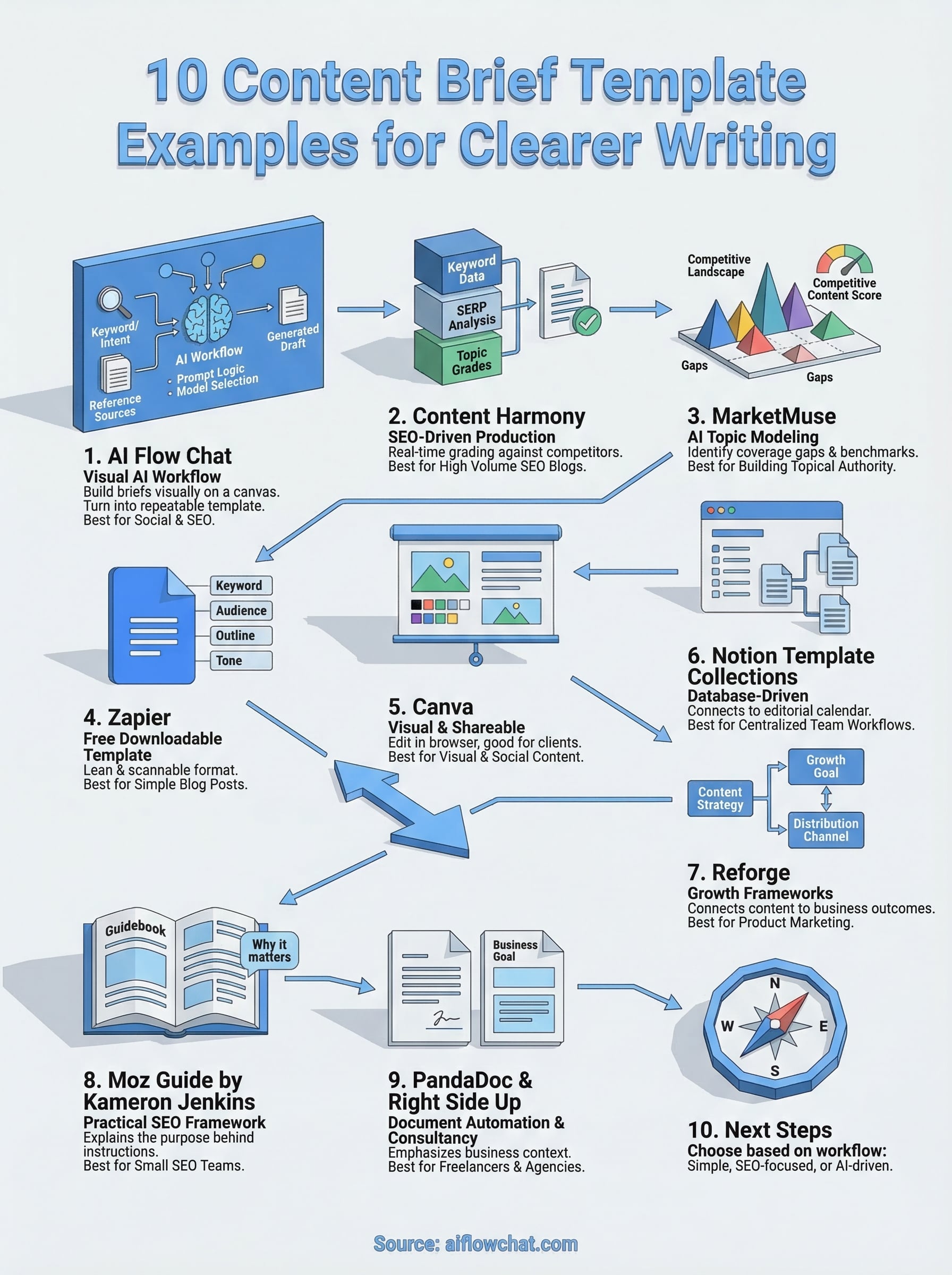
Next steps
Every content brief template on this list solves a real problem, but the right pick depends on how your team actually works. If you brief freelancers on simple blog posts, a free option from Zapier, Moz, or PandaDoc gets you started in minutes. If you run high-volume SEO content with competitive research baked into every assignment, Content Harmony or MarketMuse gives you the data layer your briefs need.
For creators and marketers who want to move faster by building briefs around proven reference material, the canvas-based approach in AI Flow Chat removes the gap between research and output. You connect your sources, build your prompt logic once, and reuse the same workflow across every new piece. That turns a brief from a static document into a production system you can scale. If that workflow fits how you think, try AI Flow Chat and build your first brief on the canvas.
Continue Reading
Discover more insights and updates from our articles
Choose an AI model for scripts, marketing copy, coding, research, long documents, and quick everyday work using a practical quality, speed, and credit-cost framework.
Compare eight current Poppy AI alternatives for visual research, creator workflows, general AI work, grounded synthesis, automation, and reusable delivery.
A practical method for turning a scattered content process into a clear AI-assisted flowchart with source context, review checks, and a reusable output.