5 Best Tools To Transcribe Video Online (Fast & Accurate)
At AI Flow Chat
Contents
0%You recorded a podcast, a client call, or a YouTube video, and now you need the text. Maybe it's for repurposing into a blog post, pulling quotes for social media, or just keeping a searchable record. Whatever the reason, you need to transcribe video online without downloading clunky software or spending hours doing it manually. The good news: AI-powered transcription tools have gotten remarkably accurate, and most work directly in your browser.
The not-so-good news is there are dozens of options, and they vary wildly in speed, accuracy, and what you can actually do with the transcript afterward. Some just hand you a text file. Others, like AI Flow Chat, let you feed that transcript directly into content workflows, so you can go from raw video to finished social posts, blog drafts, or ad scripts without switching tools. That's the difference between transcription as an end point and transcription as a starting point.
Below, we break down five of the best online transcription tools available right now. We compared them on accuracy, speed, supported formats, and pricing so you can pick the one that fits your workflow, and your budget.
1. AI Flow Chat
AI Flow Chat goes beyond standard transcription. When you paste a video link, the platform extracts the full transcript and makes it immediately usable inside a visual AI workflow. Instead of stopping at a text file, you can reference that transcript to generate blog posts, scripts, or social captions inside the same workspace.

How it transcribes videos
The platform uses AI-powered transcription to convert video audio into structured text automatically. You paste a link directly into the canvas, and the platform handles extraction without requiring any file upload or third-party integration.
Supported video sources and file types
You can transcribe video online from YouTube, TikTok, and Instagram Reels by pasting the URL. The platform also supports PDFs, Notion pages, and live websites, making it a multi-source reference tool rather than a single-format solution.
Editing, exports, and captions
Once transcribed, the text lives inside your canvas where you can edit it, reference it in prompts, or route it into the built-in Notion-style editor. You can export content in standard formats and clean up the transcript before distributing it.
Speed, accuracy, and speaker labels
Transcription completes within seconds of pasting a link for most short-to-medium videos. Accuracy is strong for clear audio, though poor audio quality may require light editing. Speaker labels are not a primary focus here since the platform is built around content extraction for workflow use.
If your goal is to repurpose video content rather than just archive it, AI Flow Chat gives you the fastest path from raw transcript to finished output.
Privacy, retention, and compliance
Transcribed content stays within your workspace and is tied to your account only. AI Flow Chat does not publicly share your inputs, and outputs are tethered to your reference materials to reduce hallucination risks.
Pricing and free plan details
AI Flow Chat starts at $29 per month on a flexible credit-based model with no annual commitment required. A free trial is available, giving you access to test the transcription and workflow features before you commit.
2. Evernote AI Transcribe
Evernote AI Transcribe integrates transcription directly into Evernote's note-taking ecosystem. If you already use Evernote to organize your work, this feature lets you transcribe video online without leaving the app.
How it transcribes videos
Evernote uses AI-powered speech recognition to convert audio from video files into text notes that save automatically inside your Evernote workspace.
Supported video sources and file types
You can upload MP4 and other common video file formats directly. The tool does not support direct URL pasting from social platforms like YouTube or TikTok.
Editing, exports, and captions
Your transcript lands inside an Evernote note, where you can edit inline. Export options include PDF and standard text formats, but dedicated caption file exports like SRT are not available.
If your primary goal is keeping transcripts organized inside a note-taking system, Evernote handles that workflow cleanly.
Speed, accuracy, and speaker labels
Transcription speed is reasonably fast for shorter clips. Accuracy depends heavily on audio quality, and speaker labels are not currently supported.
Privacy, retention, and compliance
Evernote stores your data on its own servers under its standard privacy policy, with enterprise plans offering additional compliance controls for teams.
Pricing and free plan details
Evernote's paid plans start at $14.99 per month, with a limited free tier available for testing basic transcription features before committing.
3. Sonix
Sonix is a dedicated transcription platform built for professional media workflows. It focuses on accuracy and editing for journalists, legal teams, and video producers who need reliable transcripts fast.
How it transcribes videos
The platform uses automated AI transcription to process uploaded files inside a browser-based editor. You upload your video, and Sonix returns a timestamped, editable transcript within a few minutes.
Supported video sources and file types
Sonix supports MP4, MOV, AVI, and dozens of other video formats. You cannot transcribe video online by pasting a social media URL directly, so you need to download files before uploading.
Editing, exports, and captions
Once uploaded, you get a built-in editor that syncs your text with the original audio, making corrections straightforward. Exports are available in SRT, TXT, DOCX, and several other formats, covering both transcript and caption needs.
If you need clean caption files alongside accurate transcripts, Sonix handles that combination better than most tools on this list.
Speed, accuracy, and speaker labels
Processing is fast, and the platform supports multi-speaker detection, automatically labeling different voices within your transcript for better readability.
Privacy, retention, and compliance
Your files are stored on encrypted servers, and Sonix offers SOC 2 compliance for teams handling sensitive recordings.
Pricing and free plan details
Sonix charges $10 per hour of transcription on a pay-as-you-go model, with premium plans starting at $22 per month for frequent users.
4. UniScribe
UniScribe is a browser-based tool built to transcribe video online quickly from uploaded files or direct links without any software installation required.
How it transcribes videos
UniScribe runs AI speech recognition in your browser and returns a timestamped transcript within minutes of uploading or linking your video.
Supported video sources and file types
You can upload MP4 and MOV files directly, and the platform also accepts YouTube links for transcription without requiring a separate download step first.
Editing, exports, and captions
UniScribe includes an inline editor so you can fix errors before exporting your transcript as SRT or TXT files for captions or documents.
If you need both a caption file and a clean text transcript from the same video, UniScribe handles both in a single workflow.
Speed, accuracy, and speaker labels
Processing is fast for standard-length videos, and accuracy holds up well on clear audio. Speaker labels are not supported, so you will need to manually separate voices in multi-speaker recordings.
Privacy, retention, and compliance
Your files are processed securely on UniScribe's servers, though the platform does not currently publish formal compliance certifications for enterprise or regulated industries.
Pricing and free plan details
UniScribe offers a free plan with limited monthly minutes, and paid tiers are available for higher transcription volumes.
5. Canva Video to Text
Canva is primarily a design platform, but it added a video-to-text feature that lets you transcribe video online directly inside your creative workspace without opening a separate tool.
How it transcribes videos
The platform uses AI-powered transcription to detect speech in uploaded video files and generate text captions automatically inside the editor.
Supported video sources and file types
You can upload MP4 and MOV files directly. The tool does not support pasting social media URLs, so you need to download files before uploading them.
Editing, exports, and captions
The transcript connects to Canva's native caption editor, where you can adjust timing and wording before exporting. You can burn captions into the video file or export the text separately.
If your main goal is producing styled captions for short-form social videos, Canva keeps that entire process in one workspace.
Speed, accuracy, and speaker labels
Transcription is quick for short clips, and accuracy holds up well on clean audio. Speaker labels are not available, so you will need to separate voices manually for multi-speaker recordings.
Privacy, retention, and compliance
Your uploaded files are stored on Canva's servers under its standard privacy policy. Canva for Teams plans include additional access controls for organizations handling sensitive content.
Pricing and free plan details
Canva Pro unlocks the full transcription feature set at $15 per month. A limited free tier is available for testing basic functionality before upgrading.
Quick Next Step
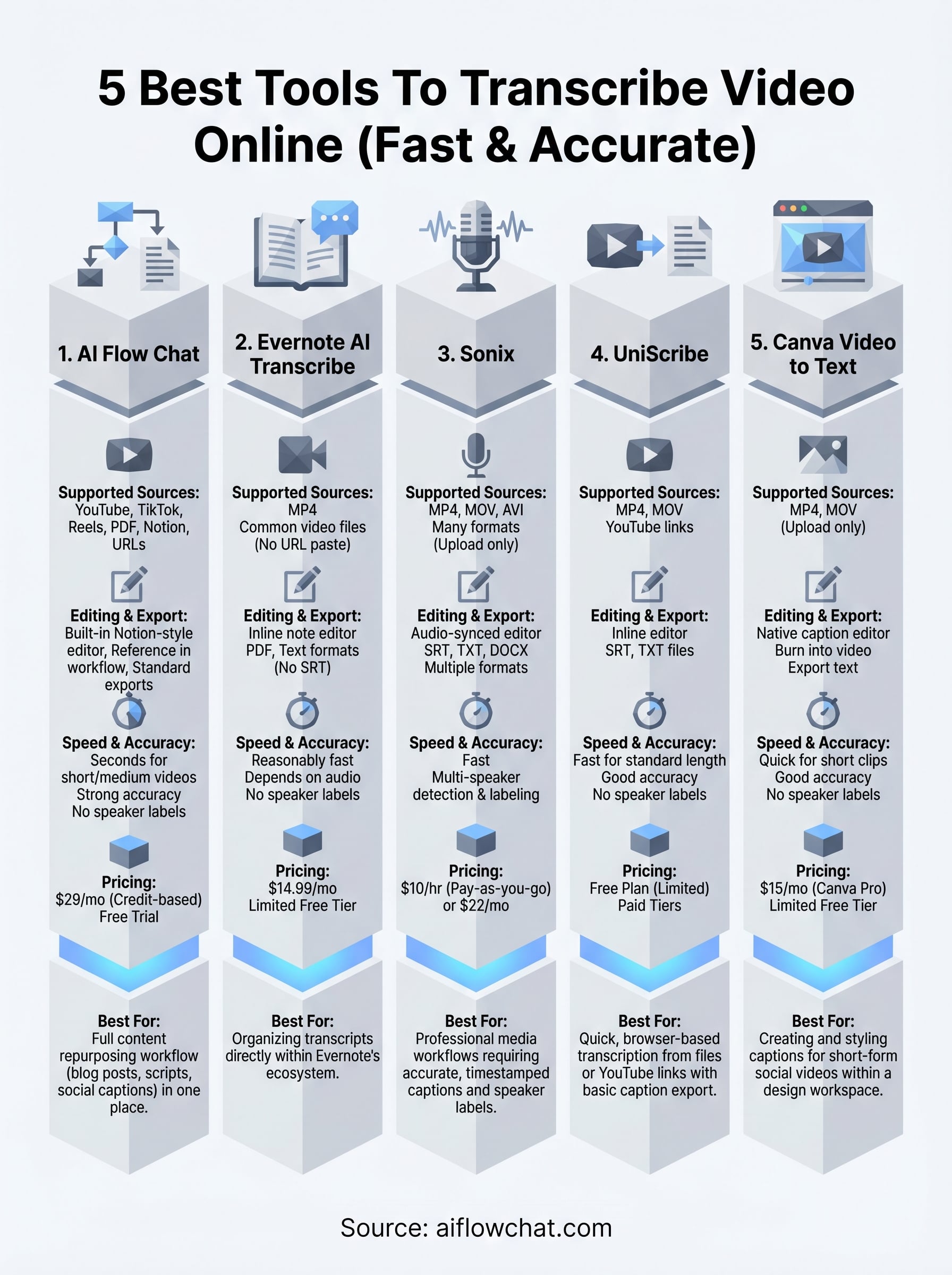
All five tools on this list will transcribe video online reliably, but they serve different goals. If you need professional-grade captions and timestamped exports, Sonix or UniScribe are solid picks. If transcription is just one step in a larger content workflow, and you want to go from raw video to finished blog posts, social captions, or ad scripts without jumping between tools, AI Flow Chat gives you the most direct path.
Your choice comes down to what happens after the transcript. A text file is useful, but a text file you can immediately reference inside an AI workflow is where the real time savings happen. Rather than copying and pasting your transcript into a separate writing tool, you can build the entire repurposing process inside one canvas.
Start with a free trial and see how fast you can go from video link to finished content with AI Flow Chat.
Continue Reading
Discover more insights and updates from our articles
Choose an AI model for scripts, marketing copy, coding, research, long documents, and quick everyday work using a practical quality, speed, and credit-cost framework.
Compare eight current Poppy AI alternatives for visual research, creator workflows, general AI work, grounded synthesis, automation, and reusable delivery.
A practical method for turning a scattered content process into a clear AI-assisted flowchart with source context, review checks, and a reusable output.