Temi Transcription: Pricing, Accuracy, Features (2026)
At AI Flow Chat
Contents
0%Temi transcription is one of the most recognized automated speech-to-text services on the market, known for its pay-as-you-go pricing and fast turnaround. Whether you're a content creator repurposing podcast episodes, a marketer pulling quotes from client calls, or an agency transcribing video content at scale, Temi has likely crossed your radar as a budget-friendly option for converting audio and video to text.
But how well does it actually perform in 2026? Pricing models shift, accuracy claims don't always hold up under real conditions, and newer alternatives have entered the space. Before you commit credits or cash to any transcription tool, you need a clear picture of what you're getting and where the gaps are. That's especially relevant if you work with video and audio content inside platforms like AI Flow Chat, where transcribed text from sources like YouTube, TikTok, and Reels feeds directly into AI-powered content workflows.
This article breaks down Temi's current pricing, real-world accuracy, core features, and limitations so you can decide whether it fits your workflow or if something else makes more sense.
Why Temi transcription matters
If you produce content at any real volume, transcription stops being optional and becomes a core part of your production chain. Podcast episodes, client interviews, video scripts, and recorded calls all contain raw material you can repurpose across platforms, but that content stays locked inside audio until you convert it to text. Temi transcription sits directly in the middle of that problem: it converts spoken words to editable text fast, without requiring you to pay the rates human transcription services charge or wait days for a turnaround.
The volume problem content creators face
Content creators and marketers rarely transcribe one file a month. Agencies running weekly client calls, podcasters releasing multiple episodes, and video marketers analyzing competitor content generate a continuous stream of audio and video that needs to become usable text. Manual transcription takes roughly four to six hours per hour of audio when handled by a human. That math collapses fast once you're dealing with real production volume.
Automated transcription tools cut that production time to minutes, which is why services like Temi became popular as the creator economy scaled up.
Automated services like Temi solve the throughput issue by processing files in a fraction of the time, letting you pull usable transcripts quickly and move on to the next step in your workflow. For teams or solo operators running lean, that time savings translates directly into capacity, not just convenience.
A few situations where fast automated transcription directly removes a bottleneck:
- Repurposing long-form video into written blog content or social captions
- Extracting key quotes from recorded sales calls or client interviews
- Pulling dialogue from competitor video content for analysis
- Converting recorded internal meetings into searchable, shareable notes
Where transcription fits in a modern content workflow
Transcription is rarely the final step. In most workflows, a raw transcript becomes the source material for something else: a blog post, a set of social captions, a summary document, or ad copy. The value of a transcription tool isn't just in the text it produces, but in how quickly you can use that text downstream without needing to correct it extensively.
This becomes especially relevant if you use a platform that pulls from multiple content sources simultaneously. Tools like AI Flow Chat let you feed transcribed text from YouTube videos, TikTok clips, and recorded calls directly into AI-powered content workflows, which means the accuracy and structure of your transcript directly affects every output that follows. A clean transcript with clear speaker labels saves significant cleanup time before you can use it productively.
Whether Temi holds up as a reliable link in that chain depends on the type of content you're transcribing and how much post-edit time you're willing to accept, which the rest of this article addresses directly.
Temi pricing and what you actually pay
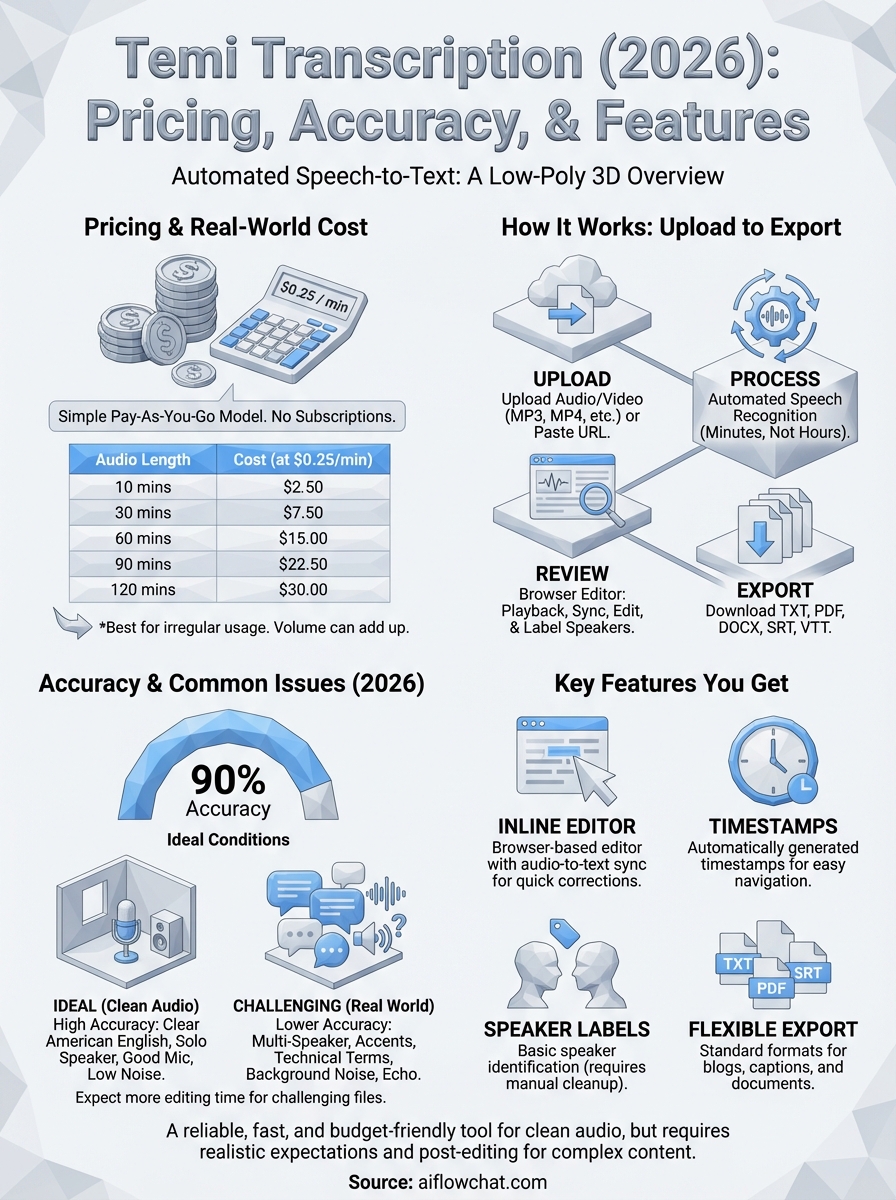
Temi uses a straightforward pay-as-you-go model. You pay $0.25 per minute of audio or video, with no monthly subscription, no seat fees, and no minimum purchase. That simplicity is one of Temi's most consistent selling points, especially if your transcription volume spikes some months and drops to near zero in others.
The per-minute cost in real terms
Before you load up your account, it helps to map the cost against the file lengths you actually deal with. A 60-minute podcast episode costs $15 to transcribe, a 90-minute recorded call runs $22.50, and a short 10-minute video lands at $2.50. Those numbers stay predictable because there are no tier adjustments or volume discounts at standard usage levels.
If you're running high-volume transcription regularly, the per-minute cost adds up faster than a flat monthly plan would, so the math only stays favorable when your usage stays irregular.
The table below gives you a quick reference for common file lengths:
| Audio Length | Cost at $0.25/min |
|---|---|
| 10 minutes | $2.50 |
| 30 minutes | $7.50 |
| 60 minutes | $15.00 |
| 90 minutes | $22.50 |
| 120 minutes | $30.00 |
What the pricing does not include
Temi transcription does not include human review, speaker identification cleanup, or guaranteed accuracy thresholds at the base rate. What you get is an automated transcript delivered fast, typically within a few minutes for shorter files. Formatting, punctuation, and speaker labels are generated algorithmically, which means you still need to budget editing time for files with heavy accents, background noise, or technical vocabulary.
There is no free tier beyond an initial trial credit. Once that runs out, every file costs credits tied to your account balance. For creators or marketers who transcribe content in unpredictable bursts, the flexible structure works. For teams with consistent weekly volume, you may find a subscription-based alternative delivers better cost efficiency over time.
Temi features you get in 2026
Temi transcription keeps its feature set lean by design. The platform focuses on delivering a fast transcript rather than loading you down with tools you won't use. That approach works in its favor for simple use cases, but it also means you hit the ceiling quickly if your workflow requires anything beyond basic automated text conversion.
Editor and export options
Once your transcript is ready, Temi gives you access to a browser-based editor where you can play back audio while reviewing the text side by side. Clicking any word in the transcript jumps the audio playback to that exact moment, which makes spot-checking errors faster than scanning the full file independently. You can make corrections directly in the editor without downloading anything first.
The inline playback editor is one of Temi's most practical features for anyone who needs to do a quick accuracy pass before using a transcript downstream.
Export options include plain text, PDF, Microsoft Word, SRT, and VTT formats, covering the most common use cases from blog repurposing to subtitle creation. If you produce video content and need captions in a standard format, the SRT and VTT exports handle that without requiring a separate tool.
Speaker labels and timestamps
Temi automatically generates timestamps throughout your transcript, which helps you navigate long files and makes it easier to pull specific segments for repurposing. The timestamps appear at regular intervals and are clickable inside the editor.
Speaker identification is included but works with variable reliability, particularly when voices are similar in tone or when speakers overlap. You can manually relabel speakers inside the editor after the transcript is generated. The platform does not offer automatic speaker diarization with named identification, so you will still do some manual labeling on multi-speaker recordings.
The feature set is straightforward: a functional editor, reliable timestamp placement, flexible export formats, and basic speaker labeling. Those features cover the core workflow well when your files are clean and your accuracy expectations are realistic.
How Temi works from upload to export
The end-to-end process for temi transcription is intentionally simple. You create an account, load credits, and move through upload, processing, review, and export in a linear sequence that most users complete without needing any documentation.

Uploading your file
You start by uploading an audio or video file directly from your device or by pasting a publicly accessible URL for supported formats. Temi accepts MP3, MP4, M4A, WAV, and several other common file types, so you rarely need to convert a file before submitting it. File size limits apply, and very long recordings may take slightly longer to process, but most standard-length content moves through without issue.
Keeping your source files in a common format like MP3 or MP4 before uploading removes the one friction point most users run into during their first session.
Processing and transcript delivery
Once you submit a file, Temi's automated speech recognition engine processes it and returns a completed transcript within minutes, not hours. A 30-minute audio file typically comes back in under five minutes. You receive an email notification when the transcript is ready, and the file appears in your Temi dashboard for review.
The speed is one of the platform's real advantages for high-volume work. If you are processing multiple files back to back, you can queue them and check back rather than watching a progress bar.
Reviewing and exporting your transcript
After processing completes, you open the transcript in Temi's browser-based editor, where audio playback syncs to the text. You click any word to jump to that moment in the recording, make inline corrections, and adjust speaker labels as needed. The review step is where you catch errors before moving the text into another tool or workflow.
When your edits are done, you select your preferred export format from the available options including TXT, PDF, DOCX, SRT, and VTT, then download the file directly to your device.
Temi accuracy and common issues
Temi transcription advertises around 90% accuracy under ideal conditions, and that number holds up reasonably well when your audio is clean. A single speaker recorded in a quiet environment with a decent microphone will produce a transcript you can clean up in a few minutes. The raw accuracy starts dropping as soon as those conditions change, and most real-world recordings don't meet the ideal baseline.
Your transcript quality depends far more on your source audio than on the transcription engine itself, so recording conditions matter as much as which tool you choose.
Where Temi performs well
Temi handles standard American English clearly spoken by a single speaker with reliable results. Corporate interview recordings, solo podcast intros, scripted video narration, and one-on-one sales calls with minimal background noise are all good candidates. Punctuation placement and sentence breaks are reasonably accurate in these scenarios, which reduces the editing burden before you move text into another tool or workflow.
Files recorded on a quality microphone, with the speaker close to the source and minimal room echo, consistently produce transcripts with low error rates. You will still catch occasional word substitutions and proper noun errors, but the overall volume of corrections stays manageable.
Where accuracy breaks down
Multi-speaker recordings, strong regional accents, technical vocabulary, and background noise all degrade accuracy in noticeable ways. Group interviews, webinar recordings, and panel discussions with overlapping speech produce transcripts where speaker attribution mixes up and individual sentences fragment. Technical terms in legal, medical, or software contexts get substituted with phonetically similar common words, which creates errors that require careful review to catch.
Audio quality issues including echo, compression artifacts, or phone call recordings push error rates high enough that the editing time starts to offset the speed advantage you gained from automated processing. If your content regularly comes from these sources, budget extra review time or consider whether a different tool better matches your file types.
Final take
Temi transcription delivers exactly what it promises: fast, affordable, automated text from audio and video with a clean interface and predictable pricing. If your files are recorded in quiet conditions with clear speech, Temi will save you real time and keep costs low. Where it falls short is on noisy recordings, multi-speaker content, and anything with heavy technical vocabulary. Those gaps are not deal-breakers, but they do require you to factor editing time into your actual cost calculation.
For creators and marketers who need more than just a raw transcript, the bigger opportunity is in what you do with that text once you have it. Feeding transcribed content into an AI-powered workflow is where the real leverage comes from, not the transcription step itself. If you want to pull source material from videos and social content and turn it into high-performing outputs faster, try AI Flow Chat and see how that layer works in practice.
Continue Reading
Discover more insights and updates from our articles
Choose an AI model for scripts, marketing copy, coding, research, long documents, and quick everyday work using a practical quality, speed, and credit-cost framework.
Compare eight current Poppy AI alternatives for visual research, creator workflows, general AI work, grounded synthesis, automation, and reusable delivery.
A practical method for turning a scattered content process into a clear AI-assisted flowchart with source context, review checks, and a reusable output.