Ahrefs Content Explorer: How To Find High-Performing Ideas
At AI Flow Chat

Contents
0%Finding content ideas that actually drive traffic is half the battle. The other half is producing that content consistently without burning out. Ahrefs Content Explorer is one of the most powerful tools for solving the first problem, it lets you search a database of billions of pages to surface topics that already have proven engagement, backlinks, and organic traffic.
But knowing what to write about is only the starting point. Once you've identified high-performing ideas through Content Explorer, you still need to turn them into finished pieces. That's where a platform like AI Flow Chat fits in, you can feed those winning topics, reference URLs, and competitor pages directly into a visual AI workspace to draft content that builds on what's already working, rather than starting from a blank page.
This guide walks you through how to use Ahrefs Content Explorer step by step, from running your first search and filtering results to extracting actionable content ideas and link building opportunities. Whether you've never opened the tool or you've been underusing it, you'll leave with a clear process for finding topics worth your time and a faster path to actually executing on them.
What Ahrefs Content Explorer does best
Ahrefs Content Explorer gives you search-like access to a database of over a billion web pages, each indexed with real performance data including organic traffic, referring domains, and social shares. Instead of guessing which topics might resonate, you can search for any keyword or phrase and immediately see which published pieces on that topic already attract real traffic and links. That shifts your research from speculation to evidence.
A database built around content performance
Most keyword tools show you search volume and competition scores. Ahrefs Content Explorer goes further by surfacing actual published content and how it performs, so you can evaluate topics and angles at the same time. When you search "email marketing for creators," for example, you get a ranked list of pages covering that topic, along with their organic traffic estimates, backlink counts, and publication dates. You can see not just that a topic has demand, but which specific framing of that topic tends to win consistently.
The real value is that you're looking at outcomes, not predictions. You can see what already worked before you commit a single hour to writing.
What the tool pulls that keyword tools miss
Standard keyword research tells you how often people search a term. It doesn't tell you whether the content written around that term actually earns links or holds reader attention. Content Explorer surfaces both signals at once, which is why it's particularly useful for link building research, content gap analysis, and editorial calendar planning. You can filter by referring domains to find link-worthy topics, or sort by organic traffic to find content that ranks well without many links, which often signals lower competition than the raw keyword difficulty score suggests.
The data points worth paying attention to
When you run a search in Ahrefs Content Explorer, you'll see several columns in the results. Not all of them are equally useful depending on your goal. Here are the most actionable data points to watch:
| Data Point | Why It Matters |
|---|---|
| Organic traffic | Shows if the page ranks and drives real visits |
| Referring domains | Indicates how link-worthy the topic is |
| Published date | Helps you spot evergreen vs. trending content |
| Domain Rating (DR) | Lets you filter out high-authority competition |
| Words | Helps you gauge the depth required to compete |
These columns let you build a quick picture of what it takes to compete on a topic before you spend time creating anything. A high-traffic, low-DR result is typically your best target because it signals that smaller or newer sites can break through with quality, well-researched content. Filtering by those two variables alone can cut your research time significantly and point you toward realistic wins.
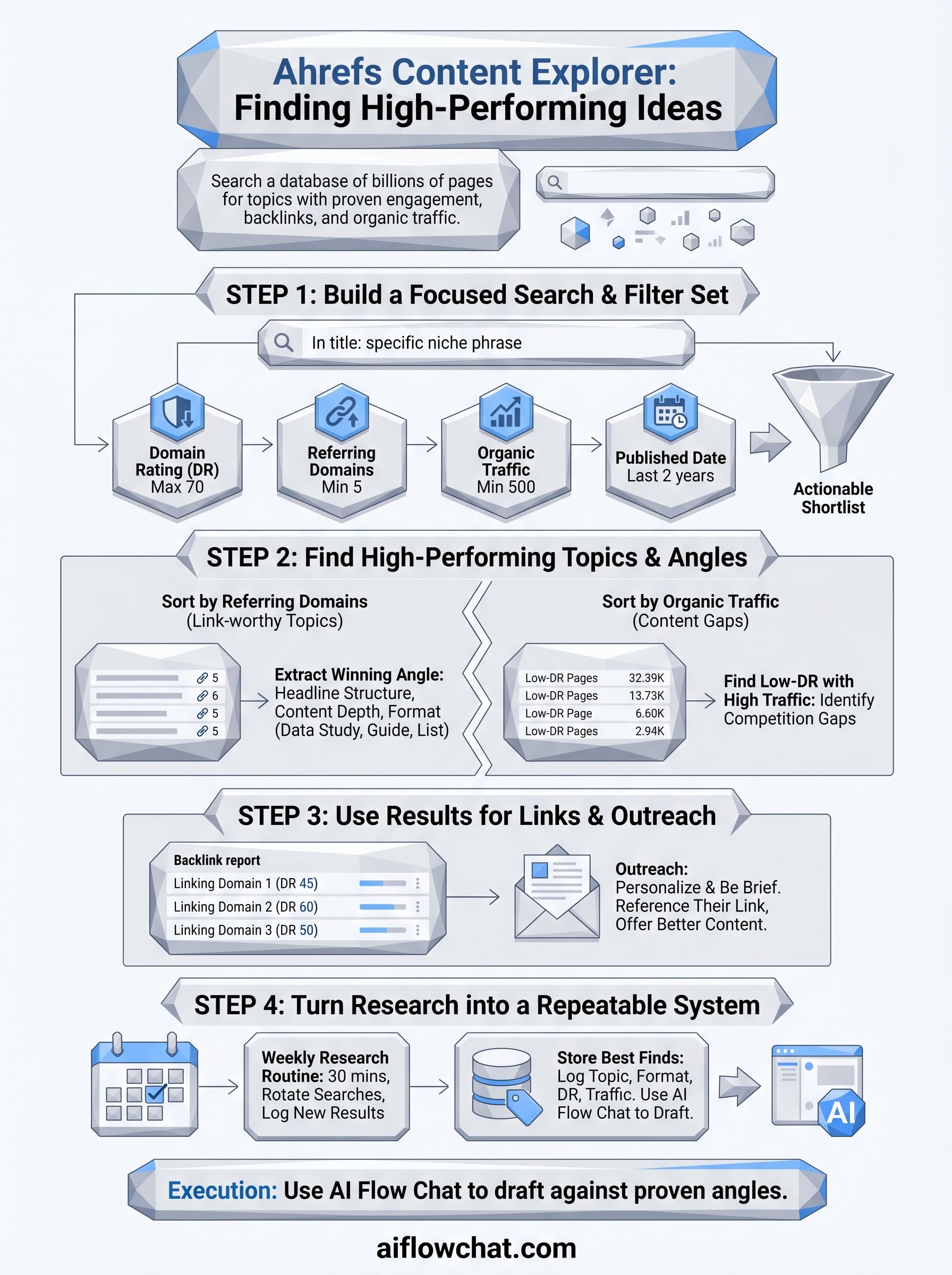
Step 1. Build a focused search and filter set
Before you start pulling ideas, you need to run a focused search rather than a broad one. Typing a single generic word like "marketing" into Ahrefs Content Explorer returns hundreds of thousands of results and most of them won't be relevant. You want to enter a specific phrase or topic that reflects your actual niche, like "content marketing for B2B SaaS" or "TikTok growth strategies for creators."
Start with the right search query
The search mode you choose changes what results you see. Ahrefs gives you four modes: In title, In content, In URL, and Everywhere. For most content research, "In title" is the most useful starting point because it surfaces pages where your topic is the primary focus of the piece, not just a passing mention. Select that mode, type your phrase, and hit search before you touch any filters.
Starting with "In title" mode cuts out irrelevant noise immediately and leaves you with pages actually built around your topic.
Apply filters to narrow the results
Raw results are still too broad without filtering. The combination of Domain Rating (DR) maximum and a referring domains minimum gives you the most actionable shortlist. Set DR to a maximum of 70 to remove dominant authority sites you can't realistically outcompete, then set referring domains to a minimum of 5 to filter out pages that haven't earned any real links yet. Here's a quick filter template to apply:
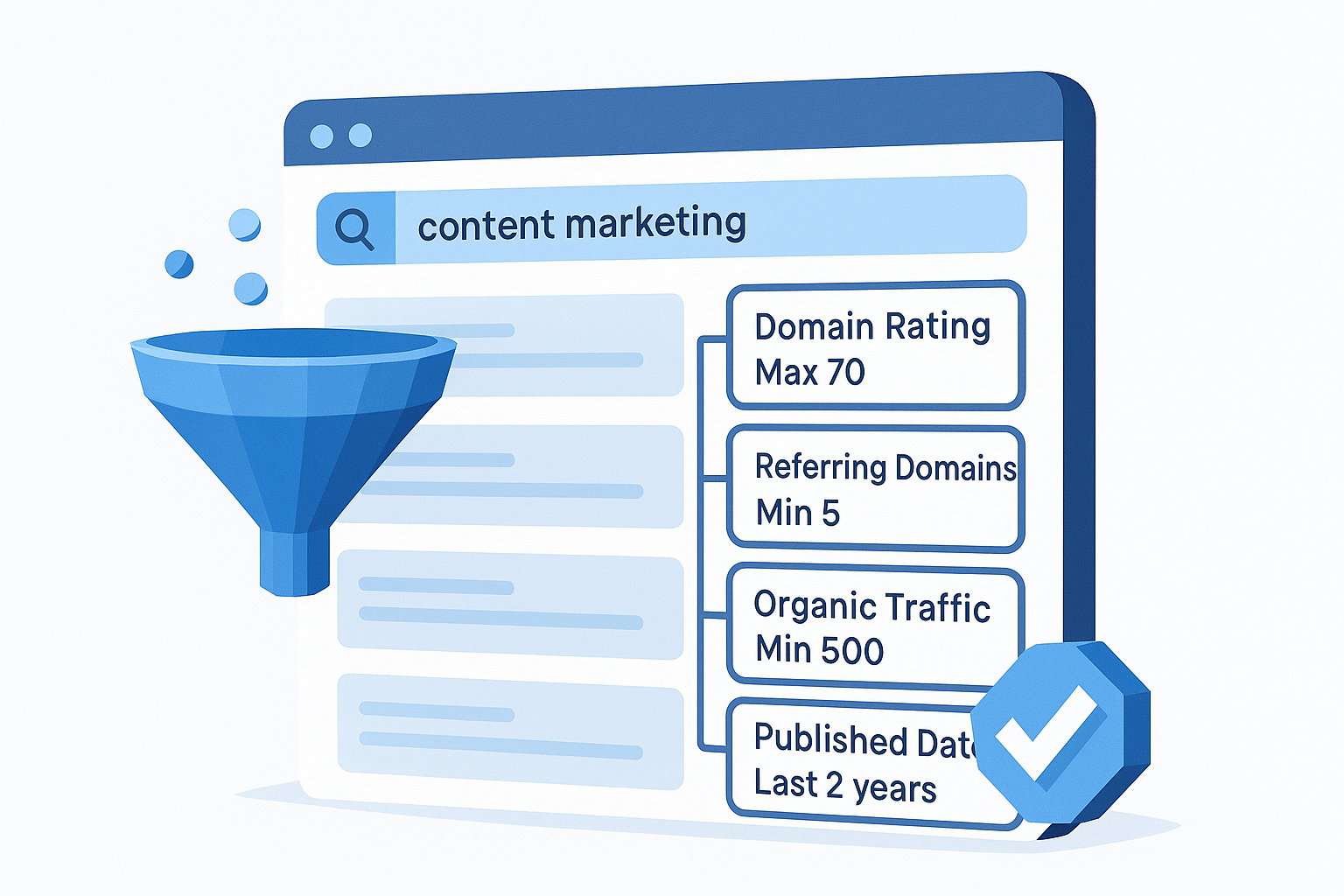
| Filter | Recommended Setting |
|---|---|
| Domain Rating (DR) | Max 70 |
| Referring Domains | Min 5 |
| Organic Traffic | Min 500 |
| Published Date | Last 2 years |
| Language | English |
Apply these together in Ahrefs Content Explorer and you'll have a shortlist of realistic targets that already attract links and traffic. From there, you can start evaluating individual results with purpose instead of scrolling through noise.
Step 2. Find high-performing topics and angles
Once your filters are set, you're ready to identify specific topics and angles worth building content around. The goal here isn't to collect a long list of ideas. It's to find the handful of proven content formats and framings that already generate traffic and links in your niche, so you can build something better or more targeted.
Sort by referring domains to spot link-worthy topics
Sorting your filtered results by referring domains in descending order tells you which topics other sites consistently link to. A piece with 40+ referring domains and moderate DR is a strong signal that your niche audience finds that topic reference-worthy. Note the angle the winning piece took, whether it was a data study, a step-by-step guide, or a ranked list, because that format is likely what earned the links.
If the same topic format appears repeatedly at the top of your sorted results, that format is what your audience already trusts and shares.
Look for low-DR pages with high traffic
Switch your sort to organic traffic and scan for pages with a Domain Rating under 50 that still pull in 1,000+ monthly visits. These results expose content gaps where high-authority sites haven't dominated yet. A smaller site ranking well on a relevant topic tells you there's room to compete without needing years of domain authority behind you.
Extract the winning angle
For each strong result, open the page and note three things: the headline structure, the content depth, and whether it leads with a data point, a story, or a direct how-to. Keep a simple log like this:
| Topic | Format | DR | Traffic | Angle |
|---|---|---|---|---|
| Email list growth | Step-by-step guide | 42 | 3,200 | Numbered framework |
| TikTok hooks | Data study | 38 | 5,100 | Original research |
| SEO for YouTube | List post | 55 | 1,800 | Tool-based tips |
Logging this alongside your Ahrefs Content Explorer filtered results gives you a clear editorial brief before you write a single word.
Step 3. Use results for links and outreach
Ahrefs Content Explorer isn't just a topic research tool. It's also one of the fastest ways to build a targeted link prospecting list, because every result with referring domains is a page that other sites already decided was worth linking to. That means the sites linking to those pages are warm prospects for your own outreach once you publish something better or more current.
Find link prospects from top results
Pick three to five of your strongest filtered results and click through to the Backlinks report for each one. You're looking for sites with a DR between 30 and 70 that linked editorially, meaning the link appeared inside the body of an article rather than in a footer or sidebar. Export those linking domains into a simple spreadsheet and flag the ones that cover your niche consistently. This gives you a prioritized outreach list built entirely from proven interest rather than cold guessing.

The sites that already linked to content on your topic are the easiest starting point for outreach because relevance is already established.
| Column | What to Track |
|---|---|
| Linking Domain | Site URL |
| DR | Domain Rating |
| Link Type | Editorial or sidebar |
| Contact Found | Yes / No |
| Outreach Status | Not contacted, Sent, Replied |
Write an outreach email that gets replies
Keep your outreach message short and specific. Reference the exact article they linked to and explain why your piece gives their readers more value, whether that's fresher data, a wider scope, or a more practical format. Here's a simple template you can adapt:
Subject: Quick note about your [article title] piece
Hi [Name],
I noticed you linked to [linked article] in your post on [their article]. I recently published [your article URL], which covers [specific improvement or update]. Thought it might be a useful addition for your readers.
Happy to answer any questions.
[Your name]
Personalization and brevity are the two factors that separate replies from ignored emails. Keep it under 100 words and make the value exchange obvious.
Step 4. Turn research into a repeatable system
Running a one-off search in Ahrefs Content Explorer gives you one batch of ideas. Building a repeatable process gives you a steady pipeline. The goal is to set up a weekly research rhythm that keeps your content calendar full without requiring hours of manual digging each time.
Build a weekly research routine
Set aside 30 minutes each week to run three to five targeted searches using your saved filter template from Step 1. Rotate your search phrases to cover different angles of your niche rather than repeating the same query. Here's a simple weekly workflow you can follow:
- Run searches using your saved filter template
- Sort by organic traffic, then by referring domains
- Log any new top results into your content tracker
- Flag new link prospects for outreach
- Add one to two strong angles to your editorial calendar
A consistent 30-minute weekly block compounds over time, giving you months of validated content ideas without starting from scratch each time.
Store and reuse your best finds
Your research is only as useful as your ability to retrieve it later. Use a simple spreadsheet or a project management tool to log every strong result you find, including the topic, the format, the DR, and the traffic estimate. Tag each row by content category so you can filter by theme when planning a specific campaign or content sprint.
Feeding those logged topics and reference URLs directly into a visual AI workspace, like AI Flow Chat, lets you draft against proven angles immediately rather than re-researching every time you sit down to write. Your research system and your production system start working together, cutting the gap between idea and finished piece significantly.
Wrap up and what to do next
Ahrefs Content Explorer gives you a direct line to proven topics rather than guesses. You've now seen how to build a focused filter set, identify high-performing angles, build a link prospecting list, and turn the whole process into a weekly routine that compounds over time.
The gap most people hit next is execution. Finding the right topics is only half the work, and turning those validated ideas into finished content quickly is where most research efforts stall out. That's where feeding your top results directly into a visual AI workspace pays off.
AI Flow Chat lets you drop your reference URLs, competitor pages, and research notes directly into a spatial canvas and draft against proven angles without starting from scratch. If you're already using Ahrefs Content Explorer for research, connecting it to a faster production system is the logical next step.
Continue Reading
Discover more insights and updates from our articles
Choose an AI model for scripts, marketing copy, coding, research, long documents, and quick everyday work using a practical quality, speed, and credit-cost framework.
Compare eight current Poppy AI alternatives for visual research, creator workflows, general AI work, grounded synthesis, automation, and reusable delivery.
A practical method for turning a scattered content process into a clear AI-assisted flowchart with source context, review checks, and a reusable output.