Visual AI Workflow vs. ChatGPT: Which Fits Your Task?
At AI Flow Chat
Topics covered:
Contents
0%Use ChatGPT when the task is bounded, conversational, and easy to hold in one thread. Use a visual AI workflow when the sources, transformations, review points, or reusable outputs need to remain explicit.
That distinction is about working structure, not which tool has the “best AI.” A chat can handle substantial research and creation work. A visual workflow can still be unnecessary—or badly designed. The useful question is: what is the simplest structure that lets you understand, review, and repeat this particular task?
What “linear chat” and “visual workflow” mean
A linear AI chat organizes work as a conversation. You provide context, ask for an output, inspect the response, and refine it with follow-up messages. The transcript records the sequence, but the task’s stages usually live inside messages rather than as separate objects.
“Linear” does not mean “one prompt only.” ChatGPT can accept files and follow-up instructions. OpenAI’s current guidance says to use a chat for a one-off task and a project when related chats, files, and instructions should stay together. ChatGPT Projects can also preserve shared sources and project instructions across separate chats. Those features make chat suitable for much more than quick questions.
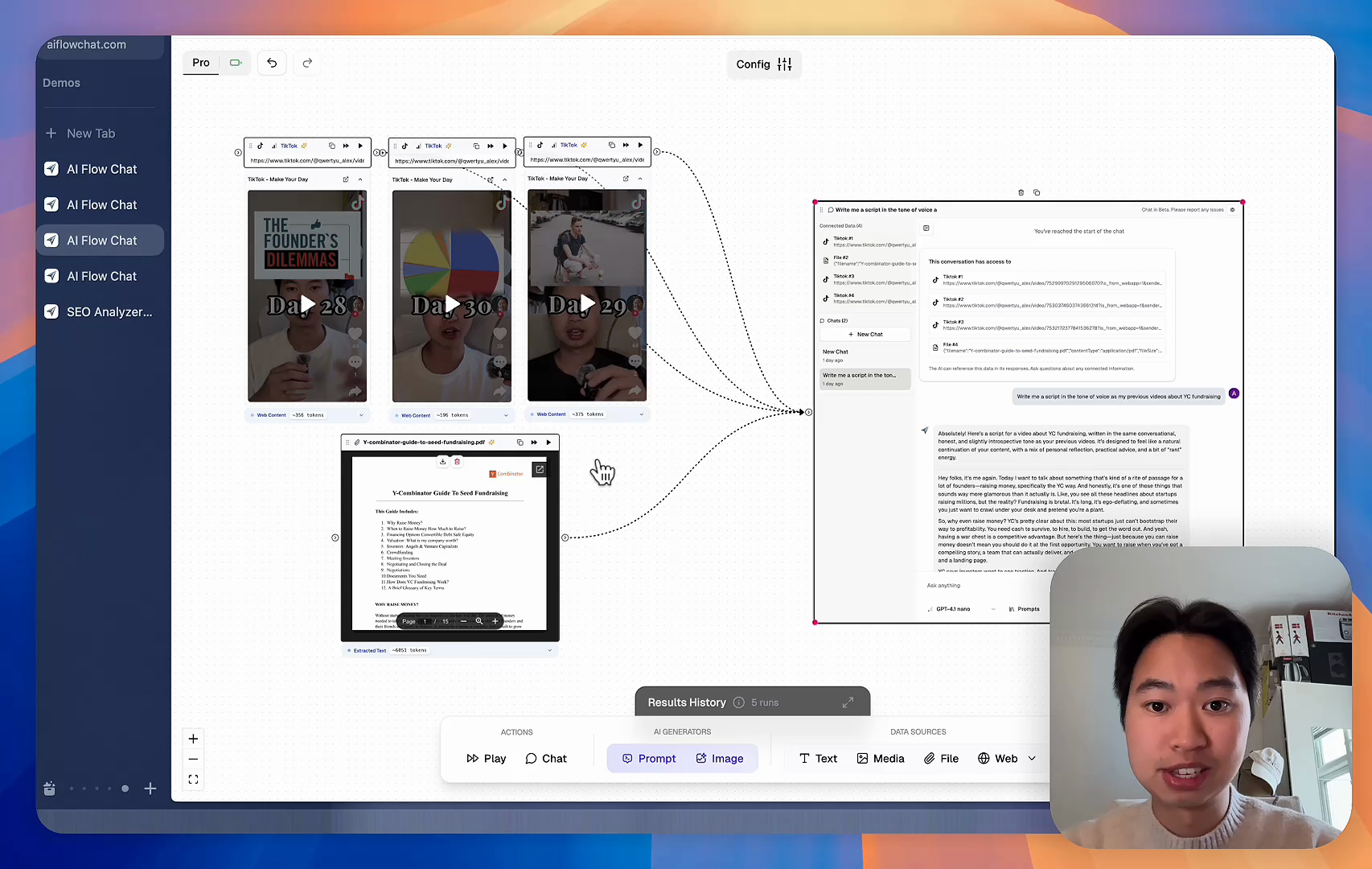
A visual AI workflow represents inputs and transformations as connected elements on a canvas. The layout makes relationships visible: which sources feed a prompt, which output becomes the next input, and where a person reviews the work. In AI Flow Chat, for example, the public Flows documentation describes nodes with inputs and outputs connected from left to right. That is a product behavior, not a general promise that every visual workflow tool works the same way.
The two approaches can also work together. A visual workflow can include a conversational step, while a ChatGPT project can contain separate chats for research, drafting, and review.
The short comparison
| Decision factor | Linear AI chat | Visual AI workflow |
|---|---|---|
| Task shape | Best fit for a bounded question, draft, or iterative conversation | Useful when the task has several named stages or parallel branches |
| Source context | Files and instructions can live in a chat or ChatGPT project | Sources can be placed beside and connected to the steps that use them |
| Intermediate work | Usually found by reading the conversation | Can be represented as separate steps and outputs |
| Repeatability | Reuse a project, saved instructions, a template, or a prior chat | Keep the sequence and handoffs visible for the next run |
| Human review | Review responses and request changes in conversation | Place a review checkpoint between transformation and output |
| Setup effort | Low for an immediate task | Higher because the steps and connections must be designed |
| Maintenance | Update prompts, files, or project instructions | Update the affected node, connection, source, or review rule |
ChatGPT’s current product surface narrows the gap in the “context” and “repeatability” rows. OpenAI recommends projects for work that continues over time or depends on the same context, and ChatGPT Work can create and refine multi-step deliverables. The comparison is therefore not “ChatGPT has no workflow” versus “a canvas has workflow.” It is conversation-led organization versus an explicit visual model of the process.
When ChatGPT is the simpler choice
Stay in chat when you can state the goal and review the result without needing a process map.
One-off questions and transformations
Examples include:
- Summarize one supplied document for a specific audience.
- Brainstorm ten angles for an article, then refine the strongest three.
- Rewrite a paragraph in a clearer tone.
- Compare two headlines against a stated brief.
- Ask follow-up questions while learning an unfamiliar topic.
These tasks may take several turns, but their state is easy to understand from the conversation. Adding a canvas would create setup work without clarifying much.
Iterative drafting
Conversation is a natural interface when the next instruction depends on how the previous draft feels: “make the opening more concrete,” “preserve this example,” or “show me a less promotional option.” OpenAI’s file guidance also supports reviewing generated files and requesting focused revisions, so a chat-first approach does not require accepting the first output. See OpenAI’s current guidance for creating and refining files.
Research with one final deliverable
A chat or project can also fit multi-source research when the job still has one clear destination, such as a sourced decision memo. Put the approved material in a project, define the scope and output format, ask the model to identify missing evidence, and review the citations before using the result.
Choose chat because its structure fits the job—not merely because it is familiar.
When a visual AI workflow becomes useful
Consider a visual workflow when understanding the process is becoming part of the work.
Several sources feed different steps
Suppose a creator has an original webinar transcript, a first-party product brief, audience questions, and a brand-voice guide. The transcript and brief may feed theme extraction; the questions may guide the outline; the voice guide may apply only during drafting.
In one conversation, all four sources can be attached and explained. On a canvas, each source can sit next to the transformation that uses it. That arrangement can make an incorrect connection easier to spot before running the next step.
Intermediate outputs need separate review
Research-heavy content should not jump directly from source collection to publishable copy. It may need a source inventory, claim list, outline, channel drafts, and final review.
NIST’s Generative AI Profile recommends assessing generated output with methods that can include human oversight and comparison with known ground truth. A visual checkpoint does not perform that assessment for you, but it can make the expected review stage harder to overlook.
The same structure will be used again
Repeatability is not the same as identical output. A small agency might reuse the same stages for each client while changing the sources, audience, constraints, and reviewer.
The benefit of a visual structure is that the reusable part—the sequence and handoffs—remains visible. The team can replace inputs without reconstructing the whole process from a transcript. If the process is only needed once, that setup may not pay off.
Independent outputs share the same context
One approved outline might feed a newsletter, a LinkedIn post, and a short-video script. These are parallel outputs: they share source context, but each has different format constraints. A visual branch can show that relationship without implying that one channel draft should become the source of truth for the others.
If your task is mainly a sequence of prompts, the guide to prompt chaining and when it makes sense goes deeper into that specific design pattern. If you are choosing between a visual AI workspace and a broader automation platform, compare the jobs in n8n vs. AI Flow Chat.
One content workflow, built both ways
Consider a hypothetical independent creator preparing a campaign from material they own:
- A webinar transcript
- A product brief
- A document of audience questions
- A brand-voice guide
The desired outputs are an evidence-backed outline, a newsletter draft, and two social posts. A person must check factual claims and approve the outline before channel drafts are created.
Version 1: run it in linear chat
Create a ChatGPT project and add the four source files. State which file is authoritative for product claims, define the audience, and ask for a source inventory before drafting.
Then work through the stages in conversation:
- Ask for recurring themes and audience questions, with a reference to the source behind each item.
- Correct missing or weak evidence.
- Ask for an outline that uses only the approved themes.
- Review and approve the outline.
- Request the newsletter and social drafts.
- Check every factual statement against the first-party files.
This is a reasonable solution. The project keeps context together, and follow-up messages support judgment calls. The main burden is procedural: the creator must remember which outputs are approved and which instruction governs each stage.
Version 2: represent it as a visual workflow
Place the four source inputs on a canvas. Connect the webinar, product brief, and audience questions to a theme-extraction step. Connect its output to an outline step. Keep the voice guide connected to the drafting steps rather than the research step.
The structure can be read as:
context → extract themes → review outline → create channel drafts → final review
After outline approval, branch the approved outline into separate newsletter and social-output steps. Keep the factual review after drafting, because a visible connection does not verify a claim.
AI Flow Chat’s current Chat Flows documentation verifies that source nodes can be connected to a Chat node for source-aware ideation. Its flow docs also show that connected nodes pass output downstream. These behaviors support the example’s visible context and transformation stages. They do not prove that the visual version will be faster or more accurate.
A minimal four-part workflow model
You do not need an elaborate graph. Start with four parts:
1. Context
Identify the material the task is allowed to use. Label first-party facts, background reading, examples, and constraints differently. Do not put every available file into context merely because you can.
2. Transformation
Name the change each AI step should make: extract, classify, compare, outline, draft, or adapt. A vague “process content” step hides decisions and is difficult to review.
3. Review
Define what a person checks and what happens when the check fails. Examples include verifying claims against source files, confirming that an outline serves the reader’s intent, or checking that a channel draft preserves required facts.
OpenAI’s own prompting guide notes that there is no single perfect prompt template and emphasizes making the task clear enough to produce useful results. See the official ChatGPT prompting guide. A larger graph cannot compensate for an unclear objective.
4. Output
Specify the deliverable and its constraints. “Newsletter draft for existing subscribers, 600–800 words, with source notes retained for review” is more testable than “write content.”
This same four-part model works in chat. The visual option simply turns the parts into persistent objects and connections.
Common failure modes
Overengineering a simple task
If one prompt and two follow-ups produce a reviewable result, building eight nodes is probably process decoration. Begin in chat and move to a workflow only when the task’s structure becomes difficult to manage.
Hiding weak instructions inside a complex graph
Node labels can make a workflow look rigorous even when prompts are ambiguous, sources conflict, or output criteria are missing. Test each transformation independently before trusting the full sequence.
Treating visibility as proof
A canvas shows what you intended to connect. It does not prove that the source is accurate, the model followed it, or the output is safe to use. Review remains a real action, not a box labeled “review.”
Automating before the process is understood
Run a new process manually first. Notice where judgment is required, where context changes, and which outputs are genuinely reusable. Then formalize the stable parts. For a broader introduction to executable diagrams, see how to create AI flowcharts for workflow automation.
Assuming the choice is permanent
Start a task in chat. Move its stable stages to a visual workflow. Return to conversation for exploration or sensitive judgment. Hybrid work is often more practical than forcing every step into one interface.
A decision checklist
Answer these questions before changing tools:
- Can I describe and review the whole task in one conversation?
- Will the same sources and instructions be reused across multiple outputs?
- Do different sources belong to different transformations?
- Must a person approve an intermediate result before work continues?
- Are there parallel outputs with different constraints?
- Will I run this structure again with new inputs?
- Would another person understand the process without reading the full transcript?
- Is the expected benefit worth the setup and maintenance?
If most answers are no, remain in chat. If questions 2–7 repeatedly produce yes, prototype a small visual workflow. If the task mixes exploration with repeatable production, combine both: use conversation to discover the process and a visual structure to preserve the stable parts.
The goal is not to graduate from ChatGPT to a “more advanced” interface. It is to match the working structure to the job.
Sign up for AI Flow Chat to organize your source context and AI steps in a visual workflow.
Continue Reading
Discover more insights and updates from our articles
Choose an AI model for scripts, marketing copy, coding, research, long documents, and quick everyday work using a practical quality, speed, and credit-cost framework.
Compare eight current Poppy AI alternatives for visual research, creator workflows, general AI work, grounded synthesis, automation, and reusable delivery.
A practical method for turning a scattered content process into a clear AI-assisted flowchart with source context, review checks, and a reusable output.