Meta Ads Library: How To Research Competitor Ads In Minutes
At AI Flow Chat
Contents
0%The Meta Ads Library is one of the most underused free tools in a marketer's toolkit. It gives you direct access to every active ad running across Facebook and Instagram, from your closest competitors to the biggest brands in your niche. No special account needed, no paid subscription required.
The problem? Most people open it, run a search, and have no idea what to do with the results. They scroll through a wall of ads without a clear framework for extracting actionable insights or turning what they find into better-performing campaigns of their own. That's where a structured research process, and the right tools, make the difference between browsing and actually gaining an edge.
At AI Flow Chat, we built our platform around this exact workflow: feeding competitor ads and viral content directly into AI to reverse-engineer what's working, then generating new creatives and copy in your own voice. This guide walks you through how to use the Meta Ads Library step by step, so you can research competitor ads in minutes and walk away with insights you can actually use.
What the Meta Ads Library is and what it reveals
The Meta Ads Library is a public database that Meta maintains, showing every active ad currently running on Facebook, Instagram, Messenger, and the Meta Audience Network. Meta originally introduced it as a transparency tool for political advertising, but it has since expanded to cover all ad categories. You can search it without logging in, without a Facebook account, and without spending a single dollar.
The library gives you a real-time window into what any advertiser is running right now, which makes it one of the most powerful free competitive intelligence tools available to marketers.
What the library actually contains
When you search for a brand in the Meta Ads Library, you pull up a feed of all active creatives tied to that advertiser's account, including images, videos, and carousels alongside their copy. Each result shows you the ad format, the launch date, and which platforms the ad is running on. For political and social issue ads, Meta also provides impression ranges and spend estimates, though those figures aren't available for standard commercial ads.
Here's a breakdown of what each ad entry typically shows:
- Advertiser name and linked page
- Ad creative: image, video, or carousel
- Ad copy: headline, primary text, and call-to-action
- Start date: when the ad first went live
- Active or inactive status
- Platforms: Facebook, Instagram, Messenger, or Audience Network
- Ad ID: a unique identifier you can use to track specific creatives over time
What you can learn from each ad
Knowing an ad exists is only the starting point. The real value comes from understanding what that ad signals about a competitor's strategy. If an ad has been running for 30, 60, or 90-plus days, that's a strong indicator it's generating profitable results. Advertisers don't keep losing ads live. A long-running ad tells you the hook is working, the offer resonates, and the creative converts well enough to justify continued spend.
You can also read each ad for structural patterns. Pay close attention to the first line of copy, since that's the hook, and to the opening frame of any video. These elements carry the most weight in stopping the scroll. When you study multiple ads from the same advertiser, patterns emerge: a preferred tone, a recurring offer structure, a consistent visual style. Those patterns reveal the positioning decisions a competitor has made after testing and iterating.
What the library doesn't show you
The library has real limits you need to understand before drawing conclusions. It does not show performance data like click-through rates, conversion rates, or return on ad spend for standard commercial advertisers. You can see what's running, not how well it's performing. You also won't find ads that have been paused or deleted, so the library only reflects an advertiser's current active state.
This means you need to bring your own analytical lens to the data. The raw creative and copy tell part of the story, but interpreting what's working requires you to apply media-buying judgment or run those assets through an AI analysis layer that can surface the patterns faster than manual review alone.
Step 1. Open the library and set your filters fast
Go to facebook.com/ads/library in your browser. You don't need to be logged into a Facebook account to access it, but signing in does unlock a few additional filter options. Start by selecting your target country from the dropdown on the left, then set the ad category to "All ads" unless you're specifically researching political or social issue content.
Search by advertiser name, not keyword
The most efficient way to use the meta ads library is to search directly by the advertiser's Page name rather than typing in a broad keyword. Keyword search works, but it pulls a wide mix of unrelated advertisers and makes it harder to stay focused on one competitor at a time. When you search by Page name, you land directly on that brand's full active inventory and can scan everything they're running in a single view.
If you're unsure of a competitor's exact Page name, search their brand name and look for the verified blue checkmark or the page with the highest follower count to confirm you have the right account.
Type the brand name into the search bar, select "Advertisers" from the dropdown, then click their Page when it appears. You'll now see every active ad tied to that account.
Use filters to cut the noise
Once you're inside a competitor's ad feed, the filter panel on the left is your most important tool. Apply these four filters before you start reviewing any creative:
| Filter | What it does |
|---|---|
| Active status | Shows only ads the advertiser is currently spending on |
| Platform | Isolates ads running on Facebook, Instagram, or both |
| Media type | Lets you focus on video, image, or carousel formats |
| Language | Useful if the brand runs ads across multiple markets |
Set Active status first so you're only studying ads they're actively funding, not old tests they paused and forgot. After that, pick the media type that matches the format you plan to run, which keeps your analysis focused and directly applicable to your next campaign.
Step 2. Find real competitors and build a watchlist
Before you start saving ads, you need to identify the right accounts to research. The mistake most marketers make is searching only the names they already know. Direct competitors are an obvious starting point, but you also want to study adjacent brands that sell to the same audience, even if their product is different. They've already done the work of figuring out what messaging resonates with your potential customers.
Who counts as a real competitor
A real competitor for this exercise is any brand that is actively spending on Meta ads and targeting the same demographic you want to reach. That includes businesses in your exact category, but also aspirational brands one tier above you in positioning and budget alternatives one tier below. Studying all three gives you a full spectrum of messaging strategies to analyze.
Brands that have run ads continuously for 60 or more days are your most valuable research targets, since sustained spend almost always signals a profitable formula.
If you sell fitness supplements, for example, your watchlist might include a premium brand like AG1, a mid-tier direct competitor, and a budget DTC option. Each one tells you something different about how your shared audience responds to price framing, urgency, and creative format.
How to organize your watchlist
Once you identify your target accounts, track them in a simple table so you can return to the meta ads library consistently and monitor changes over time. Use a spreadsheet or note-taking tool and log the following for each competitor:
| Field | What to record |
|---|---|
| Brand name | The advertiser's name as it appears in the library |
| Page URL | Direct link to their ads library page |
| Primary format | Video, image, or carousel |
| Longest-running ad | Short description + start date |
| Notable pattern | Hook style, offer type, or visual theme |
Review this list at least once a week so you catch new creatives before competitors have already iterated on and optimized them further.
Step 3. Break down each ad like a media buyer
Once you have your watchlist built, stop scrolling and start analyzing. Every ad you open in the meta ads library deserves a structured read-through, not a quick glance. Media buyers don't react to ads emotionally; they dissect them by component to understand which element is doing the heavy lifting.
Analyze the hook first
The hook is the most critical part of any ad. In video, it's the first three seconds; in static or carousel ads, it's the headline and first line of copy. Before you evaluate anything else, ask yourself: what is this ad doing in the first moment to stop someone mid-scroll? Is it leading with a bold claim, a question, a relatable pain point, or social proof?
If you can identify the hook pattern across multiple ads from the same advertiser, you've found the formula they've already proven with real money.
Read the full copy structure
After the hook, work through the rest of the ad copy in order. Most high-performing ads follow a tight structure: hook, problem or agitation, solution, and call-to-action. When you see this pattern, note how many sentences each section gets. Short paragraphs and single-sentence punches usually signal a direct-response ad optimized for mobile scroll behavior.
Use this template to log each ad you review:
| Element | What to record |
|---|---|
| Hook | First line or opening frame description |
| Problem framed | How they describe the pain point |
| Solution offered | How the product is positioned as the fix |
| CTA | Exact call-to-action wording |
| Tone | Casual, authoritative, urgent, or conversational |
| Format | Video, image, or carousel |
| Run length | Start date and how long it's been active |
Look at creative and copy together
Copy and creative work as a unit, so evaluate them together rather than in isolation. A video with a bold text overlay hook and calm voiceover tells you the brand is optimizing for sound-off viewing, which is how most mobile users scroll. A bright product image with a short punchy headline signals urgency and impulse. When you start reading creative decisions this way, the underlying strategy behind each ad becomes clear fast.
Step 4. Turn insights into tests you can launch
Research without action is just browsing. Once you've logged patterns from the meta ads library into your watchlist, the next move is converting those patterns into a structured test plan you can run inside your own ad account. The goal isn't to copy a competitor's ad; it's to isolate the specific elements that appear to be working and build your own version around that same logic.
Build a swipe file from what you find
A swipe file is a curated collection of ad elements you've flagged as worth testing: specific hooks, offer structures, copy formats, and visual approaches. Every time you spot a long-running ad with a notable pattern, add the relevant details to your swipe file immediately. Waiting until later means you lose context on why you flagged it in the first place.
The strongest swipe files focus on structure and intent, not surface-level wording, so you're borrowing a proven framework rather than lifting someone's exact copy.
Organize your swipe file with these five fields for each entry:
- Hook type: Bold claim, question, pain point, or social proof
- Offer framing: Discount, free trial, outcome-first, or scarcity
- Copy format: Long paragraph, bullet list, or single punchy sentence
- Visual style: UGC-style, product-only, lifestyle, or text overlay
- Why it stood out: One sentence on what makes it worth testing
Write your test ads using competitor patterns as a brief
Take the top three patterns from your swipe file and treat each one as a creative brief for your own ad. Write a new hook using your product, your voice, and your specific offer, but follow the same structural logic the competitor used. If their best-performing ad opens with a direct pain point statement in one sentence, your test should open the same way.
Run one variable at a time when you launch. Test the hook first by keeping everything else constant. Once a winning hook is confirmed, move on to testing the offer framing, then the visual format. This sequence keeps your results clean and your conclusions reliable.
Wrap-up and what to do next
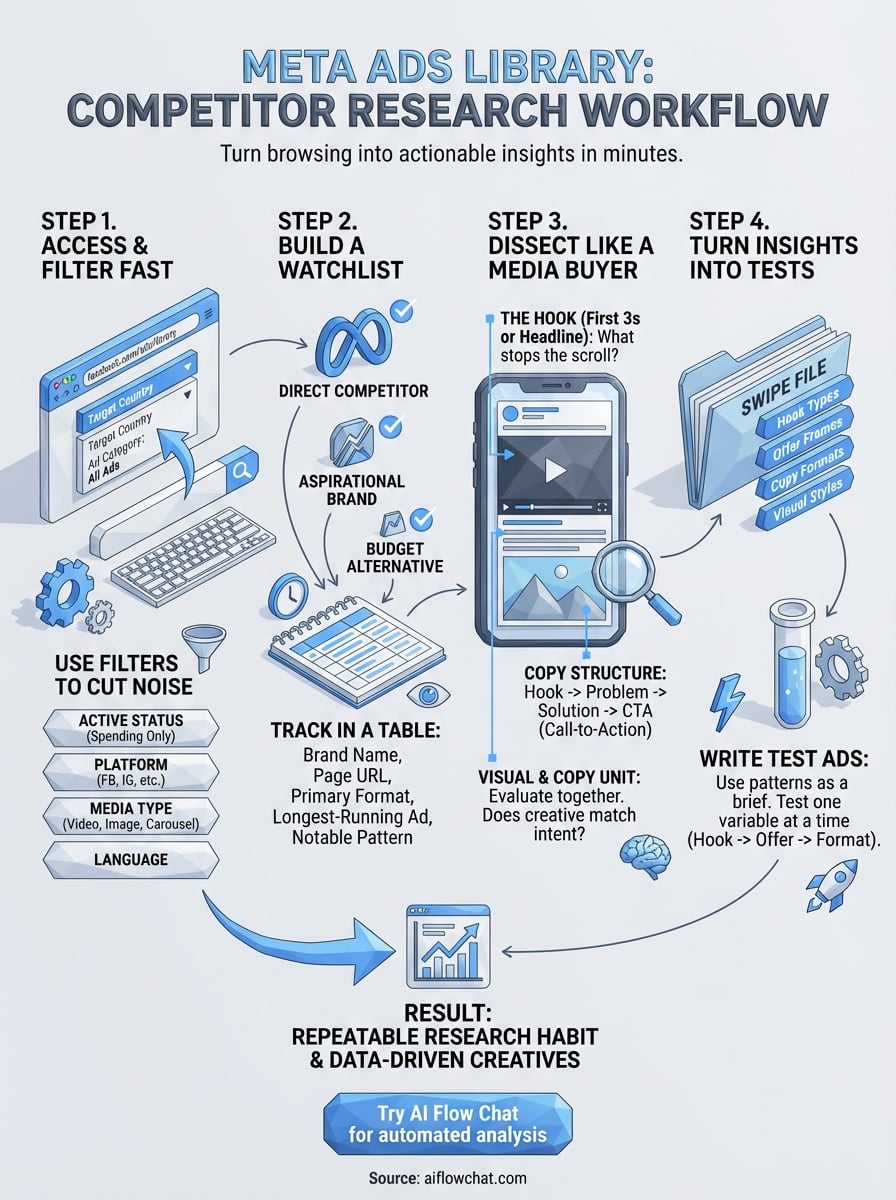
The meta ads library gives you a direct look at what your competitors are spending real money on right now. Work through the steps in this guide: set your filters fast, build a watchlist of active advertisers, dissect each ad by component, and use what you find to build a swipe file that drives your next round of tests. That sequence turns raw browsing into a repeatable research habit you can run in under an hour each week.
The sticking point for most marketers is the analysis step. Reading dozens of ads manually, logging patterns, and then writing new copy from scratch takes time most people don't have. AI Flow Chat solves this directly by letting you paste competitor ad links straight into a visual workflow, extract hooks and copy structure with AI, and generate new creatives in your own voice without switching between tools. Try AI Flow Chat and run your first competitor ad analysis today.
Continue Reading
Discover more insights and updates from our articles
Choose an AI model for scripts, marketing copy, coding, research, long documents, and quick everyday work using a practical quality, speed, and credit-cost framework.
Compare eight current Poppy AI alternatives for visual research, creator workflows, general AI work, grounded synthesis, automation, and reusable delivery.
A practical method for turning a scattered content process into a clear AI-assisted flowchart with source context, review checks, and a reusable output.