Google Ads Experiments: How To Set Up And A/B Test Campaigns
At AI Flow Chat
Contents
0%Running Google Ads without testing is just expensive guessing. Google Ads experiments let you A/B test campaign changes, bidding strategies, ad copy, landing pages, against a control group so you can make decisions backed by actual performance data instead of gut feelings.
The problem? Most marketers either skip experiments entirely because setup feels confusing, or they run them incorrectly and draw the wrong conclusions. Both waste budget. Whether you're testing a new Smart Bidding strategy or comparing two completely different ad approaches, understanding how to properly configure and read experiments is a skill that directly impacts your ROAS.
This guide walks you through everything: what Google Ads experiments are, how to set them up step by step, which campaign elements are worth testing, and how to interpret the results so you actually know when to commit to a change. If you're using AI Flow Chat to build ad copy workflows or reverse-engineer competitor ads from the Meta Ads library, pairing that creative process with structured Google Ads testing is how you turn good ideas into proven, scalable campaigns.
What Google Ads experiments are and when to use them
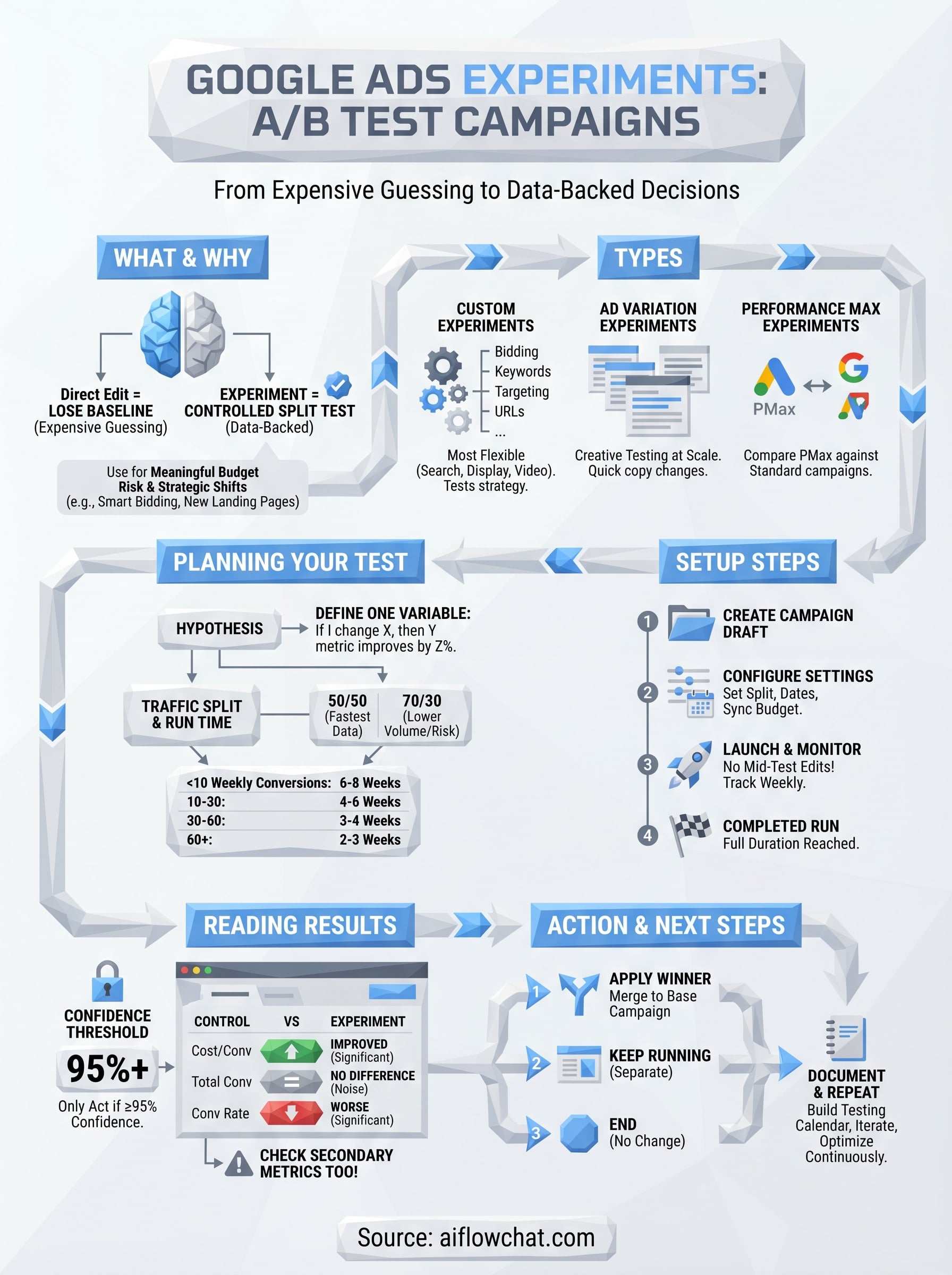
Google Ads experiments are a built-in testing framework that lets you run a controlled split test against a live campaign. Instead of making a change directly to your campaign and hoping it improves performance, you create an experiment that divides your traffic between the original campaign (control) and a modified version (the treatment). Google tracks both simultaneously and surfaces statistical confidence data so you can see whether any performance difference is real or just noise.
How experiments differ from just editing a campaign
Most advertisers edit campaigns on the fly, swapping a bidding strategy, changing an ad headline, adjusting a landing page, and then checking performance a few weeks later. The problem is you lose your baseline. You have no way to know whether performance changed because of your edit or because of a seasonal shift, a competitor's budget increase, or random variance in the auction.
Experiments solve this by keeping your original campaign running exactly as it was while a mirrored version tests the change side by side, in the same auctions, at the same time.
Google Ads experiments allocate a percentage of your campaign's auction traffic to the experiment version. You control that split, typically somewhere between 50/50 and 80/20 depending on how quickly you need to gather data. Because both variants compete in the same auctions for the same audiences, most of the external variables that would contaminate your results are removed.
The types of changes experiments can test
Experiments cover a wide range of campaign-level and ad-level variables. Depending on your campaign type, you can test bidding strategies such as switching from manual CPC to Target CPA, ad copy variations, landing page URLs, audience targeting adjustments, and broad match versus exact match keywords. The options available shift based on which campaign type you're working with.
For Search campaigns, you get the most flexibility. Performance Max has its own experiment format that compares a PMax campaign against a standard Shopping or Search campaign rather than testing changes within a single campaign. Video campaigns support ad format experiments and creative A/B tests. Knowing which experiment type maps to which campaign type before you start saves a lot of setup confusion and frustration.
When to run an experiment instead of making a direct edit
Run a Google Ads experiment any time you're making a change that carries meaningful budget risk or a significant strategic shift. Switching from manual bidding to Smart Bidding is the most common use case, since the algorithm's learning period alone can temporarily hurt performance. Running that switch inside an experiment means your main campaign keeps operating without disruption while you gather real comparative data.
Experiments are also the right tool when you're testing a hypothesis rather than solving an obvious problem. If your Quality Scores are dropping because of a broken landing page, fix it directly. But if you believe a new landing page will outperform the current one, you need proof, not assumption. The same logic applies to ad copy variations, audience signals for Performance Max, and keyword match type strategies. Changing those elements without a controlled test means you're reacting to results you can't fully explain.
Choose the right experiment type
Google Ads gives you three distinct experiment formats, and picking the wrong one for your goal means your data will either be incomplete or completely useless. Before you build anything, match your testing objective to the correct experiment type so the framework you're working inside actually supports the variable you want to measure.
Custom experiments
Custom experiments are the most flexible option and work with Search, Display, and Video campaigns. This is the format you'll use for the majority of your google ads experiments: bidding strategy switches, keyword match type tests, audience targeting changes, and ad group structure comparisons. When you create a custom experiment, Google builds a draft copy of your original campaign and lets you modify it before launching the split. Your original campaign keeps running as the control while the experiment version tests your change, with both sharing your specified traffic split.
For example, if you want to test switching from Target CPA to Maximize Conversions on a Search campaign spending $5,000 per month, you'd create a custom experiment with a 50/50 traffic split and run it until you hit statistical significance. The table below shows what custom experiments can and cannot test:
| Variable | Testable with custom experiments |
|---|---|
| Bidding strategy | Yes |
| Keyword match types | Yes |
| Landing page URLs | Yes |
| Audience targeting | Yes |
| Ad creative | Yes (via ad group edits in draft) |
| Campaign type | No |
Ad variation experiments
Ad variations are a separate tool built specifically for testing headlines, descriptions, and other ad copy elements at scale. Instead of creating a full campaign draft, you define a text substitution rule and Google applies it across every eligible ad in your selected campaigns. This is the right choice when your goal is purely creative testing across a large ad inventory without touching bidding or targeting.
Ad variations work across hundreds of ads simultaneously, which makes them significantly faster for copy testing than building individual custom experiments for each campaign.
Performance Max experiments
Performance Max experiments work differently from the other two types. Rather than testing a change within a single PMax campaign, you run a split test between a PMax campaign and an existing Search or Standard Shopping campaign to measure which drives better results for the same budget. You can find the official setup documentation on the Google Ads Help Center.
Plan your A/B test so results mean something
Running google ads experiments without a clear plan produces data you cannot trust. Before you touch the setup screen, you need to define exactly one variable to test and decide in advance what result would convince you to make the change permanent. Testing two things at once, such as a new bidding strategy and new ad copy simultaneously, makes it impossible to know which change drove the outcome.
Define a single hypothesis
Your hypothesis should follow a simple structure: "If I change X, then Y metric will improve by Z percent." For example: "If I switch from manual CPC to Target CPA at a $40 target, then my cost per conversion will drop by at least 15% without reducing total conversions by more than 10%." That specificity forces you to decide what success looks like before results come in, which stops you from rationalizing a bad outcome after the fact.
Write your hypothesis down before you launch. If you cannot state it in one sentence, you are not ready to run the experiment.
A clear hypothesis also identifies your primary metric. For bidding tests, that is usually cost per conversion or ROAS. For copy tests, focus on CTR or conversion rate at the ad level.
Set the traffic split and run time
Traffic split and experiment duration are where most tests fall apart. A 50/50 split gives you the fastest path to statistical significance, but if your campaign has low conversion volume, routing half your traffic to an untested variant carries real risk. In that case, use a 70/30 split with a longer run time rather than cutting the test short to protect your baseline performance.
Use the table below as a starting benchmark for minimum run time based on your campaign's weekly conversion volume:
| Weekly conversions (control) | Minimum run time |
|---|---|
| Under 10 | 6 to 8 weeks |
| 10 to 30 | 4 to 6 weeks |
| 30 to 60 | 3 to 4 weeks |
| 60+ | 2 to 3 weeks |
Know your confidence threshold before you start
Google Ads reports statistical significance directly in the experiment results panel, but you need to set your threshold before you launch, not after. A 95% confidence level is the standard benchmark for making a reliable decision. Anything below that means you cannot rule out that the difference between your control and experiment was random variance, and ending a test early because results look promising at 80% confidence puts you right back to guessing.
Set up an experiment in Google Ads step by step
Once your hypothesis is written and your run time calculated, the actual setup moves quickly. Google Ads experiments live under the "Campaigns" section of your account, and the entire configuration process takes less than 15 minutes once you know the sequence.
Create a campaign draft
Navigate to your Google Ads account and open the campaign you want to test. In the left navigation panel, click "Drafts & experiments" and then select "Experiment" to start a new one. Google will prompt you to either create a new draft or base the experiment on an existing one.
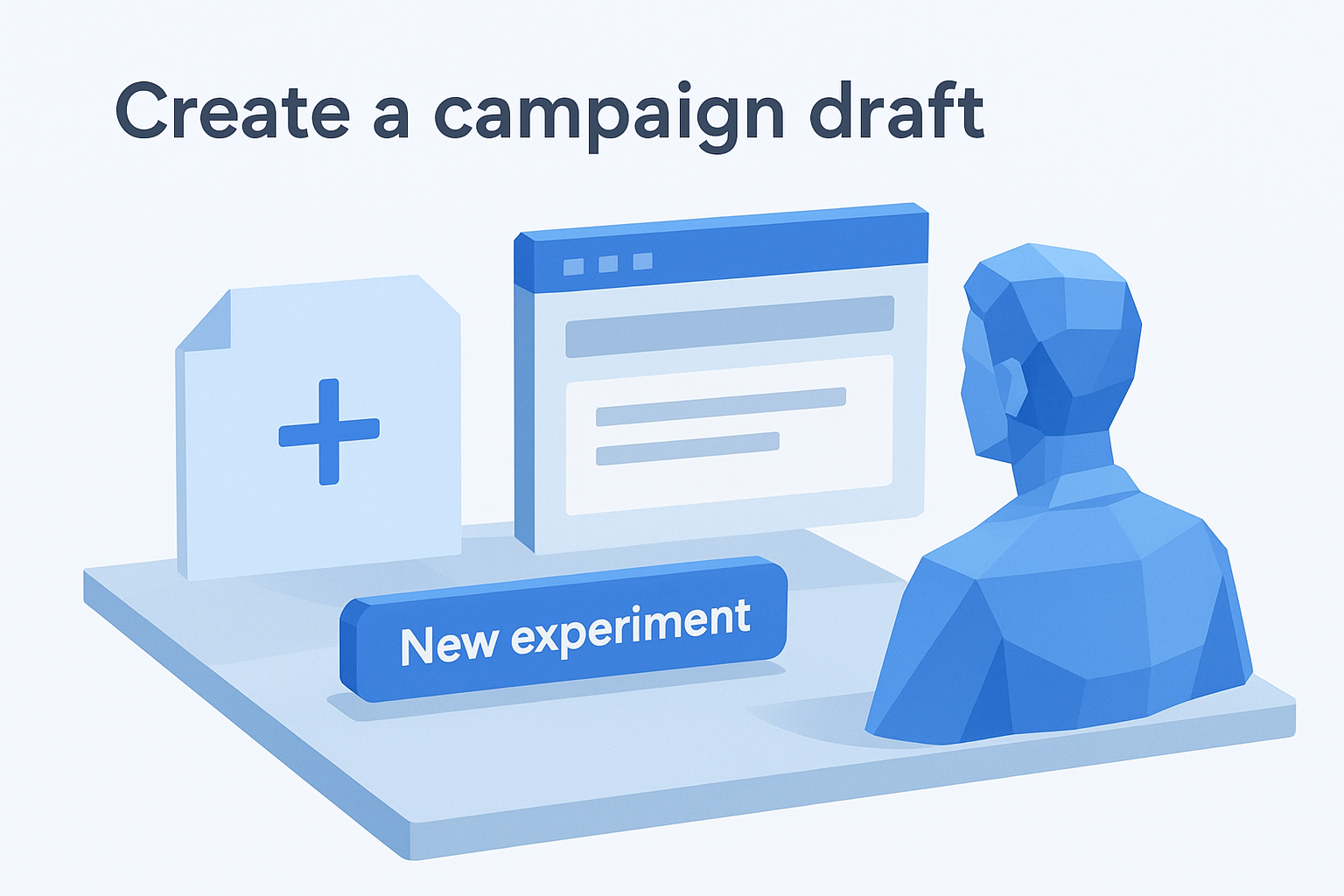
Follow these steps in order:
- Click "+ New experiment" in the Experiments tab.
- Select your experiment type: custom experiment, ad variation, or Performance Max experiment.
- Choose the base campaign you are testing against.
- Name your experiment clearly, for example: "Search - Target CPA vs Manual CPC - April 2026".
- Make your single variable change in the draft version and do not touch anything else.
Clear naming conventions matter because you will likely run multiple experiments over time, and a vague label like "Test 1" becomes meaningless when you are reviewing results three months later.
Configure the experiment settings
After you define your draft changes, Google asks you to set the traffic split percentage and the experiment start and end dates. This is where your planning from the previous section pays off. Enter the traffic split you calculated, set the start date at least 24 hours in the future so the system has time to process, and set the end date based on your minimum run time table.
| Setting | Recommended default |
|---|---|
| Traffic split | 50/50 for sufficient volume, 70/30 for low-volume campaigns |
| Start date | 24+ hours from creation |
| End date | Based on weekly conversion volume |
| Sync with base campaign | Enabled for budget and bid changes |
Make sure "Sync with base campaign" is turned on if your test involves bidding. This keeps your budget consistent between the control and experiment versions so budget variance does not skew your results.
Launch and monitor the experiment
Click "Save and launch" to activate the experiment. Google will begin splitting traffic on your chosen start date. During the run, resist the urge to edit either the control campaign or the experiment draft, since mid-test changes contaminate your data and force you to restart.
Check the Experiments tab weekly to track impression share, conversions, and the confidence percentage Google surfaces. Do not draw conclusions until the test has run its full planned duration.
Read results and roll out the winner
When your google ads experiments run their full planned duration, Google surfaces the results in the Experiments tab alongside a confidence percentage for each metric you tracked. Reading this panel correctly determines whether you act on the data or extend the test, so do not skim past the numbers and assume the experiment version wins just because it looks better on the surface.
Read the experiment results panel
Open the Experiments tab and select your completed experiment. Google shows a side-by-side comparison of your control and experiment across key metrics including clicks, conversions, cost per conversion, and conversion value. Next to each metric, you will see a colored indicator and a confidence level. Green means the experiment outperformed the control with statistical confidence. Gray means no meaningful difference was detected. Red means the experiment performed worse.
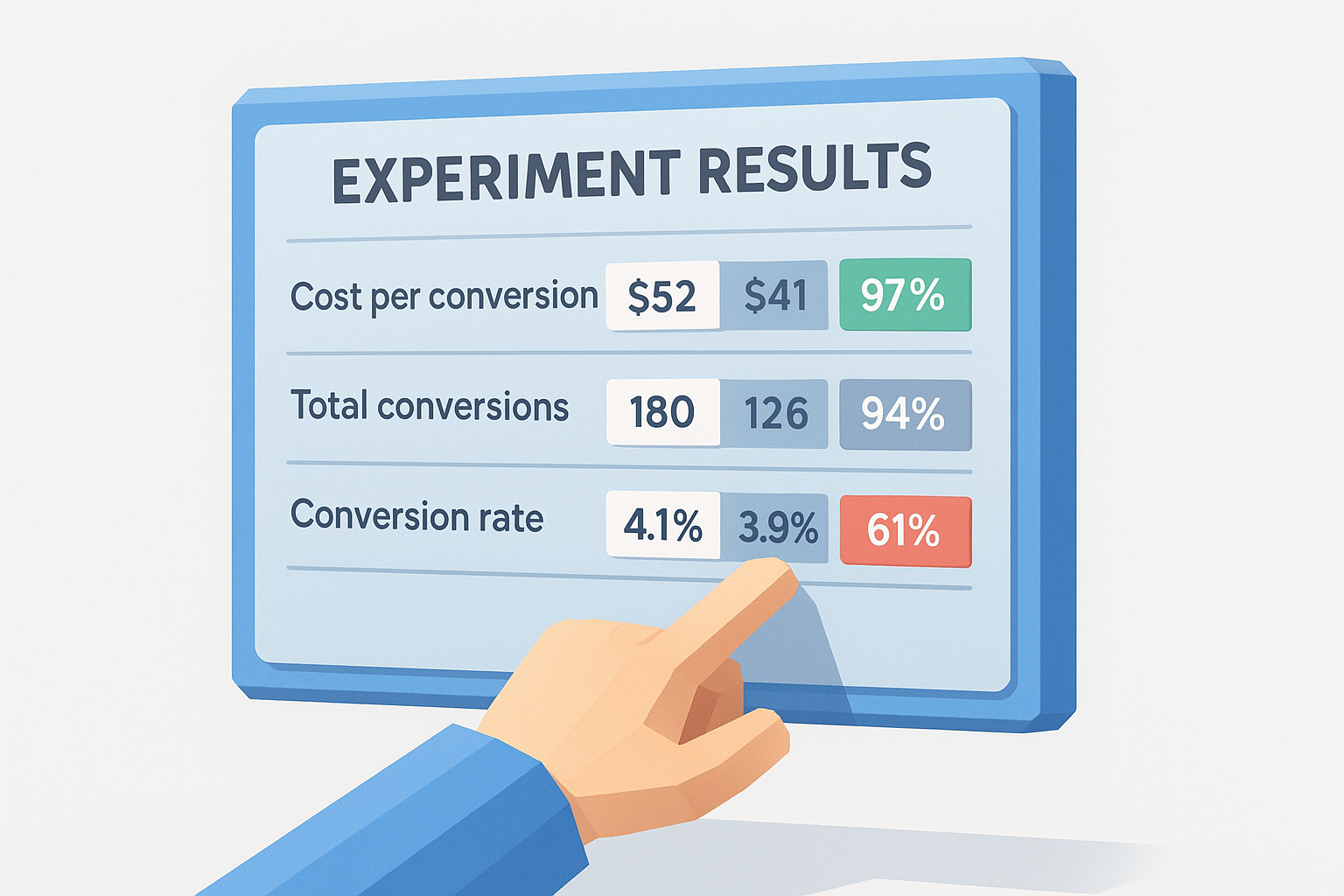
Only act on results that show 95% confidence or higher. Anything below that threshold means the difference could be random, and applying the change permanently puts you back in the position of guessing.
Look at both your primary metric and your secondary metrics together before deciding. A 20% drop in cost per conversion sounds like a clear win, but if total conversions also dropped by 30%, you did not improve performance, you just spent less on fewer results. Use the template below when reviewing:
| Metric | Control | Experiment | Confidence | Pass threshold? |
|---|---|---|---|---|
| Cost per conversion | $52 | $41 | 97% | Yes |
| Total conversions | 180 | 126 | 94% | No |
| Conversion rate | 4.1% | 3.9% | 61% | No |
If your primary metric passes but a secondary metric fails, extend the test by two to three weeks before making a final call.
Apply the winner and close the experiment
Once you confirm the results meet your threshold across the metrics that matter, Google gives you three options: apply the experiment to the base campaign and shut down the experiment version, keep the experiment running as a separate campaign, or end the experiment with no changes. In most cases, applying it to the base campaign is the cleanest move since it preserves your campaign history and quality signals.
To apply, click "Apply experiment" in the Experiments tab and confirm. Google will merge the winning settings into your original campaign and pause the draft. Document your results with the hypothesis you wrote before launch, the confidence levels achieved, and the percentage change in each key metric. This record becomes your testing history, which you can reference when planning the next experiment and building a systematic optimization schedule over time.
Where to go from here
You now have everything you need to run google ads experiments that produce reliable, actionable data. The process comes down to three things: pick one variable, let the test run its full planned duration, and only apply changes that hit 95% confidence across both your primary and secondary metrics. Start with a bidding strategy test or a landing page swap since those two variables consistently deliver the clearest performance signals.
From here, build a testing calendar so experiments run sequentially rather than sporadically. Document every result using the review template from the results section, and let each completed test inform the next hypothesis. If you want to accelerate the creative side of this process, including ad copy variations and competitor ad analysis to feed into your experiments, AI Flow Chat gives you a visual workflow for generating and organizing ad concepts before you put budget behind them.
Continue Reading
Discover more insights and updates from our articles
Choose an AI model for scripts, marketing copy, coding, research, long documents, and quick everyday work using a practical quality, speed, and credit-cost framework.
Compare eight current Poppy AI alternatives for visual research, creator workflows, general AI work, grounded synthesis, automation, and reusable delivery.
A practical method for turning a scattered content process into a clear AI-assisted flowchart with source context, review checks, and a reusable output.